
Įvadas
The Vivitar 450PZ is a compact 35mm camera designed for ease of use, featuring fully automatic operation. This manual provides essential information for setting up, operating, maintaining, and troubleshooting your camera to ensure optimal performance.
The camera incorporates automatic focusing and exposure, a 38 to 70mm zoom lens, an automatic flash with red-eye reduction, and motorized film handling. An electronic self-timer is also included for convenience.
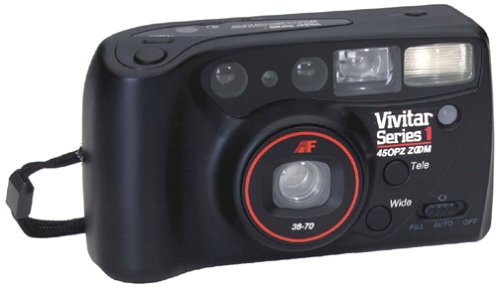
Vaizdas: priekis view of the Vivitar 450PZ 35mm Camera, showcasindėl savo kompaktiško dizaino ir objektyvo.
Sąranka
1. Akumuliatoriaus įdėjimas
- Raskite baterijų skyriaus dangtelį ant fotoaparato korpuso.
- Open the cover by sliding or lifting it according to the indicator.
- Insert the required CR123A type batteries, ensuring correct polarity (+/-) as indicated inside the compartment.
- Saugiai uždarykite akumuliatoriaus skyriaus dangtelį.
2. Plėvelės įkėlimas
- Open the camera back by sliding the latch.
- Place a 35mm film cartridge into the film chamber.
- Pull the film leader across to the film take-up spool, aligning it with the start mark.
- Close the camera back. The camera will automatically advance the film to the first frame.
3. Wrist Strap Attachment
Attach the provided wrist strap to the designated loop on the camera body. This helps prevent accidental drops and provides a secure grip during use.
Fotoaparato valdymas
1. Maitinimo įjungimas/išjungimas
Locate the power button or switch, typically near the shutter button. Press or slide it to turn the camera on or off.
2. Fotografavimas
- Pažiūrėkite per viewieškiklis, kad sukurtumėte kadrą.
- Press the shutter button halfway down to activate the autofocus and exposure systems. The camera will automatically set the focus and exposure.
- Norėdami nufotografuoti, paspauskite užrakto mygtuką iki galo. Juosta automatiškai perjungs kitą kadrą.
3. Priartinimo funkcija
Use the zoom control (usually a lever or buttons near the shutter) to adjust the focal length between 38mm (wide-angle) and 70mm (telephoto). This allows you to bring subjects closer or capture a wider scene.
4. Blykstės veikimas
- Automatic Flash: The flash will automatically fire in dimly lit conditions to ensure proper exposure.
- Raudonų akių efekto mažinimas: When activated, the camera emits a series of pre-flashes before the main flash to reduce the red-eye effect in portraits.
- Flash Off Mode: For situations where flash is not desired (e.g., museums, theater), locate the flash mode button and select the 'flash off' setting.
5. Laikmatis
To use the self-timer, press the self-timer button. A flashing LED indicator will typically signal the countdown. After a set delay (e.g., 10 seconds), the camera will automatically take the picture, allowing the photographer to be included in the shot.
6. Filmo atsukimas atgal
When the film roll is complete, the camera will automatically rewind the film back into the cartridge. A mid-roll rewind function may also be available, allowing you to rewind the film before the roll is finished by pressing a specific button (refer to camera markings if available).
Priežiūra
Fotoaparato valymas
- Švelniai nuvalykite fotoaparato korpusą minkštu, nepūkuotu skudurėliu.
- For the lens, use a specialized lens cleaning cloth and lens cleaning solution. Avoid touching the lens surface with your fingers.
- Do not use abrasive cleaners or solvents, as these can damage the camera's finish and optical components.
Sandėliavimas
- Kai nenaudojate fotoaparato, laikykite jį vėsioje, sausoje vietoje, toliau nuo tiesioginių saulės spindulių ir ekstremalių temperatūrų.
- Jei fotoaparatas ilgesnį laiką nebus naudojamas, išimkite baterijas, kad išvengtumėte jų pratekėjimo.
Trikčių šalinimas
Fotoaparatas neįsijungia
- Patikrinkite, ar baterijos įdėtos teisingai, tinkamu poliškumu.
- Pakeiskite senas arba išsikrovusias baterijas naujomis.
- Įsitikinkite, kad maitinimo jungiklis yra padėtyje „Įjungta“.
Film Not Advancing
- Verify that the film is correctly loaded and the leader is engaged with the take-up spool.
- Check if the film door is securely closed.
- Ensure there is enough power from the batteries for the motor to operate.
Blykstė neveikia
- Confirm that the flash is not set to 'Flash Off' mode.
- Allow sufficient time for the flash to charge (indicated by a flash ready lamp).
- Ensure ambient light conditions are dark enough for the automatic flash to activate.
Specifikacijos
| Funkcija | Detalė |
|---|---|
| Prekės ženklas | „Vivitar“ |
| Modelio pavadinimas | 450PZ |
| Filmo formato tipas | 35 mm |
| Objektyvas | 38-70mm Zoom |
| Ekspozicijos valdymas | Automatinis |
| Fokusavimo sistema | 14-zone Autofocus |
| Blykstė | Automatic with Red-Eye Reduction |
| Filmų tvarkymas | Motorized Loading, Advance, and Rewind |
| Ypatingos savybės | Built-In Flash, Compact Design, Electronic Self-Timer |
| Prekės svoris | 15.2 uncijos |
| Įtraukti komponentai | Kameros korpusas ir objektyvas |
Garantija ir palaikymas
Informacija apie garantiją
The Vivitar 450PZ camera comes with a warranty covering one year on parts and 90 days on labor from the date of purchase. Please retain your proof of purchase for warranty claims.
Pagalba klientams
For technical assistance, service, or further inquiries regarding your Vivitar 450PZ camera, please refer to the contact information provided with your product packaging or visit the official Vivitar webpalaikymo išteklių svetainė.