
Svarbi saugos informacija
Please read all safety and operating instructions carefully before using this VCR. Retain this manual for future reference.
- Maitinimo šaltinis: Connect the VCR only to the power supply indicated on the label.
- Vėdinimas: Užtikrinkite tinkamą vėdinimą. Neužblokuokite ventiliacijos angų.
- Vanduo ir drėgmė: Do not expose the VCR to rain or moisture. Do not place objects filled with liquids on the VCR.
- Valymas: Unplug the VCR from the wall outlet before cleaning. Use a dry cloth.
- Aptarnavimas: Nemėginkite patys aptarnauti šio gaminio. Visą techninę priežiūrą patikėkite kvalifikuotam aptarnavimo personalui.
Produktas baigtasview
The Sharp VC-A422 is a 4-head VCR designed for reliable playback and recording of VHS tapes. It features a user-friendly interface for easy operation.
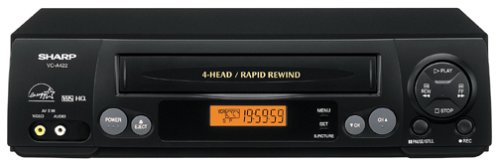
Vaizdas: priekis view of the Sharp VC-A422 4-Head VCR, showing the tape slot, display, and control buttons.
Sąranka
1. Išpakavimas ir įdėjimas
- Atsargiai išimkite vaizdo grotuvą iš pakuotės.
- Place the VCR on a stable, level surface. Ensure there is adequate space around the unit for ventilation.
- Avoid placing the VCR near heat sources, direct sunlight, or areas with high humidity.
2. Prijungimas prie televizoriaus
To connect your VCR to a television, you will typically use RCA audio/video cables (red, white, yellow) or a coaxial cable.
- RCA Connection (Recommended for best quality):
- Prijunkite geltoną vaizdo išvesties lizdą ant vaizdo grotuvo prie geltono vaizdo įvesties lizdo ant televizoriaus.
- Prijunkite vaizdo grotuvo baltą garso išvesties lizdą prie balto garso įvesties lizdo televizoriuje.
- Prijunkite raudoną vaizdo grotuvo garso išvesties lizdą prie raudono garso įvesties lizdo televizoriuje.
- Select the corresponding AV input on your television (e.g., Video 1, AV1, Input 1).
- Koaksialinis ryšys:
- Connect a coaxial cable from the "RF Out" or "Antenna Out" jack on the VCR to the "Antenna In" or "RF In" jack on your TV.
- Connect your antenna or cable TV signal to the "RF In" or "Antenna In" jack on the VCR.
- Tune your television to channel 3 or 4 (depending on the VCR's output setting) to receive the VCR signal.
3. Maitinimo prijungimas
- Plug the VCR's power cord into a standard electrical outlet.
- The VCR should enter standby mode, indicated by a clock display or power light.
Naudojimo instrukcijos
1. Pagrindinis atkūrimas
- Ensure the VCR is powered on and your TV is set to the correct input.
- Insert a VHS tape into the tape slot. The VCR will automatically load the tape.
- Paspauskite ŽAISTI mygtuką ant vaizdo grotuvo arba nuotolinio valdymo pulto.
- Norėdami sustabdyti atkūrimą, paspauskite STOP mygtuką.
- Norėdami pristabdyti atkūrimą, paspauskite PASTABA mygtuką. Norėdami tęsti, paspauskite dar kartą.
- To fast forward or rewind, press the FF (Greitai persukti pirmyn) arba REW (Rewind) button. Press ŽAISTI norėdami tęsti įprastą atkūrimą.
- Norėdami išstumti juostą, paspauskite IŠMETIMAS mygtuką.
2. Įrašymo programos
The Sharp VC-A422 allows for recording television programs. Ensure a blank or recordable VHS tape is inserted and its safety tab is intact.
- Tune the VCR to the desired channel using the VCR's tuner.
- Paspauskite ĮRAŠAS button. The VCR will begin recording.
- Norėdami sustabdyti įrašymą, paspauskite STOP mygtuką.
- For timed recordings, refer to the VCR's on-screen programming guide (if available) or consult the full manual for detailed timer recording instructions.
Priežiūra
Tinkama priežiūra užtikrina jūsų vaizdo grotuvo ilgaamžiškumą ir optimalų veikimą.
- Išorinis valymas: Vaizdo grotuvo išorę nuvalykite minkštu, sausu skudurėliu. Nenaudokite skystų valiklių ar abrazyvinių medžiagų.
- Galvos valymas: If picture quality degrades (e.g., snowy picture, lines), the video heads may be dirty. Use a dry-type VCR head cleaning cassette sparingly. Excessive use can wear down the heads.
- Juostos priežiūra: Store VHS tapes in their cases, away from dust, direct sunlight, and strong magnetic fields. Avoid exposing tapes to extreme temperatures.
- Vėdinimas: Keep the VCR's ventilation slots clear of obstructions to prevent overheating.
Trikčių šalinimas
If you encounter issues with your Sharp VC-A422 VCR, refer to the following common problems and solutions:
| Problema | Galima priežastis | Sprendimas |
|---|---|---|
| Nėra galios | Power cord unplugged; power outlet not active. | Patikrinkite maitinimo laido jungtį. Išbandykite lizdą su kitu įrenginiu. |
| Nėra vaizdo ar garso | Incorrect TV input selected; A/V cables loose or incorrectly connected. | Select correct TV input (e.g., AV1, Video 1). Ensure A/V cables are securely connected to matching color ports. |
| Snowy or distorted picture | Dirty video heads; poor tape quality; incorrect channel for coaxial connection. | Use a VCR head cleaning cassette. Try a different tape. If using coaxial, ensure TV is on channel 3 or 4. |
| Tape will not eject | Power failure; mechanical issue. | Ensure VCR is powered on. If problem persists, seek professional service. |
| Negalima įrašyti | Tape's safety tab removed; VCR not tuned to a channel. | Check if the safety tab on the VHS tape is intact (cover the notch with tape if removed). Ensure VCR tuner is set to the desired channel. |
Specifikacijos
- Prekinis ženklas: Aštrus
- Modelis: VC-A422
- Galvos: 4-Head (Video)
- Prekės svoris: 6 svaro
- Pakuotės matmenys: 15.55 x 11.02 x 5.24 colio
- ASIN: B00005LABU
- Pirmą kartą pasiekiama data: 4 m. rugsėjo 1999 d
Pastaba: Specifikacijos gali būti keičiamos be išankstinio įspėjimo.
Informacija apie garantiją
This Sharp product is covered by a limited warranty. For specific details regarding warranty coverage, duration, and terms, please refer to the warranty card included with your purchase or visit the official Sharp websvetainėje. Išsaugokite pirkimo įrodymą garantiniams reikalavimams.
Pagalba klientams
For further assistance, technical support, or service inquiries, please contact Sharp customer support. You can find contact information on the official Sharp websvetainėje arba dokumentuose, pateiktuose kartu su jūsų produktu.
Visit the official Sharp store for more information: Sharp Official Store
Teisinis atsisakymas
VARTOTOJŲ ĮSPĖJIMAS: Šis televizijos imtuvas turi tik analoginio transliavimo imtuvą ir nuo 2009 m. vasario 17 d., norint priimti eterines transliacijas su antena, reikės keitiklio, nes JAV perėjo prie skaitmeninio transliavimo. Tik analoginius signalus palaikantys televizoriai turėtų ir toliau veikti kaip ir anksčiau su kabelinės ir palydovinės televizijos paslaugomis, žaidimų konsolėmis, vaizdo grotuvais, DVD grotuvais ir panašiais produktais. Norėdami gauti daugiau informacijos, skambinkite Federalinei ryšių komisijai telefonu 1-888-225-5322 (TTY: 1-888-835-5322) arba apsilankykite komisijos skaitmeninės televizijos svetainėje. Web svetainė adresu: www.dtv.gov.