
1. Įvadas
This manual provides essential information for the safe and efficient operation of your Crosley WR18 Mini Bubbler Jukebox. Please read these instructions thoroughly before using the unit and retain them for future reference.
The Crosley WR18 is a reproduction of a 1946-style jukebox, featuring percolating bubble tubes, neon lights, a front-loading compact disc player, FM radio, and stereo speakers. It is operated primarily via a 12-button remote control.
2. Saugos instrukcijos
- Saugokite įrenginį nuo lietaus ar drėgmės.
- Neužblokuokite jokių ventiliacijos angų.
- Įsitikinkite, kad įrenginys pastatytas ant stabilaus, lygaus paviršiaus.
- Atjunkite įrenginį žaibuojant arba kai nenaudojate ilgą laiką.
- Visus techninės priežiūros darbus patikėkite kvalifikuotam techninės priežiūros personalui.
3. Sąranka
3.1 Išpakavimas ir įdėjimas
Carefully remove the jukebox from its packaging. Place the unit on a flat, stable surface away from direct sunlight, heat sources, and excessive dust or moisture. Ensure there is adequate space around the unit for ventilation.
3.2 Maitinimo jungtis
Connect the AC power cord to the power input on the back of the unit, then plug it into a standard wall outlet. The unit is designed for 120V AC, 60Hz power supply.
3.3 Nuotolinio valdymo pulto sąranka
Insert two AAA batteries (not included) into the remote control, observing the correct polarity. The remote control is essential for operating most functions of the jukebox.
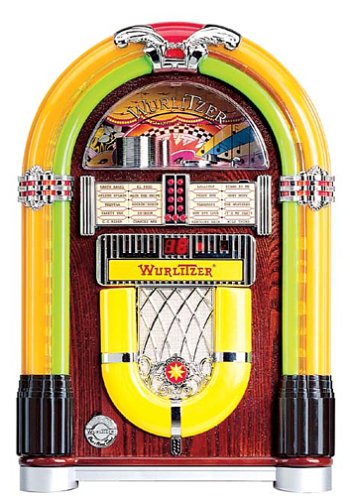
1 paveikslas: Priekyje view of the Crosley WR18 Mini Bubbler Jukebox. This image shows the main unit with its distinctive bubble tubes, neon lights, and speaker grilles. The CD player slot is visible below the main display area.
4. Naudojimo instrukcijos
4.1 Maitinimo įjungimas/išjungimas
Paspauskite GALIA mygtuką ant nuotolinio valdymo pulto, kad įjungtumėte arba išjungtumėte įrenginį.
4.2 CD grotuvo valdymas
- Paspauskite CD button on the remote to select CD mode.
- Paspauskite ATIDARYTI/UŽDARYTI button on the remote to open the CD tray.
- Place a compact disc, label side up, into the tray.
- Paspauskite ATIDARYTI/UŽDARYTI dar kartą, kad uždarytumėte dėklą. Įrenginys pradės skaityti diską.
- Naudokite PALEISTI / PAUZĖ mygtuką, norėdami pradėti arba pristabdyti atkūrimą.
- Naudokite Praleisti pirmyn (|>>) arba PRAŠKITE ATGAL (<<|) mygtukais naršykite tarp takelių.
- The PROGRAMA function allows you to create a custom playback order for tracks. Refer to the remote control diagram for specific programming steps.
- The KARTOT function allows you to repeat the current track or the entire disc.
4.3 FM radijo veikimas
- Paspauskite FM button on the remote to select FM radio mode.
- Extend the external FM antenna located at the back of the unit for optimal reception. Adjust its position for clearer sound.
- Naudokite TUNE UP (+) arba SUJUNGTI (-) buttons on the remote to manually tune to desired radio stations.
4.4 Garsumo valdymas
Reguliuokite garsumą naudodami PAdidinkite garsumą (+) ir SUMAŽINTI GARSUMĄ (-) buttons on the remote control. Note that all volume adjustments are made via the remote.
4.5 Neon Lights and Bubble Tubes
The genuine multicolored neon lights and percolating bubble tubes activate automatically when the unit is powered on, enhancing the retro aesthetic. There are no separate controls for these features.
5. Priežiūra
5.1 Spintos valymas
Wipe the handcrafted hardwood cabinet with a soft, dry cloth. For stubborn marks, a slightly damp Galima naudoti šluostę, po kurios nedelsiant nusausinkite. Venkite abrazyvinių valiklių ar tirpiklių.
5.2 CD grotuvo priežiūra
To ensure optimal performance, keep the CD tray and lens clean. Use a specialized CD lens cleaner disc periodically. Avoid touching the CD lens directly.
5.3 Bubble Tubes and Neon Lights
The bubble tubes and neon lights are sealed units and require no user maintenance. If any issues arise with these components, contact customer support.
6. Problemų sprendimas
| Problema | Galima priežastis | Sprendimas |
|---|---|---|
| Nėra galios | Maitinimo laidas neprijungtas; lizdas neaktyvus | Įsitikinkite, kad maitinimo laidas yra tvirtai prijungtas; išbandykite lizdą su kitu įrenginiu. |
| Nėra garso | Volume too low; incorrect mode selected | Increase volume using remote; ensure correct mode (CD/FM) is selected. |
| CD negroja | Disc inserted incorrectly; disc dirty/scratched; CD mode not selected | Reinsert disc correctly; clean disc; select CD mode. |
| Prastas FM priėmimas | Antenna not extended/positioned correctly | Fully extend and adjust the external FM antenna. |
| Nuotolinio valdymo pultas neveikia | Batteries depleted; line of sight blocked; remote malfunction | Replace batteries; ensure no obstructions between remote and unit; if remote remains unresponsive, contact customer support as many functions are remote-only. |
7. Specifikacijos
- Modelio numeris: WR18
- Gaminio matmenys: 12 x 22 x 16 inches (Width x Height x Depth)
- Prekės svoris: 16.8 svaro
- Gamintojas: Crosley radijas
- Garso funkcijos: Stereo sound with two 4-inch speakers and built-in ampgyvybingesnis
- Medijos atkūrimas: CD player with program and repeat functions, FM radio with external antenna
- Estetinės savybės: Handcrafted hardwood cabinet, genuine multicolored neon lights, bubble tube accents
- Valdymas: 12-button mini jukebox remote control
8. Garantija ir palaikymas
The Crosley WR18 Mini Bubbler Jukebox typically comes with a manufacturer's warranty. Based on user reports, the Crosley warranty period is 90 days. Please note that for warranty service, you may be responsible for shipping the unit back to the manufacturer and an additional fee for return shipping and handling after repair.
For technical support, warranty claims, or service inquiries, please contact Crosley Radio customer service directly. Refer to the contact information provided with your product packaging or visit the official Crosley websvetainę, kurioje pateikiama naujausia pagalbos informacija.