
1. Įvadas
Thank you for choosing the Stanton RM-50 DJ Mixer. This professional 19-inch rackmount mixer is designed for reliable performance and versatile audio control in various DJ and live sound environments. This manual provides essential information for proper installation, operation, and maintenance to ensure optimal performance and longevity of your device. Please read this manual thoroughly before operating the unit.
2. Produktas baigtasview
2.1 Pagrindinės savybės
- 9 line, 4 phono, 4 mic inputs for extensive connectivity.
- 3-band master EQ with complete kill (+9/-60 dB) for precise sound shaping.
- Dedicated Booth output for monitoring.
- Fader start capability for seamless track transitions.
- Fully assignable crossfader (A, B, bypass) for flexible mixing.
- Balanced XLR master output for professional audio connections.
2.2 Priekinio skydelio išdėstymas
The Stanton RM-50 features an intuitive front panel designed for ease of use during live performances. Familiarize yourself with the controls shown below.
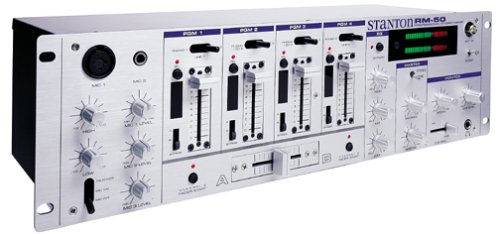
1 pav.: priekinis skydelis view of the Stanton RM-50 DJ Mixer.
Detailed Description of Front Panel Controls:
- Microphone Section (Left Side): Features inputs for MIC 1 (XLR) and MIC 2 (1/4" jack). Each microphone input has dedicated HIGH, MID, and LOW EQ controls, along with individual LEVEL knobs. A MIC ON/OFF switch is also present.
- Program (PGM) Channels 1-4: Each of the four program channels includes a LINE/PHONO input selector switch, GAIN control, 3-band EQ (HIGH, MID, LOW), and a channel fader. A CUE button allows for pre-listening through headphones.
- „Crossfader“: Located at the bottom center, this fader allows for smooth transitions between channels assigned to A and B. An assign switch for each channel determines if it's routed to A, B, or bypass.
- Master Section (Right Side): Includes controls for MASTER LEVEL, BOOTH LEVEL, and HEADPHONE LEVEL. The 3-band master EQ (HIGH, MID, LOW) with kill switches is also located here. LED VU meters provide visual feedback of the master output level.
- Ausinių lizdas: A 1/4" stereo jack for connecting headphones for monitoring.
3. Sąranka
3.1 Montavimas ant stovo
The Stanton RM-50 is designed for standard 19-inch rack mounting. Secure the mixer using appropriate rack screws (not included) into a stable equipment rack. Ensure adequate ventilation around the unit to prevent overheating.
3.2 Garso jungtys
- Įvesties šaltiniai: Connect your turntables to the PHONO inputs and CD players, media players, or other line-level devices to the LINE inputs on the rear panel. Ensure the corresponding LINE/PHONO switch on the front panel is set correctly for each channel.
- Mikrofonai: Connect dynamic microphones to the MIC 1 (XLR) or MIC 2 (1/4" jack) inputs on the front panel.
- Pagrindinė išvestis: Connect the balanced XLR MASTER OUT to your main ampkeltuvai arba maitinami garsiakalbiai.
- Booth išvestis: Connect the BOOTH OUT to your monitor speakers or a separate amplifier for booth monitoring.
- Ausinės: Plug your headphones into the 1/4" HEADPHONE jack on the front panel.
3.3 Maitinimo jungtis
Connect the provided power cord to the AC input on the rear of the mixer and then to a suitable power outlet. Ensure all connections are secure before powering on the unit.
4. Naudojimo instrukcijos
4.1 Įjungimas / išjungimas
Always ensure all volume controls (Master, Booth, Channel Faders) are set to their minimum position before powering on or off the mixer to prevent sudden loud noises or potential damage to speakers.
- Norėdami įjungti: Press the POWER switch located on the rear panel.
- Norėdami išjungti: Dar kartą paspauskite POWER jungiklį.
4.2 Basic Mixing
- Įvesties pasirinkimas: For each channel, select LINE or PHONO using the switch above the GAIN knob, corresponding to your connected source.
- Stiprinimo reguliavimas: Adjust the GAIN knob for each active channel until the signal level is strong but not clipping (indicated by the channel's peak LED).
- Kanalo faderiai: Slowly raise the channel fader for the desired audio source.
- Pagrindinė išvestis: Adjust the MASTER LEVEL knob to control the overall output volume to your main sound system.
- Booth išvestis: Adjust the BOOTH LEVEL knob for your monitor speakers.
- Ausinių stebėjimas: Press the CUE button on any channel to pre-listen to its audio through your headphones. Adjust the HEADPHONE LEVEL knob for comfortable listening.
4.3 Equalization (EQ)
- Kanalo EQ: Use the HIGH, MID, and LOW knobs on each channel to adjust the tonal characteristics of individual audio sources.
- Pagrindinis EQ: The 3-band master EQ allows for overall tonal adjustment of the mixed output. The kill switches provide a complete cut (-60 dB) for dramatic effects.
4.4 Crossfader Operation
The crossfader allows for smooth transitions between channels assigned to either side A or B. Use the assign switches above each channel fader to route the channel to A, B, or bypass the crossfader entirely.
- Move the crossfader to the left to hear channels assigned to A.
- Move the crossfader to the right to hear channels assigned to B.
- Center position blends both A and B channels.
4.5 Mikrofono naudojimas
Connect your microphone, then press the MIC ON/OFF switch to activate the microphone channel. Adjust the MIC LEVEL knob and the HIGH, MID, LOW EQ controls for the desired sound. Be mindful of feedback when using microphones.
5. Priežiūra
Proper maintenance ensures the longevity and optimal performance of your Stanton RM-50 DJ Mixer.
- Valymas: Regularly wipe the exterior of the mixer with a soft, dry, lint-free cloth. Avoid using abrasive cleaners, solvents, or waxes. Do not spray liquids directly onto the unit.
- Vėdinimas: Ensure that the ventilation openings are not blocked. Dust accumulation can lead to overheating.
- Saugykla: Kai maišytuvas nenaudojamas ilgesnį laiką, jį laikykite vėsioje, sausoje vietoje, apsaugotoje nuo dulkių ir ekstremalių temperatūrų.
- Faderio priežiūra: Keep faders and knobs free from dust and debris. Specialized fader lubricants can be used if faders become stiff or noisy, but consult a professional if unsure.
6. Problemų sprendimas
If you encounter issues with your RM-50 mixer, refer to the following common problems and solutions before contacting support.
| Problema | Galima priežastis | Sprendimas |
|---|---|---|
| Nėra garso išvesties |
|
|
| Iškraipytas garsas |
|
|
| Mikrofono atsiliepimai |
|
|
7. Specifikacijos
Below are the technical specifications for the Stanton RM-50 DJ Mixer:
- Prekinis ženklas: Stantonas
- Modelio numeris: RM50
- Gaminio matmenys: 48.26 x 13.49 x 21.01 cm (19 x 5.3 x 8.3 colio)
- Prekės svoris: 3.39 kg (7.47 svaro)
- Kanalų skaičius: 4
- Maitinimo šaltinis: Su laidu elektra
- Išvesties jungties tipas: XLR (Balanced Master Output)
- Įėjimai: 9 Line, 4 Phono, 4 Mic
- EQ: 3-band master EQ with kill (+9/-60 dB)
- „Crossfader“: Fully assignable (A, B, bypass)
- Additional Outputs: Booth išvestis
8. Garantija ir palaikymas
For detailed warranty information, please refer to the warranty card included with your product or visit the official Stanton website. For technical support or service inquiries, please contact Stanton customer service through their official channels. Keep your purchase receipt as proof of purchase for warranty claims.
Daugiau informacijos ir palaikymo išteklių galite rasti adresu Stanton Store on Amazon.