
Įvadas
The Nyko 80610 Airflo PC Game Controller is designed to enhance your PC and Mac gaming experience. This controller features an ergonomic design for comfortable use and an integrated airflow system to help keep your hands cool during extended gaming sessions. This manual provides detailed instructions for setting up, operating, maintaining, and troubleshooting your Airflo controller.
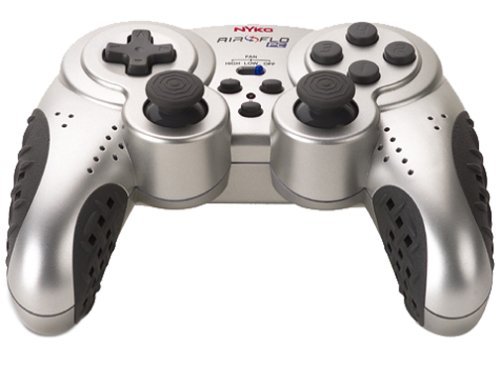
Image of the Nyko 80610 Airflo PC Game Controller, showcasindėl savo ergonomiško dizaino ir mygtukų išdėstymo.
Sąranka
Pakuotės turinys
- Nyko 80610 Airflo PC Game Controller (Set of two 12-button gamepads)
- Driver Installation CD (if applicable)
- Vartotojo vadovas (šis dokumentas)
Sistemos reikalavimai
- Operating System: Windows 2000/XP/Vista/7/8, Mac-Intel OS X
- Galimas USB prievadas
Montavimas
- Ensure your computer is powered on and running.
- Kompiuteryje raskite laisvą USB prievadą.
- Plug the USB connector of the Nyko Airflo controller into the USB port.
- For most Windows operating systems, the controller will be automatically detected and drivers installed. If prompted, follow the on-screen instructions.
- If automatic installation does not occur, insert the provided Driver Installation CD into your computer's optical drive and follow the installation wizard.
- Once installed, the controller is ready for use. It is recommended to have the gamepad plugged in and ready before launching a game to ensure proper recognition.
Naudojimo instrukcijos
Pagrindiniai valdikliai
The Nyko Airflo controller features a standard gamepad layout, including:
- Two Analog Sticks: For precise movement and camera control.
- D-Pad (Directional Pad): For directional input.
- Action Buttons: Typically labeled for in-game actions.
- Shoulder Buttons/Triggers: Located on the top of the controller.
- Start and Select/Back Buttons: For menu navigation and game functions.
Oro srauto funkcija
The integrated airflow system helps to cool your hands during intense gaming. The controller includes a switch or button to activate and adjust the fan speed. While effective, the fan may produce some noise, especially on higher settings.
- Locate the fan control switch/button on the controller.
- Toggle the switch or press the button to turn the fan on/off or cycle through different speed settings.
Žaidimo konfigūracija
Most PC games allow for controller configuration within their settings menu. You may need to:
- Navigate to the 'Controls' or 'Options' section of your game.
- Select 'Gamepad' or 'Controller' as the input device.
- Map the in-game actions to the corresponding buttons and sticks on your Nyko Airflo controller.
- The controller may come with mapping software that allows for custom button assignments, which can be useful for games that do not natively support the controller's default layout or for remapping keyboard commands.
Priežiūra
- Valymas: Valdiklį nuvalykite minkšta, sausa šluoste. Jei nešvarumai sunkiai nuvalote, šiek tiek pamirkykite.ampNuvalykite šluostę vandeniu. Venkite naudoti stiprias chemines medžiagas ar abrazyvinius valiklius.
- Saugykla: Store the controller in a clean, dry place away from direct sunlight and extreme temperatures. Avoid wrapping the cable too tightly to prevent damage.
- Kabelio priežiūra: Do not pull the controller by its cable. Always grasp the USB connector when plugging or unplugging it from your computer.
Trikčių šalinimas
- Valdiklis neatpažintas:
- Įsitikinkite, kad USB laidas yra tvirtai prijungtas tiek prie valdiklio, tiek prie kompiuterio.
- Pabandykite prijungti valdiklį prie kito USB prievado.
- Restart your computer with the controller connected.
- Verify that the necessary drivers are installed (refer to the Installation section).
- Analog Stick or D-Pad Issues:
- If analog sticks are not calibrated correctly in-game, try unplugging the gamepad, closing the game, plugging the gamepad back in, and then restarting the game.
- Some users have reported that the D-pad may not register diagonal inputs reliably or may simultaneously press adjacent directions. This can be a characteristic of the controller's design.
- Buttons Sticking or Requiring Heavy Pressing:
- Ensure the controller is clean and free of debris around the buttons.
- If the issue persists, it may indicate wear or a manufacturing characteristic.
- Ventiliatoriaus triukšmas:
- The airflow fan may produce audible noise, especially on higher settings. This is normal operation.
Specifikacijos
| Prekės ženklas | Nyko |
| Modelis | 80610 Airflo |
| Suderinami įrenginiai | Mac, Windows |
| Valdiklio tipas | Žaidimų pultelis |
| Ryšio technologija | USB (laidinis elektrinis) |
| Spalva | Juoda/Sidabrinė |
| Papildomos funkcijos | Ergonomic, Integrated Airflow System |
| Mygtukų kiekis | 12 (per gamepad) |
| Aparatinės įrangos platforma | PC |
| Kabelio ilgis | Itin ilgas |
| GTIN / UPC | 743840806103 |
| ASIN | B0000TNJWM |
Garantija ir palaikymas
For information regarding warranty coverage, technical support, or replacement parts, please contact Nyko customer service directly. Details can typically be found on the manufacturer's official websvetainėje arba produkto pakuotėje.
Prašome išsaugoti pirkimo įrodymą bet kokiems garantiniams reikalavimams.