
Coby CT-P9040 SVR
Coby CT-P9040 5.8 GHz Analog Cordless Phone User Manual
Model: CT-P9040 SVR
Įvadas
This manual provides comprehensive instructions for the setup, operation, and maintenance of your Coby CT-P9040 5.8 GHz Analog Cordless Phone. Please read this manual thoroughly before using your phone to ensure proper functionality and to prevent damage.
Pakuotės turinys ir komponentai
Prieš pradėdami, įsitikinkite, kad pakuotėje yra visi komponentai:
- Belaidis ragelis
- Bazinis blokas
- Kintamos srovės adapteris
- Telefono linijos laidas
- Įkraunama baterija
- Vartotojo vadovas (šis dokumentas)
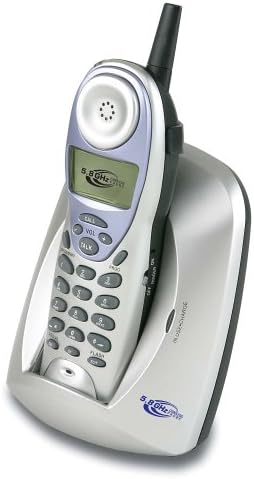
Image: The Coby CT-P9040 cordless phone, showing the handset docked in its silver base unit. The handset features a display screen, numeric keypad, and function buttons. The base unit has a charging cradle for the handset.
Sąrankos vadovas
1. Akumuliatoriaus įdėjimas
- Raskite akumuliatoriaus skyrių ragelio gale.
- Atidarykite akumuliatoriaus skyriaus dangtelį.
- Connect the rechargeable battery pack connector to the jack inside the compartment.
- Place the battery pack into the compartment and close the cover securely.
2. Pagrindinio įrenginio prijungimas
- Connect one end of the telephone line cord to the "LINE" jack on the back of the base unit.
- Kitą telefono linijos laido galą prijunkite prie standartinio telefono sieninio lizdo.
- Connect the AC power adapter to the "DC IN" jack on the back of the base unit.
- Prijunkite kintamosios srovės adapterį į standartinį elektros lizdą.
3. Pradinis įkrovimas
Place the handset in the base unit's charging cradle. Ensure the "IN CHARGE" indicator light on the base unit illuminates, indicating proper charging. For optimal battery performance, charge the handset for at least 12-14 hours before initial use.
Naudojimo instrukcijos
Skambinimas
- Pick up the handset from the base unit or press the KALBĖKITE mygtuką.
- Klausykitės rinkimo tono.
- Surinkite norimą telefono numerį.
- Norėdami baigti pokalbį, paspauskite KALBĖKITE button again or place the handset back in the base unit.
Atsiliepimas į skambutį
Kai suskamba telefonas, pakelkite ragelį arba paspauskite KALBĖKITE mygtuką atsiliepti į skambutį.
Perrinkimo funkcija
Norėdami perrinkti paskutinį skambintą numerį, paspauskite PERSKAMBINTI mygtuką ant ragelio.
Garsumo reguliavimas
Pokalbio metu naudokite VOL+ ir TŪRIS - buttons on the handset to adjust the earpiece volume.
Blykstės funkcija
Paspauskite BLYKSTE button to use call waiting or transfer calls if supported by your telephone service provider.
Storing Phone Numbers (Speed Dial)
Your phone can store up to 10 numbers for frequently called contacts. Refer to the detailed instructions in the full manual for programming speed dial entries.
Priežiūra ir priežiūra
- Laikykite telefoną atokiau nuo šilumos šaltinių, tiesioginių saulės spindulių ir drėgmės.
- Telefono paviršius valykite minkšta,amp audinys. Nenaudokite abrazyvinių valiklių ar tirpiklių.
- Ensure the charging contacts on the handset and base unit are clean to maintain proper charging.
- Jei telefonas bus nenaudojamas ilgesnį laiką, išimkite bateriją iš ragelio.
Trikčių šalinimas
| Problema | Galima priežastis | Sprendimas |
|---|---|---|
| Nėra rinkimo tono | Telefono linijos laidas atjungtas. | Įsitikinkite, kad telefono linijos laidas yra tvirtai prijungtas tiek prie pagrindinio įrenginio, tiek prie sieninio lizdo. |
| Ragelis nesikrauna | Ragelis netinkamai įdėtas į laikiklį arba nešvarūs įkrovimo kontaktai. | Reseat the handset in the base unit. Clean the charging contacts on both the handset and base unit with a dry cloth. |
| Prasta garso kokybė / statinis triukšmas | Interference from other electronic devices or out of range. | Move the base unit away from other electronic devices (e.g., microwaves, Wi-Fi routers). Move closer to the base unit. |
| Negaliu skambinti / priimti skambučių | Power adapter disconnected or battery low. | Check if the AC power adapter is securely plugged in. Ensure the handset battery is fully charged. |
Specifikacijos
- Modelis: CT-P9040 SVR
- Dažnis: 5.8 GHz analoginis
- Kanalai: 40 Channel Auto Scan
- Atmintis: 10-number speed dial storage
- Funkcijos: Flash, Redial, Pause, Tone/Pulse Switch
- Ausinių lizdas: Įmontuotas 2.5 mm
- Montavimas: Desk and Wall Mountable
- Matmenys (P x P x A): 5 x 8 x 4 colio
- Svoris: 1.8 svaro
- Spalva: Sidabras
- Skambintojo ID: Nepalaikoma
- Kelių linijų veikimas: Vienos linijos veikimas
Garantija ir palaikymas
For warranty information and technical support, please refer to the warranty card included with your product or visit the official Coby websvetainėje. Išsaugokite pirkimo kvitą kaip pirkimo įrodymą garantiniams reikalavimams.
For further assistance, you may contact Coby customer service. Contact details are typically available on the manufacturer's websvetainėje arba produkto pakuotėje.
Ask a question about this manual
Ask about setup, troubleshooting, compatibility, parts, safety, or missing instructions. Manuals+ will review the question and use this page’s manual context to help answer it.