
1. Įvadas
Welcome to the user manual for your new Singing Machine SMVG-620 CD+G Karaoke System. This system is designed to provide hours of entertainment with its CD+G playback capabilities, built-in camera, 5.5-inch monitor, and AM/FM radio. Please read this manual thoroughly before operating your unit to ensure proper use and to maximize your enjoyment.
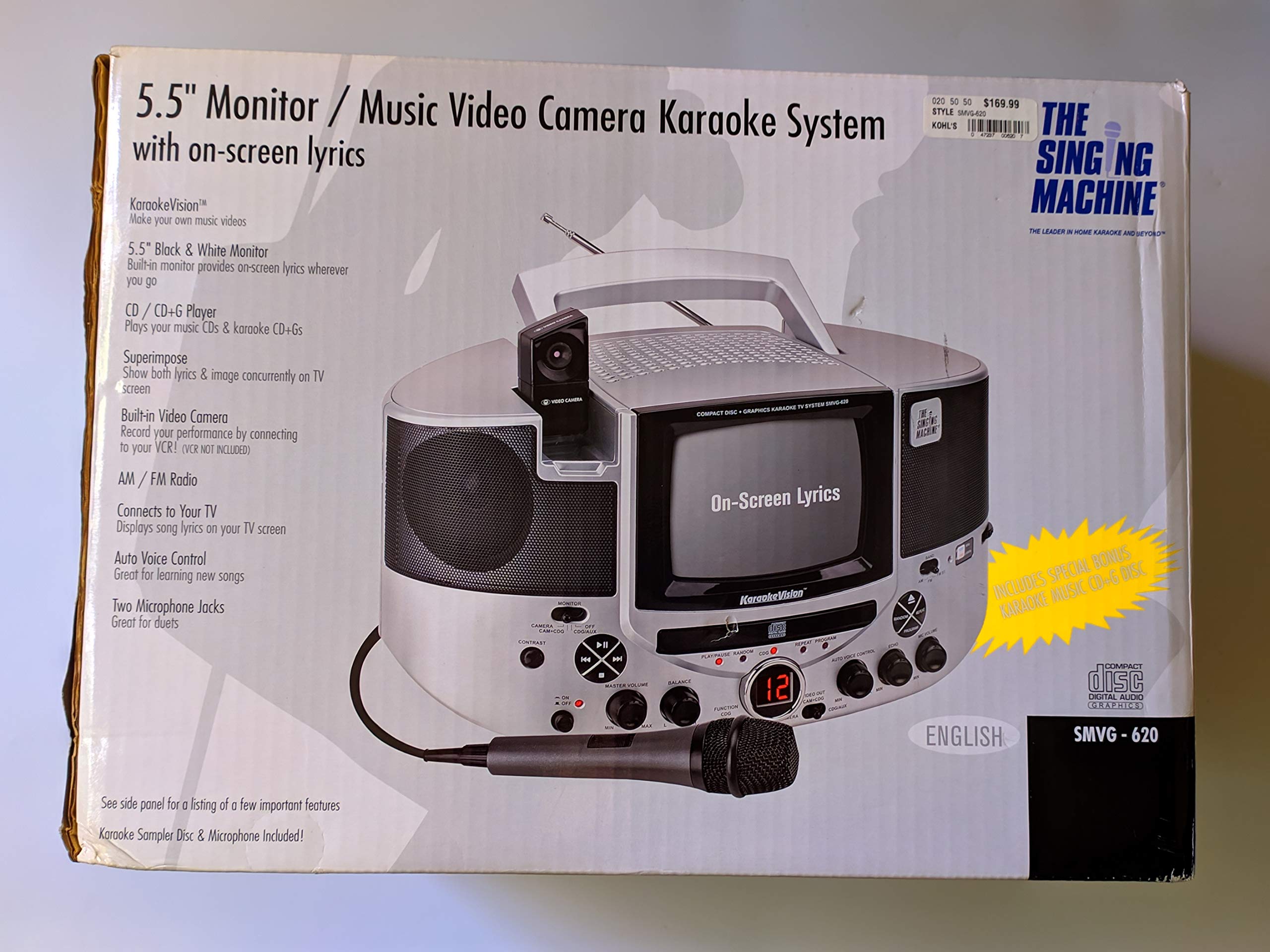
1.1 paveikslas: The Singing Machine SMVG-620 CD+G Karaoke System.
For optimal performance and safety, always follow the instructions and warnings provided.
2. Svarbi saugos informacija
- Skaitykite instrukcijas: Prieš naudojant prietaisą reikia perskaityti visas saugos ir naudojimo instrukcijas.
- Išsaugokite instrukcijas: Saugos ir naudojimo instrukcijas reikia išsaugoti, kad galėtumėte jas peržiūrėti ateityje.
- Atkreipkite dėmesį į įspėjimus: Būtina laikytis visų įspėjimų ant prietaiso ir naudojimo instrukcijose.
- Vykdykite instrukcijas: Turi būti laikomasi visų naudojimo ir naudojimo instrukcijų.
- Vanduo ir drėgmė: Nenaudokite šio prietaiso šalia vandens.
- Valymas: Valykite tik sausa šluoste.
- Vėdinimas: Neužblokuokite jokių ventiliacijos angų. Montuokite pagal gamintojo instrukcijas.
- Šiluma: Nemontuokite šalia jokių šilumos šaltinių, pvz., radiatorių, šilumokaičių, viryklių ar kitų įrenginių (įskaitant ampkeltuvai), kurie gamina šilumą.
- Maitinimo laido apsauga: Saugokite maitinimo laidą, kad ant jo neužeitų ar nesuspaustų, ypač prie kištukų, patogių lizdų ir toje vietoje, kur jie išeina iš aparato.
- Priedai/priedai: Naudokite tik gamintojo nurodytus priedus/priedus.
- Žaibas: Atjunkite šį įrenginį žaibuojant arba kai nenaudojate ilgą laiką.
- Aptarnavimas: Visą techninę priežiūrą patikėkite kvalifikuotam aptarnavimo personalui. Techninė priežiūra reikalinga, kai aparatas yra bet kokiu būdu pažeistas.
3. Pakuotės turinys
Carefully unpack your Singing Machine SMVG-620 system and ensure all items listed below are present and in good condition.
- SMVG-620 CD+G Karaoke System
- One (1) Microphone
- Sampler CD+G Disc
- Audio/Video RCA Cables
- Kintamos srovės adapteris
- Instrukcijų vadovas

3.1 paveikslas: Contents of the box, including the microphone, RCA cables, and the instruction manual.
4. Produktas baigtasview
Familiarize yourself with the various parts and controls of your SMVG-620 Karaoke System.

4.1 paveikslas: Galinis view of the product packaging highlighting key features and components of the SMVG-620 system.
Pagrindinės funkcijos:
- 5.5" Black & White Monitor: For on-screen lyrics from CD+G discs.
- Built-in Color Camera: Allows you to see yourself on the monitor or connected TV.
- Dual Microphone Jacks: Connect two microphones for duets (one microphone included).
- AM/FM radijas: Įsijunkite mėgstamiausias radijo stotis.
- CD+G grotuvas: Plays standard audio CDs and CD+Graphics discs.
- Automatinis valdymas balsu (AVC): Helps maintain vocal balance by automatically reducing the main vocal track when you sing.
- Aido valdymas: Adds depth and resonance to your voice.
- Professional Style Microphone: For clear vocal pickup.
- Garso / vaizdo išvestis: Connects to your TV for larger screen display and enhanced audio.
5. Sąranka
5.1 Maitinimo jungtis
- Įsitikinkite, kad įrenginys pastatytas ant stabilaus, lygaus paviršiaus.
- Connect the AC power adapter to the DC IN jack on the back of the SMVG-620 unit.
- Plug the other end of the AC power adapter into a standard wall outlet (AC 120V ~ 60Hz).
5.2 Prijungimas prie televizoriaus
Į view lyrics on a larger screen and enhance audio, connect the SMVG-620 to your television using the supplied Audio/Video RCA cables.
- Locate the AUDIO OUT (white and red) and VIDEO OUT (yellow) jacks on the back of the SMVG-620.
- Connect the white plug of the RCA cable to the white AUDIO OUT jack on the karaoke system and to the white AUDIO IN jack on your TV.
- Connect the red plug of the RCA cable to the red AUDIO OUT jack on the karaoke system and to the red AUDIO IN jack on your TV.
- Connect the yellow plug of the RCA cable to the yellow VIDEO OUT jack on the karaoke system and to the yellow VIDEO IN jack on your TV.
- Turn on your TV and select the correct A/V input source (e.g., AV1, Video 1) that corresponds to the jacks you used.
5.3 Mikrofono prijungimas
Plug the microphone into either the MIC 1 or MIC 2 jack on the front of the SMVG-620 unit.
6. Operacija
6.1 Įjungimas / išjungimas
Paspauskite GALIA button located on the front panel to turn the unit ON or OFF.
6.2 CD+G Playback
- Open the CD compartment door and carefully place a CD+G disc (or standard audio CD) onto the spindle with the label side facing up. Close the door.
- Pasirinkite CD+G mode using the FUNCTION selector.
- Paspauskite PALEISTI / PAUZĖ mygtuką, norėdami pradėti atkūrimą.
- Sureguliuokite PAGRINDINIS GARSAS rankenėlę iki norimo klausymosi lygio.
- Naudokite PRALEISTI mygtukai (<< or >>), kad galėtumėte naršyti tarp takelių.
- Norėdami pristabdyti, paspauskite PALEISTI / PAUZĖ dar kartą. Norėdami tęsti, paspauskite dar kartą.
- Norėdami sustabdyti atkūrimą, paspauskite STOP mygtuką.
6.3 Mikrofono naudojimas
- Ensure the microphone is connected to a MIC jack.
- Sureguliuokite MIKRO TŪRIS rankenėlę, skirtą mikrofono išvesties lygiui reguliuoti.
- Pasukite ECHO knob to add an echo effect to your voice.
- The AUTO VOICE CONTROL (AVC) switch can be toggled ON/OFF. When ON, the original vocal track on a CD+G disc will be reduced when you sing into the microphone.
6.4 AM/FM radijas
- Pasirinkite AM or FM mode using the FUNCTION selector.
- Ištieskite FM anteną, kad signalas būtų geresnis.
- Pasukite TUNINGAS rankenėlę, kad pasirinktumėte norimą radijo stotį.
- Sureguliuokite PAGRINDINIS GARSAS rankenėlė.
6.5 Kameros funkcija
The built-in camera allows you to display your image on the 5.5-inch monitor or a connected TV.
- Ensure the unit is powered on and connected to a TV if you wish to use an external display.
- The camera feed will automatically display when the unit is in CD+G or Video mode, or when no other video source is active.
7. Priežiūra
7.1 Įrenginio valymas
- Prieš valydami, visada ištraukite įrenginį iš maitinimo lizdo.
- Išoriniams paviršiams valyti naudokite minkštą, sausą šluostę.
- Nenaudokite abrazyvinių valiklių, vaško ar tirpiklių, nes jie gali pažeisti apdailą.
- CD lęšiui naudokite specialų CD lęšių valymo diską.
7.2 CD priežiūra
- Kompaktinius diskus imkite už kraštų, kad ant grojimo paviršiaus neliktų pirštų atspaudų.
- Keep discs in their cases when not in use to prevent scratches.
- Diskus valykite minkštu, nepūkuotu skudurėliu, šluostydami nuo centro į išorę.
8. Problemų sprendimas
If you encounter any issues with your SMVG-620, please refer to the following common problems and solutions.
| Problema | Galima priežastis | Sprendimas |
|---|---|---|
| Nėra galios | Maitinimo laidas netinkamai prijungtas. | Įsitikinkite, kad kintamosios srovės adapteris yra tvirtai prijungtas prie įrenginio ir veikiančio sieninio lizdo. |
| Iš garsiakalbių nėra garso | Master Volume is too low. Pasirinktas neteisingas funkcijos režimas. | Increase the MASTER VOLUME. Select the correct FUNCTION (CD+G, AM, FM). |
| Nėra garso iš mikrofono | Microphone not connected. MIC VOLUME is too low. Mikrofono jungiklis yra IŠJUNGTAS. | Plug microphone into MIC 1 or MIC 2 jack. Increase the MIC VOLUME. Ensure microphone switch is ON. |
| No video on TV / No lyrics | RCA kabeliai netinkamai prijungti. Pasirinkta neteisinga televizoriaus įvestis. Not a CD+G disc. | Check all RCA cable connections (yellow for video). Select the correct A/V input on your TV. Ensure you are playing a CD+G disc for lyrics. |
| CD skipping | Diskas nešvarus arba subraižytas. Įrenginys yra ant nestabilaus paviršiaus. | Clean the disc or try another disc. Place the unit on a stable, vibration-free surface. |
9. Specifikacijos
| Modelio numeris | SMVG-620 (SIN SMVG620) |
| Maitinimo šaltinis | AC 120V ~ 60Hz (via AC Adapter) |
| Monitorius | 5.5-inch Black & White |
| Pranešėjų skaičius | 2 |
| Suderinami įrenginiai | Televizija |
| Medijos tipas | CD, CD+G |
| Gaminio matmenys (IxPxH) | 35.8 x 20.8 x 19.3 cm (14.1 x 8.2 x 7.6 colio) |
| Prekės svoris | 3.9 kg (8.6 svaro) |
10. Garantija ir palaikymas
For warranty information and customer support, please refer to the warranty card included with your product or contact The Singing Machine directly. You may also consult your retailer for details regarding their return and warranty policies.
Gamintojas: DAINAMOJI MAŠINA