
1. Įvadas
The Sigma SD14 is a 14-megapixel Digital Single-Lens Reflex (DSLR) camera designed for advanced photographers. It features the Foveon X3 direct-image sensor, which captures full RGB color information at each pixel layer, aiming for high-definition images with rich gradation. This manual provides essential information for setting up, operating, and maintaining your SD14 camera.
Key features include a 2.5-inch LCD monitor, a durable shutter mechanism rated for over 100,000 cycles, a 5-point autofocus system, and continuous shooting capabilities. The camera supports both RAW and JPEG image recording formats and includes Sigma Photo Pro 3.0 software for RAW image processing.

1.1 pav.: priekis view of the Sigma SD14 Digital SLR Camera, showing the lens mount and body design.
2. Kas yra dėžutėje
Verify that all the following items are included in your Sigma SD14 package:
- Sigma SD14 Digital SLR Camera Body
- Lithium-ion Power Battery BP-21
- Battery Charger BC-21
- USB kabelis
- Vaizdo kabelis
- Kaklo dirželis
- Eye Cap
- Kūno dangtelis
- Okuliaro dangtelis
- SIGMA Photo Pro 3.0 CD-ROM
- SD14 Instruction Manual (this document)
3. Sąranka
3.1. Baterijos įkrovimas ir įdėjimas
- Insert the Lithium-ion Battery BP-21 into the Battery Charger BC-21.
- Prijunkite įkroviklį prie maitinimo lizdo. Užsidegs įkrovimo indikatorius.
- Įkrovimas paprastai trunka maždaug 120 minučių.
- Visiškai įkrautą akumuliatorių išimkite iš įkroviklio.
- Open the battery compartment cover on the camera body.
- Insert the charged battery into the compartment, ensuring correct orientation.
- Saugiai uždarykite akumuliatoriaus skyriaus dangtelį.
A fully charged BP-21 battery can capture approximately 500 images.
3.2. Atminties kortelės įdėjimas
The SD14 uses CompactFlash (CF) Type I/II cards. Ensure the card is formatted in the camera before first use.
- Open the CF card slot cover on the side of the camera.
- Insert the CF card with the correct orientation until it clicks into place.
- Close the CF card slot cover securely.
3.3. Objektyvo pritvirtinimas
The Sigma SD14 uses the Sigma SA Bayonet mount. Only Sigma SA mount lenses are directly compatible.
- Nuimkite korpuso dangtelį nuo fotoaparato ir galinį objektyvo dangtelį nuo objektyvo.
- Align the red index mark on the lens with the red index mark on the camera body's lens mount.
- Pritvirtinkite objektyvą sukdami jį pagal laikrodžio rodyklę, kol jis spragtelėdamas užsifiksuos vietoje.
- Norėdami nuimti objektyvą, paspauskite objektyvo atleidimo mygtuką, esantį ant fotoaparato korpuso, ir pasukite objektyvą prieš laikrodžio rodyklę.
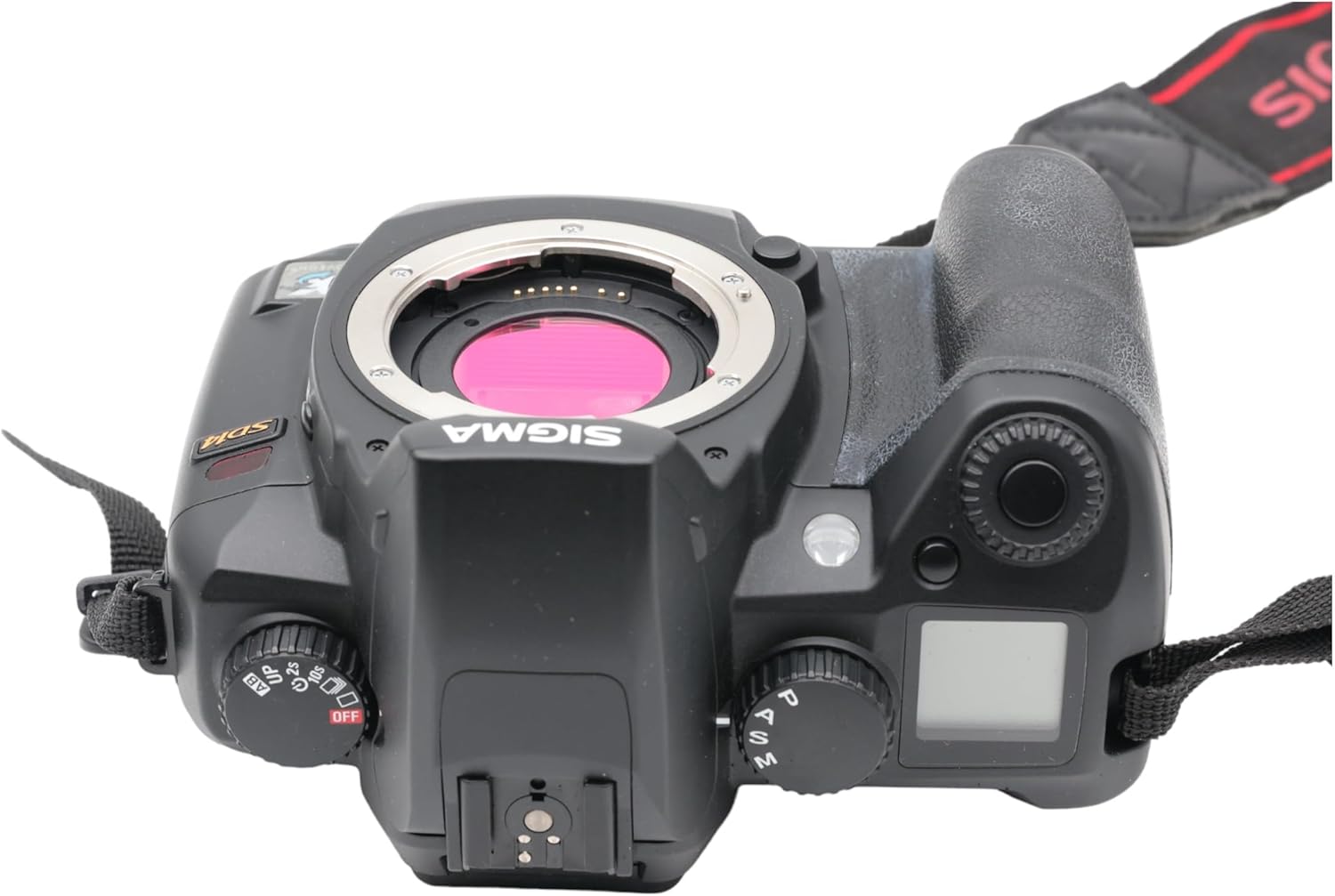
3.1 paveikslas: viršuje view of the Sigma SD14, illustrating the lens mount and mode dials.
4. Operacija
4.1. Įjungimas/išjungimas
Rotate the power switch to the ON position to turn on the camera. Rotate it to OFF to power down.
4.2. Pagrindiniai valdikliai ir ekranas
The SD14 features a 2.5-inch LCD monitor for reviewing images and navigating menus, and a pentaprism viewfinder for composing shots. The top LCD panel displays key settings such as resolution, metering mode, battery status, and remaining shots.

4.1 pav.: galinis view of the Sigma SD14, showing the LCD monitor, viewieškiklis ir valdymo mygtukai.
Key buttons include MENU, ISO, WB (White Balance), and a 4-way controller with an OK button for navigation. The INFO button displays shutter speed, aperture, and other settings on the LCD.
4.3. Fokusavimas
The camera utilizes a 5-point autofocus (AF) system (center, left, right, up, and down). The center AF point features a cross-type sensor for enhanced precision. AF point selection can be automatic or manual.
4.4. Metering Modes
The SD14 offers three metering modes:
- 8-segment Evaluative Metering: Analyzes the entire scene for balanced exposure.
- Center Area Metering: Prioritizes the central area of the frame.
- Center Weighted Average Metering: Measures the entire frame but gives more weight to the central area.
Exposure compensation and auto bracketing functions are available for fine-tuning exposure.
4.5. Vaizdo įrašymas
The camera supports both RAW (X3F) and JPEG formats. JPEG recording offers four sizes (Super High, High, Medium, Low) and three quality settings (Fine, Normal, Basic).
- Super High (4608 x 3072 pixels): Suitable for A3 or larger prints.
- High (2640 x 1760 pixels): Suitable for A4 prints.
- Medium (1776 x 1184 pixels): Suitable for regular size prints.
- Low (1296 x 864 pixels): Tinka web pages and email.
4.6. Nepertraukiamas fotografavimas
The SD14 can shoot continuously at 3 frames per second. The number of frames captured in a burst depends on the resolution setting:
- Aukštas: 6 kadrų
- Vidutinė: 12 kadrų
- Žemas: 24 kadrų
These figures apply to both RAW and JPEG modes.
4.7. Integruota blykstė
The built-in flash has a guide number of 11 (ISO 100) and covers a 17mm lens angle (28mm equivalent on 35mm format). It supports S-TTL automatic flash metering and can synchronize with shutter speeds up to 1/180 second.
4.8. Mirror Lock-up
Activate the mirror lock-up mechanism to prevent camera shake caused by mirror movement during exposure. This is particularly useful for macro photography, long telephoto shots, or scientific applications. For best results, use with a remote controller or cable release (sold separately).
4.9. Sigma Photo Pro 3.0 Software
The included Sigma Photo Pro 3.0 software is a RAW image developer. It allows for quick conversion of RAW data and offers three adjustment modes: X3F Mode (original settings), Auto Adjustment Mode, and Custom Mode for manual adjustments (exposure, contrast, shadow, highlight, saturation, sharpness, fill-light). The software supports 8-bit TIFF, 16-bit TIFF, and JPEG file formats, and sRGB, Apple RGB, Adobe RGB, and ColorMatch RGB color spaces.
5. Priežiūra
5.1. Image Sensor Dust Protector
The SD14 features a dust protector positioned in front of the image sensor. This design prevents dust from adhering directly to the sensor, minimizing its impact on image quality. If dust accumulates on the protector, it will be out of focus and generally not visible in images.
5.2. Fotoaparato korpuso ir objektyvo valymas
- Kameros korpusą nuvalykite minkšta, nepūkuota šluoste. Jei nešvarumai sunkiai įveikiami, šiek tiek pamirkykite.amplt šluostę nuvalykite vandeniu arba švelniu valymo tirpalu.
- For lenses, use a lens brush to remove loose dust, then a lens cleaning solution and a microfiber cloth. Avoid touching the lens surface with your fingers.
- Never use organic solvents like paint thinner or benzene to clean the camera or lens.
5.3. Akumuliatoriaus priežiūra
- Nenaudojamas baterijas laikykite vėsioje, sausoje vietoje.
- Kad pailgintumėte akumuliatoriaus tarnavimo laiką, venkite jo dažnai visiškai iškrauti.
- Jei fotoaparatas ilgą laiką nebus naudojamas, išimkite bateriją.
6. Problemų sprendimas
| Problema | Galima priežastis | Sprendimas |
|---|---|---|
| Kamera neįsijungia. | Baterija išsikrovusi arba netinkamai įdėta. | Visiškai įkraukite bateriją ir įsitikinkite, kad ji tinkamai įdėta. |
| Vaizdai neryškūs. | Neteisingas fokusavimas, fotoaparato drebėjimas arba nešvarus objektyvas. | Užtikrinkite tinkamą fokusavimą. Naudokite greitesnį užrakto greitį arba trikojį. Nuvalykite objektyvą. |
| Vaizdai per tamsūs arba per šviesūs. | Incorrect exposure settings or metering mode. | Adjust exposure compensation. Select an appropriate metering mode for the scene. |
| Color blotching in underexposed areas. | Characteristic of the Foveon sensor when severely underexposed. | Aim to slightly overexpose images (e.g., +.7 EV) to retain shadow detail and avoid this effect. |
| Nepavyksta įrašyti vaizdų. | Memory card is full, locked, or not inserted correctly. | Insert an empty card, unlock the card, or reinsert it correctly. Format the card if necessary (this will erase all data). |
| Kamera užstringa arba nereaguoja. | Laikinas programinės įrangos triktis. | Išimkite ir vėl įdėkite bateriją, kad iš naujo nustatytumėte fotoaparato gamyklinius nustatymus. |
For more detailed troubleshooting or error codes, please refer to the comprehensive instruction manual included with your camera or visit the Sigma support websvetainę.
7. Specifikacijos
| Funkcija | Detalė |
|---|---|
| Modelio pavadinimas | SD14 |
| Nuotraukų jutiklio skiriamoji geba | 14 MP (Foveon X3 direct-image sensor) |
| Nuotraukų jutiklio dydis | APS-C |
| Suderinami tvirtinimai | Sigma SA Bayonet |
| Palaikoma File Formatai | JPEG, RAW (X3F), TIFF |
| Ekrano dydis | 2.5 Inches (150,000 pixels) |
| Viewieškiklis | Optical Pentaprism (98% coverage, 0.9x magnification) |
| Automatinio fokusavimo taškai | 5-point (Phase Detection) |
| Nepertraukiamo fotografavimo greitis | 3 kadrų per sekundę |
| Maksimalus užrakto greitis | 1/4000 sekundės |
| Minimalus užrakto greitis | 30 sekundžių |
| Išplėstas ISO diapazonas | 100 - 1600 |
| Matavimo režimai | 8-segment Evaluative, Center Area, Center Weighted Average |
| Built-in Flash Guide Number | 11 (ISO 100) |
| Saugojimo laikmena | Compact Flash (CF) Type I/II |
| Maitinimo šaltinis | Lithium-ion Battery BP-21 |
| Ryšys | USB, Video Out |
| Prekės svoris | 1.65 svaro (apie 748 g) |
| Modelio numeris | C23900 |
| UPC | 085126924416 |
7.1. Optional Accessories (Sold Separately)
- Sigma Lenses (over 40 compatible models)
- Flashguns: EF-500 DG SUPER, EF-500 DG ST, EM-140 DG
- Power Grip PG-21
- Cable Release CR-21
- Remote Controller RS-31
- AC Adapter SAC-21
8. Garantija ir palaikymas
8.1. Informacija apie garantiją
For detailed warranty terms and conditions, please refer to the warranty card included with your product or visit the official Sigma webGarantija paprastai apima medžiagų ir gamybos defektus tam tikrą laikotarpį nuo įsigijimo datos.
8.2. Pagalba klientams
If you encounter any issues or have questions not covered in this manual, please contact Sigma customer support. Contact information can usually be found on the official Sigma websvetainėje arba garantijos dokumentuose.
Internetiniai ištekliai: Visit the official Sigma website for product registration, firmware updates, FAQs, and additional support resources.