
1. Įvadas
This manual provides detailed instructions for the setup, operation, and maintenance of your Bushnell Onix 200 Portable GPS Navigator. The Onix 200 is designed for outdoor use, offering navigation capabilities with satellite and aerial photos on a 2.7-inch sunlight-readable LCD screen. It features a rugged, waterproof design (IPX7) and 32 MB of internal memory for storing navigational data.
2. Produktas baigtasview
2.1 Pagrindinės savybės
- Navigation with satellite and aerial photos.
- Rugged rubber armor and IPX7 waterproof rating.
- Sunlight-readable 2.7-inch LCD screen.
- Vartotojo Profiles for customized activity settings.
- Night-mode screen viewpasirinkimo variantas.
- 32 MB internal memory.
- USB jungtis.
2.2 Komponentai
The Bushnell Onix 200 package typically includes:
- Bushnell Onix 200 GPS Unit
- Riešo laikiklis
- USB laidas (duomenims perduoti ir įkrauti)
- Vartotojo vadovas (šis dokumentas)
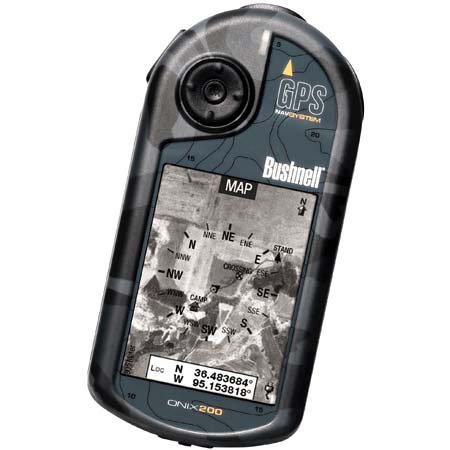
Figure 1: Bushnell Onix 200 handheld GPS unit, showing its rugged design and screen.
3. Sąranka
3.1 Akumuliatoriaus įdėjimas
The Bushnell Onix 200 does not include batteries. It requires standard AA batteries (not included). To install:
- Įrenginio gale suraskite baterijų skyriaus dangtelį.
- Atidarykite dangtelį stumdami arba atlaisvindami jį pagal žymes.
- Insert the required number of AA batteries, ensuring correct polarity (+/-).
- Tvirtai uždarykite baterijų skyriaus dangtelį, kad išlaikytumėte atsparumą vandeniui.
3.2 Pradinis įjungimas ir pagrindiniai nustatymai
- Paspauskite ir palaikykite maitinimo mygtuką, kol ekranas įsijungs.
- Upon first use, the device may prompt you to set basic preferences such as language, time zone, and measurement units. Follow the on-screen instructions.
- Allow the device to acquire a GPS signal. This may take several minutes, especially during the first use or after a long period of inactivity. Ensure you are in an open area with a clear view dangaus.
3.3 Prijungimas prie kompiuterio
Use the provided USB cable to connect the Onix 200 to your computer for data transfer, map updates, or firmware updates. The device is compatible with Windows operating systems.
4. Naudojimo instrukcijos
4.1 Navigation with Satellite/Aerial Photos
The Onix 200 allows you to overlay navigation information directly onto satellite or aerial photographs. This feature provides enhanced situational awareness, especially in unfamiliar terrain.
- Access the map view iš pagrindinio meniu.
- Select the desired map type (e.g., satellite, aerial, USGS map) from the display options.
- Use the touch screen or voice controls to pan, zoom, and interact with the map.
- Your current position will be indicated on the map, along with any loaded waypoints or routes.
4.2 User Profiles
The "User Profiles" feature allows you to customize the device's settings and menu options based on your activity (e.g., hiking, fishing, hunting). This streamlines access to relevant functions.
- Eikite į „Pro“files" section in the main menu.
- Pasirinkite esamą profesionaląfile arba sukurti naują.
- Customize settings such as display preferences, data fields, and shortcut menus for that specific activity.
- Activate the desired profile before starting your activity.
4.3 Naktinis režimas
For low-light conditions, activate the night-mode screen viewing option. This adjusts the display's backlight and color scheme to reduce eye strain and improve visibility in the dark.
- Access display settings from the main menu.
- Toggle the "Night Mode" option to ON.
4.4 Valdymo metodai
The Onix 200 supports both touch screen and voice control for interacting with the device. Refer to the on-screen prompts and the device's internal help system for specific voice commands.
5. Priežiūra
5.1 Prietaiso valymas
- Nuvalykite ekraną ir išorę minkšta, damp, nepūkuojantis audinys.
- Do not use abrasive cleaners, solvents, or aerosol sprays, as these can damage the device's finish and screen.
- Ensure all ports are dry before connecting cables.
5.2 Waterproofing Care (IPX7)
The Onix 200 is waterproof to IPX7 standards, meaning it can withstand immersion in water up to 1 meter for 30 minutes. To maintain this rating:
- Ensure the battery compartment cover and any port covers are securely closed before exposure to water.
- Do not intentionally submerge the device beyond its rated depth or duration.
- If the device gets wet, dry it thoroughly before opening any compartments or connecting to power.
5.3 Saugykla
Store the device in a cool, dry place away from direct sunlight and extreme temperatures when not in use. Remove batteries if storing for extended periods to prevent leakage.
6. Problemų sprendimas
6.1 Nėra galios
- Patikrinkite, ar baterijos tinkamai įdėtos ir visiškai įkrautos.
- Pakeiskite senas baterijas naujomis.
- Įsitikinkite, kad maitinimo mygtukas yra pakankamai nuspaustas ir laikomas.
6.2 GPS Signal Loss or Inaccuracy
- Įsitikinkite, kad esate atviroje vietoje su švaria view of the sky, away from tall buildings, dense foliage, or strong electromagnetic interference.
- Allow the device more time to acquire a signal.
- Perform a soft reset (refer to the device's internal menu for this option, if available).
6.3 Ekranas nereaguoja
- Įsitikinkite, kad ekranas yra švarus ir sausas.
- If the touch screen is resistive, apply firm but gentle pressure.
- Iš naujo paleiskite įrenginį.
6.4 Device Not Connecting to Computer
- Verify the USB cable is securely connected to both the device and the computer.
- Išbandykite kitą kompiuterio USB prievadą.
- Ensure necessary drivers are installed on your Windows operating system.
For further assistance, please refer to the official Bushnell support resources.
7. Specifikacijos
| Funkcija | Specifikacija |
|---|---|
| Prekės ženklas | Bushnellas |
| Modelio pavadinimas | Oniksas 200 |
| Modelio numeris | 36-2000 |
| Ekrano dydis | 2.7 colių |
| Rezoliucija | 160 x 240 |
| Ekrano tipas | LCD |
| Jutiklinio ekrano tipas | Atsparus |
| Atminties talpa | 32 MB |
| Ryšio technologija | USB |
| Žemėlapio tipas | Palydovas |
| Palaikoma palydovinė navigacijos sistema | GPS |
| Ypatinga funkcija | Atsparus vandeniui (IPX7) |
| Kontrolės metodas | Touch, Voice |
| Operacinė sistema | Windows (for PC connection) |
| Matmenys (P x A x G) | 1.1 x 8.0 x 2.2 colio |
| Prekės svoris | 15.2 uncijos |
| Baterijos įtrauktos | No (Requires AA) |
| UPC | 029757362001 |
8. Garantija ir palaikymas
For detailed warranty information, product registration, and technical support, please visit the official Bushnell websvetainėje arba susisiekite su klientų aptarnavimo skyriumi.
Daugiau informacijos ir palaikymo išteklių galite rasti adresu „Bushnell“ parduotuvė „Amazon“ platformoje.