
1. Įvadas
Thank you for choosing the TFA Dostmann Digital Weather Station 35.1065. This device provides accurate indoor temperature, humidity, time, date, and a weather trend forecast. Please read this manual carefully before using the device to ensure proper operation and to prevent damage.
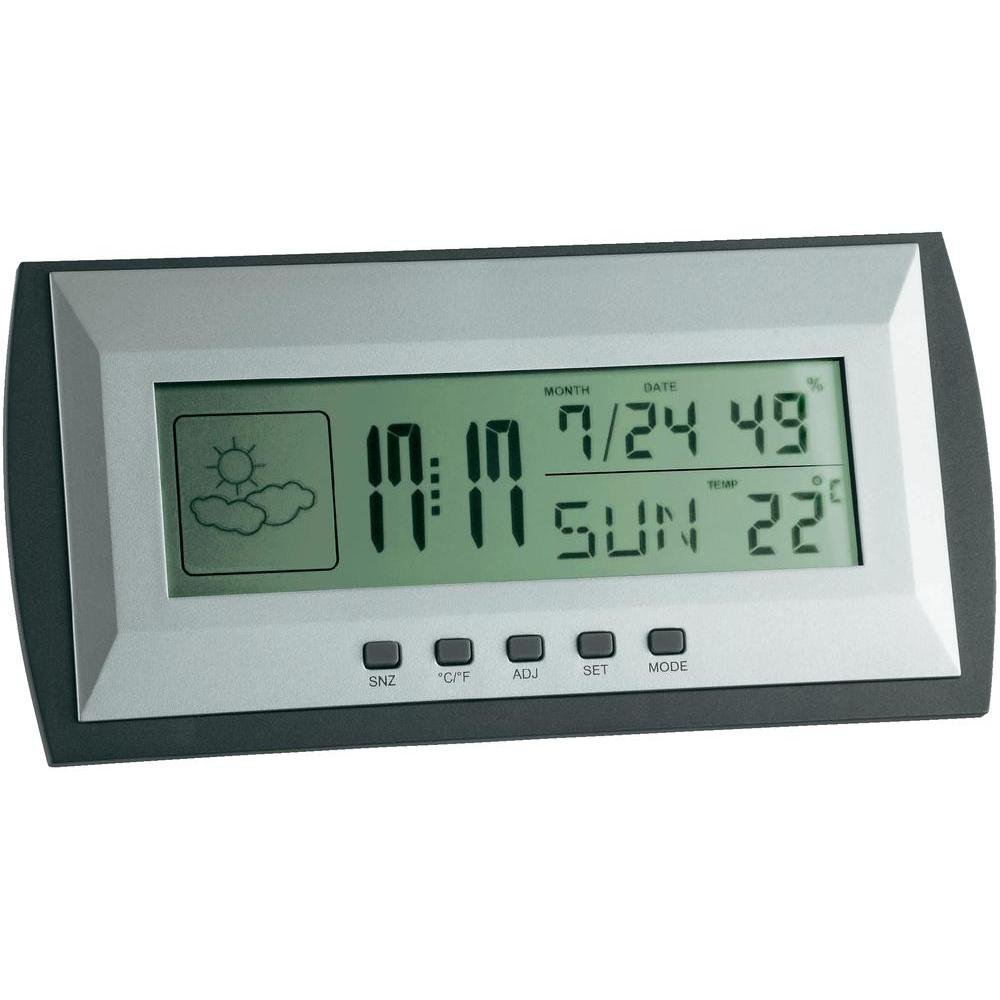
Figure 1: TFA Dostmann Digital Weather Station 35.1065 on a wooden desk. This image shows the weather station displaying time, date, and weather information in a typical home or office setting.
2. Saugos informacija
- Išsaugokite šį vadovą ateityje.
- Saugokite prietaisą nuo ekstremalių temperatūrų, vibracijos ar smūgių.
- Venkite tiesioginių saulės spindulių ir drėgmės.
- Nenardinkite prietaiso į vandenį.
- Nebandykite patys taisyti ar modifikuoti įrenginio. Dėl remonto kreipkitės į kvalifikuotus specialistus.
- Išmeskite panaudotas baterijas laikydamiesi vietinių taisyklių.
3. Sąranka
3.1 Pakuotės turinys
Įsitikinkite, kad yra visi daiktai:
- TFA Dostmann Digital Weather Station 35.1065
- 2 x AA baterijos
- Vartotojo vadovas (šis dokumentas)
3.2 Akumuliatoriaus įdėjimas
- Locate the battery compartment cover on the back of the weather station.
- Atidarykite dangtelį.
- Insert two (2) AA batteries, observing the correct polarity (+ and - markings).
- Saugiai uždarykite akumuliatoriaus skyriaus dangtelį.
Įrenginys įsijungs automatiškai ir parodys pradinius rodmenis.
3.3 Pradiniai nustatymai (laikas, data, temperatūros vienetas)
Upon first power-on or after battery replacement, you may need to set the time, date, and preferred temperature unit.
- Paspauskite ir palaikykite NUSTATYTI button for a few seconds to enter setting mode. The digit to be set will flash.
- Naudokite ADJ mygtuką, kad sureguliuotumėte mirksinčią reikšmę (pvz., valandą, minutę, metus, mėnesį, dieną).
- Paspauskite NUSTATYTI button again to confirm the setting and move to the next parameter.
- Repeat steps 2 and 3 until all desired settings (time, date) are configured.
- Norėdami perjungti tarp Celsijaus (°C) ir Farenheito (°F), paspauskite ° C / ° F mygtuką.
4. Meteorologinės stoties valdymas
4.1 Ekranas baigtasview
LCD ekrane rodoma įvairi informacija:
- Laikas: Current time in 12-hour or 24-hour format.
- Data: Current month, day, and day of the week.
- Temperatūra: Indoor temperature, displayed in °C or °F.
- Drėgmė: Indoor humidity percentage.
- Weather Forecast Icon: Indicates a trend forecast (e.g., sunny, cloudy, rainy). This is a prediction based on atmospheric pressure changes and may not always reflect actual weather.
4.2 Mygtukų funkcijos
- SNZ (Snooze): Activates the snooze function for the alarm.
- °C/°F: Perjungia temperatūros rodymą pagal Celsijų ir Farenheitą.
- ADJ (Adjust): Naudojamas reikšmėms reguliuoti nustatymo režimu.
- NUSTATYTI: Enters and confirms settings.
- MODE: Switches between different display modes (e.g., time, alarm time).
4.3 Signalizacijos nustatymas
- Paspauskite REŽIMAS button repeatedly until the alarm time is displayed.
- Paspauskite ir palaikykite NUSTATYTI mygtuką. Mirksės žadintuvo valandos.
- Naudokite ADJ mygtuką, kad nustatytumėte norimą žadintuvo valandą.
- Paspauskite NUSTATYTI , kad patvirtintumėte ir pereitumėte prie minučių.
- Naudokite ADJ , kad nustatytumėte norimas žadintuvo minutes.
- Paspauskite NUSTATYTI patvirtinti ir išeiti iš žadintuvo nustatymo.
- Norėdami įjungti / išjungti žadintuvą, paspauskite ADJ button while the alarm time is displayed. An alarm icon will appear/disappear.
5. Priežiūra
5.1 Valymas
Prietaisą valykite minkšta, damp cloth. Do not use abrasive cleaners or solvents. Ensure no water enters the device.
5.2 Akumuliatoriaus keitimas
When the display becomes dim or the device stops functioning, replace the batteries. Follow the steps in Section 3.2. Always replace both batteries at the same time with new AA batteries.
5.3 Saugykla
If the device will not be used for an extended period, remove the batteries to prevent leakage and damage. Store in a cool, dry place.
6. Problemų sprendimas
| Problema | Galima priežastis | Sprendimas |
|---|---|---|
| Nėra ekrano arba ekranas pritemdytas. | Baterijos išsikrovė arba įdėtos neteisingai. | Pakeiskite baterijas naujomis, užtikrindami teisingą poliškumą. |
| Neteisingas laikas / data. | Laikas / data nustatytas neteisingai. | Refer to Section 3.3 to set the time and date. |
| Netikslūs temperatūros / drėgmės rodmenys. | Device placed near heat sources, vents, or in direct sunlight. | Relocate the weather station to a stable indoor environment away from extreme temperature fluctuations. Allow time for readings to stabilize. |
| Weather forecast icon seems incorrect. | Weather forecast is a trend prediction based on atmospheric pressure, not a real-time forecast. | Understand that the icon indicates a general trend over the next 12-24 hours, not current conditions. |
7. Specifikacijos

Figure 2: TFA Dostmann Digital Weather Station 35.1065 with dimensions. This image provides a detailed view of the device, including its width (18 cm), height (9 cm), and depth (3.81 cm).
- Prekinis ženklas: TFA Dostmannas
- Modelis: 35.1065
- Maitinimo šaltinis: Battery-powered (2 x AA batteries, included)
- Medžiaga: Plastikiniai
- Ypatingos savybės: Trend forecast
- Ekrano tipas: LCD
- Prekės matmenys (D x P x A): 3.8 cm x 18 cm x 9 cm
- Prekės svoris: 164 gramų
- Įtraukti komponentai: Weather station, batteries, user manual
- Rekomenduojamas naudojimas: Namai, biuras
- Specifiniai naudojimo būdai: Date, Humidity, Temperature, Time
- Kilmės šalis: Kinija
8. Garantija ir palaikymas
For warranty information, please refer to the documentation provided at the time of purchase or visit the official TFA Dostmann website. For technical support or further assistance, please contact TFA Dostmann customer service through their official channels.
Official TFA Dostmann Websvetainė: www.tfa-dostmann.de