
Įvadas
This manual provides comprehensive instructions for the safe and efficient operation of your Memorex MVDP1078 Portable DVD Player. Designed for both home and travel, this device features an 8-inch widescreen TFT LCD display and supports various disc formats including DVD, CD, MP3 CD, and Picture CD. Please read this manual thoroughly before using the player and retain it for future reference.
Produkto savybės
- 8-inch widescreen TFT LCD display for clear viewing.
- Compatible with DVD, DVD+R/RW, DVD-R/RW, CD-R/RW, CD+R/RW, MP3 CD, and Picture CD formats.
- Built-in stereo speakers for audio playback.
- On-screen graphical user interface for easy navigation.
- Anti-shock protection ensures smooth DVD playback during movement.
- Zoom function for detailed viewing.
- Rechargeable Lithium-Ion battery pack providing up to 2 hours of playback.
- Includes wireless remote control for convenient operation.
- Ausinių lizdas privačiam klausymuisi.
- AC/DC Adaptor for home and car use.
Pakuotės turinys
Patikrinkite, ar pakuotėje yra visi reikalingi daiktai:
- Memorex MVDP1078 Portable DVD Player
- Belaidis nuotolinio valdymo pultas
- AC/DC maitinimo adapteris
- Car Power Adapter (DC)
- Audio/Video (AV) Cable
- Vartotojo vadovas
Sąranka
1. Akumuliatoriaus įkrovimas
Before initial use, fully charge the built-in Lithium-Ion battery. Connect the AC/DC power adapter to the DC IN 9V port on the player and plug the other end into a standard wall outlet. The charging indicator light will illuminate. A full charge typically takes approximately 3-4 hours and provides up to 2 hours of playback.
2. Prisijungimas prie maitinimo
For continuous operation or to charge the battery, use the provided AC/DC adapter. For in-car use, connect the car power adapter to the DC IN 9V port and the vehicle's 12V power outlet.
3. Išorinės jungtys (neprivaloma)
To connect the player to an external display or audio system, use the supplied AV cable. Connect one end to the AV OUT port on the player and the other end to the corresponding AV IN ports on your television or audio receiver.
Naudojimo instrukcijos
1. Įjungimas/išjungimas
Stumkite GALIA pereiti prie ON position to turn on the player. The screen will illuminate. To turn off, slide the switch to the IŠJUNGTA padėtis.
2. Diskų įdėjimas ir išėmimas
- Open the disc compartment cover gently.
- Place a disc onto the spindle with the label side facing up. Ensure the disc is securely seated.
- Close the disc compartment cover until it clicks into place.
- To remove a disc, open the cover, gently press the center spindle, and lift the disc.
3. Pagrindiniai atkūrimo valdikliai
- LEISTI / PAUZĖTI (►/−): Press to start or pause playback.
- STOP (■): Press once to stop playback temporarily, press twice to stop completely and return to the disc menu.
- SKIP (◀◀ / ►►): Press to skip to the previous or next track/chapter.
- FAST FORWARD/REWIND (►►► / ◀◀◀): Press and hold to fast forward or rewind through content.
4. Meniu naršymas
Naudokite KRYPTIES RODYKLĖS (Up, Down, Left, Right) and ENTER button on the player or remote to navigate disc menus and settings.
5. Garsumo reguliavimas
Reguliuokite garsumą naudodami TŪRIS +/- buttons on the player or remote control.
6. Ausinių naudojimas
Plug standard 3.5mm headphones into the AUSINĖS jack for private listening. The built-in speakers will automatically mute.
7. Priartinimo funkcija
During DVD playback, press the MODYTI button on the remote to cycle through different zoom levels. Use directional arrows to move the zoomed area.
Priežiūra
1. Įrenginio valymas
Wipe the exterior of the player with a soft, dry cloth. Do not use liquid cleaners or abrasive materials. Keep the disc compartment free of dust and debris.
2. Akumuliatoriaus priežiūra
To prolong battery life, avoid fully discharging the battery frequently. Recharge the battery regularly, even if the player is not in use for extended periods. Store the player in a cool, dry place.
3. Diskų priežiūra
Handle discs by their edges. Store discs in their cases to prevent scratches. Clean dirty discs with a soft, lint-free cloth, wiping from the center outwards.
Trikčių šalinimas
Jei kyla problemų dėl grotuvo, žr. šias dažniausiai pasitaikančias problemas ir sprendimus:
| Problema | Galima priežastis / sprendimas |
|---|---|
| Grotuvas neįsijungia. |
|
| Disc does not play / "No Disc" error. |
|
| Nėra garso arba garsas per mažas. |
|
| Poor picture quality or distorted image. |
|
Specifikacijos
| Prekės ženklo pavadinimas | Memorex |
| Modelio numeris | MVDP1085 |
| Gaminio matmenys | 5.8 x 12.5 x 10.3 colio |
| Prekės svoris | 1 svaro |
| Ekrano dydis | 8-inch widescreen TFT LCD (diagonal) |
| Palaikomi disko formatai | DVD, DVD+R/RW, DVD-R/RW, CD-R/RW, CD+R/RW, MP3 CD, Picture CD |
| Baterijos tipas | Įkraunamas ličio jonų |
| Baterijos veikimo laikas | Iki 2 valandų |
| Spalva | Juoda |
Garantija ir palaikymas
Memorex products are designed for reliability and performance. For warranty information and technical support, please refer to the warranty card included with your product or visit the official Memorex websvetainėje. Išsaugokite pirkimo kvitą kaip pirkimo įrodymą garantiniams reikalavimams.
Produktas baigtasview
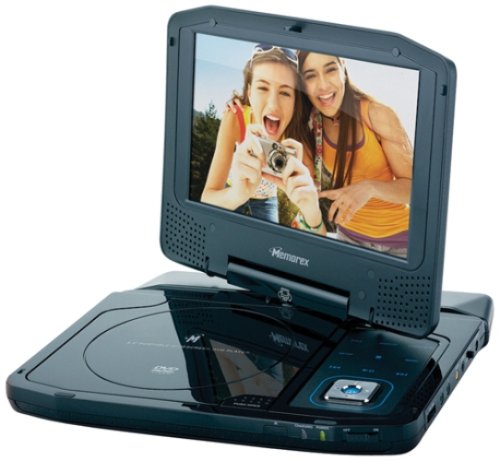
Image: The Memorex MVDP1078 Portable DVD Player shown with its 8-inch screen open, displaying the disc compartment and control buttons. The player is black with a sleek finish.