
1. Įvadas
This manual provides detailed instructions for the safe and efficient use of your Vivitar VIVICAM-7340RED 7.0MP Digital Camera. Please read this manual thoroughly before operating the camera and keep it for future reference. Your camera is designed for capturing high-quality still images and video recordings with ease.
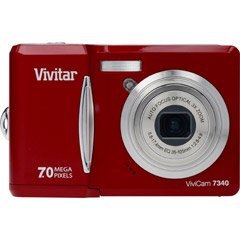
1 pav.: priekis view of the Vivitar VIVICAM-7340RED Digital Camera. This image shows the lens, flash, and the overall compact design of the camera.
2. Sąranka
2.1. Baterijų įdėjimas
- Raskite baterijų skyriaus dangtelį fotoaparato apačioje arba šone.
- Pastumkite skląstį, kad atidarytumėte dangtelį.
- Insert the required batteries (typically AA or AAA, refer to packaging) according to the polarity indicators (+ and -) inside the compartment.
- Tvirtai uždarykite baterijų skyriaus dangtelį, kol jis spragtelėdamas užsifiksuos vietoje.
Note: Ensure batteries are inserted with correct polarity as indicated inside the compartment.
2.2. Atminties kortelės įdėjimas
Your camera requires a compatible memory card (e.g., SD card) to store photos and videos. The memory card slot is usually located near the battery compartment or on the side of the camera.
- Atidarykite atminties kortelės angos dangtelį.
- Insert the memory card with the metal contacts facing the correct direction (refer to the diagram near the slot). Push gently until it clicks into place.
- Uždarykite atminties kortelės angos dangtelį.
Note: Do not force the memory card. If it does not insert easily, check its orientation.
2.3. Įjungimas/išjungimas
- Norėdami įjungti kamerą, paspauskite GALIA button. The LCD screen will illuminate.
- To turn off the camera, press and hold the GALIA mygtuką dar kartą, kol išsijungs LCD ekranas.
2.4. Initial Settings (Date & Time)
Upon first use or after battery replacement, you may need to set the date and time. Follow the on-screen prompts or navigate to the MENIU > NUSTATYMAS > DATA / LAIKAS option to adjust these settings.
3. Fotoaparato valdymas
3.1. Nuotraukų darymas
- Turn on the camera. Ensure it is in photo capture mode (usually indicated by a camera icon on the LCD).
- Kadruokite kadrą naudodami 2.4 colių LCD ekraną.
- Press the shutter button halfway down to allow the camera to focus. A green frame or beep typically indicates focus lock.
- Norėdami užfiksuoti vaizdą, iki galo paspauskite užrakto mygtuką.
3.2. Optinio priartinimo naudojimas
Your camera features a 3x optical zoom. Use the zoom lever (often located around the shutter button) to zoom in or out. Optical zoom adjusts the lens elements to magnify the subject without losing image quality.
- Pasukite priartinimo svirtelę link T (Teleobjektyvas), kad priartintumėte.
- Pasukite priartinimo svirtelę link W (Platus), jei norite atitolinti.
The camera also has a 5x digital zoom, which can be accessed after reaching the maximum optical zoom. Digital zoom digitally enlarges the image, which may result in reduced image quality.
3.3. Vaizdo įrašų įrašymas
- Perjunkite fotoaparatą į vaizdo įrašymo režimą (paprastai naudodami režimo pasirinkimo ratuką arba meniu parinktį).
- Press the shutter button to start recording. A red dot or timer on the LCD indicates recording is in progress.
- Norėdami sustabdyti įrašymą, dar kartą paspauskite užrakto mygtuką.
3.4. Viewnuotraukų ir vaizdo įrašų
- Paspauskite ATKŪRIMAS button (often indicated by a play icon).
- Use the directional buttons to navigate through your captured images and videos.
- Norėdami paleisti vaizdo įrašą, pasirinkite jį ir paspauskite OK or ŽAISTI mygtuką.
3.5. Perkėlimas Files to a Computer (PictBridge)
Your camera is PictBridge compatible, allowing direct printing to compatible printers. For transferring files prie kompiuterio:
- Prijunkite fotoaparatą prie kompiuterio naudodami pateiktą USB kabelį.
- Turn on the camera. It should appear as a removable disk or device on your computer.
- Open the camera's folder and copy the desired photos and videos to your computer.
- Prieš atjungdami USB laidą, saugiai atjunkite fotoaparatą nuo kompiuterio.
4. Priežiūra
4.1. Kameros valymas
- Objektyvas: Naudokite minkštą, nepūkuotą šluostę, specialiai skirtą fotoaparatų objektyvams. Švelniai valykite sukamaisiais judesiais. Venkite stiprių cheminių medžiagų.
- LCD ekranas: Wipe with a soft, dry cloth. For stubborn smudges, a slightly damp cloth (water only) can be used, followed by a dry wipe.
- Kameros korpusas: Nuvalykite dulkes ir pirštų atspaudus minkšta, sausa šluoste.
Do not use solvents, alcohol, or abrasive cleaners on any part of the camera.
4.2. Akumuliatoriaus priežiūra
- Jei fotoaparatas ilgesnį laiką nebus naudojamas, išimkite baterijas, kad išvengtumėte jų pratekėjimo.
- Naudokite tik rekomenduojamų tipų baterijas.
- Senas baterijas išmeskite atsakingai laikydamiesi vietinių taisyklių.
4.3. Sandėliavimas
Store the camera in a cool, dry place away from direct sunlight, extreme temperatures, and high humidity. Use the included case for protection during transport.
5. Problemų sprendimas
| Problema | Galima priežastis | Sprendimas |
|---|---|---|
| Kamera neįsijungia. | Išsikrovusios arba neteisingai įdėtos baterijos. | Replace batteries or ensure they are inserted with correct polarity. |
| Nuotraukos neryškios. | Fotoaparato drebėjimas, nefokusuotas vaizdas arba nešvarus objektyvas. | Hold camera steady, ensure focus is achieved before shooting, clean the lens. |
| Pranešimas „Atminties kortelės klaida“. | Card not inserted correctly, damaged, or full. | Reinsert card, try a different card, or delete files, kad atlaisvintumėte vietos. |
| Blykstė neveikia. | Flash mode set to OFF, or batteries low. | Check flash settings in menu, replace batteries. |
6. Specifikacijos
| Funkcija | Detalė |
|---|---|
| Prekės ženklas | „Vivitar“ |
| Modelio numeris | VIVICAM-7340RED |
| Veiksminga nejudančioji raiška | 7 MP |
| Optinis priartinimas | 3x |
| Skaitmeninis priartinimas | 5x |
| LCD ekrano dydis | 2.4 colių |
| Vaizdo įrašymas | Iki 640 x 480 raiškos, 30 kadrų per sekundę greičiu |
| Vaizdo raiška | Iki 3072 x 2304 |
| Automatinis fokusavimas | Taip |
| Suderinamas su „PictBridge“ | Taip |
| Maitinimo šaltinis | Baterijos (pridedamos) |
| Spalva | Raudona |