
KLH KL-300i
KLH AUDIO KL-300i Nostalgia 5-n-1 System
Model: KL-300i
Įvadas
Ačiū, kad pirkoteasing the KLH AUDIO KL-300i Nostalgia 5-n-1 System. This integrated audio system combines classic and modern audio playback capabilities, including a turntable, CD player, cassette player, AM/FM radio, and an iPod dock. This manual provides essential information for setting up, operating, and maintaining your system to ensure optimal performance and longevity.
Saugos informacija
Prieš naudodami šį gaminį, atidžiai perskaitykite visas saugos instrukcijas. Išsaugokite šį vadovą ateičiai.
- Maitinimo šaltinis: Prijunkite įrenginį tik prie nurodytos įtampos kintamosios srovės lizdotage.
- Vėdinimas: Užtikrinkite tinkamą vėdinimą. Neužblokuokite ventiliacijos angų.
- Vanduo ir drėgmė: Saugokite įrenginį nuo lietaus ar drėgmės. Nestatykite ant įrenginio daiktų, pripildytų skysčių, pavyzdžiui, vazų.
- Šiluma: Nestatykite įrenginio šalia šilumos šaltinių, tokių kaip radiatoriai, šildytuvai, viryklės ar kiti prietaisai (įskaitant ampkeltuvai), kurie gamina šilumą.
- Valymas: Prieš valydami atjunkite įrenginį nuo elektros lizdo. Naudokite tik sausą šluostę.
- Aptarnavimas: Nemėginkite patys aptarnauti šio gaminio. Visą techninę priežiūrą patikėkite kvalifikuotam aptarnavimo personalui.
Pakuotės turinys
Patikrinkite, ar pakuotėje yra visi toliau išvardyti daiktai:
- KLH AUDIO KL-300i Main Unit
- Nuotolinio valdymo pultas
- Pagalbinis įvesties kabelis
- AM/FM Antenna Wire
- Instrukcijų vadovas (šis dokumentas)
Produktas baigtasview
Familiarize yourself with the various components and controls of your KLH AUDIO KL-300i system.
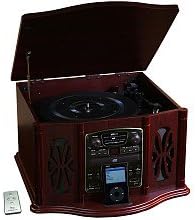
This image displays the KLH AUDIO KL-300i Nostalgia 5-n-1 System. The unit features a dark wood finish. The top lid is open, revealing a turntable. Below the turntable, the front panel includes controls for the CD player, AM/FM radio tuner, and an iPod dock. A small remote control is visible to the left of the main unit.
Priekinio skydelio valdikliai:
- Maitinimo mygtukas: Įjungia arba išjungia įrenginį.
- Funkcijų parinkiklis: Switches between Phono, CD, Radio, iPod, and Aux modes.
- Garsumo rankenėlė: Reguliuoja pagrindinį garsumo lygį.
- CD grotuvo valdikliai: Leisti / pristabdyti, sustabdyti, praleisti pirmyn / atgal.
- Radijo imtuvas: AM/FM band selector, Tuning knob.
- iPod Dock: Connector for iPod devices.
- Aux-In Jack: 3.5 mm įvestis išoriniams garso įrenginiams.
- Ausinių lizdas: 3.5 mm išvestis privačiam klausymuisi.
Viršutinis skydelis:
- Patefonas: For playing vinyl records.
- Dangtis: Protects the turntable when not in use.
Šoninis skydelis:
- Kasečių dekas: For playing audio cassette tapes.
Sąranka
Follow these steps for initial setup of your audio system.
- Vieta: Place the unit on a stable, flat surface away from direct sunlight, heat sources, and excessive dust or moisture. Ensure there is adequate space around the unit for ventilation.
- Prijunkite anteną: For optimal AM/FM radio reception, connect the supplied antenna wire to the antenna terminal on the rear of the unit. Extend the wire fully for better reception.
- Maitinimo jungtis: Įkiškite kintamosios srovės maitinimo laidą į standartinį sieninį lizdą.
- Pradinis įjungimas: Norėdami įjungti įrenginį, paspauskite priekiniame skydelyje esantį maitinimo mygtuką.
Naudojimo instrukcijos
Bendras veikimas:
- Maitinimo įjungimas/išjungimas: Norėdami įjungti arba išjungti įrenginį, paspauskite maitinimo mygtuką.
- Funkcijų pasirinkimas: Use the Function Selector knob or buttons to choose your desired audio source (Phono, CD, Radio, iPod, Aux).
- Garso reguliavimas: Rotate the Volume knob to increase or decrease the sound level.
Patefono veikimas:
- Lift the lid of the unit.
- Padėkite vinilinę plokštelę ant patefono lėkštės.
- Select the appropriate speed (33 1/3, 45, or 78 RPM) using the speed selector switch. For 45 RPM records, place the included adapter on the spindle if needed.
- Gently lift the tonearm and position the stylus over the desired starting groove of the record.
- Lower the tonearm slowly onto the record. Playback will begin automatically.
- To stop playback, gently lift the tonearm and return it to its rest.
CD grotuvo valdymas:
- Paspauskite funkcijų parinkiklį į CD režimą.
- Norėdami atidaryti CD dėklą, paspauskite išstūmimo mygtuką.
- Įdėkite kompaktinį diską į dėklą etikete į viršų.
- Press the Eject button again to close the tray. The CD will begin playing automatically or display the track count.
- Atkūrimui valdyti naudokite mygtukus „Paleisti / pristabdyti“, „Stabdyti“ ir „Praleisti“.
Kasečių grotuvo valdymas:
- Įdėkite kasetę į kasetės lizdą įrenginio šone.
- Norėdami pradėti atkūrimą, paspauskite paleidimo mygtuką.
- Use the Fast Forward (FF) button to advance the tape quickly.
- To stop playback, press the Stop/Eject button. Pressing it halfway will eject the tape.
AM/FM radijo veikimas:
- Press the Function Selector to Radio mode.
- Pasirinkite AM arba FM diapazoną naudodami diapazono pasirinkimo jungiklį.
- Rotate the Tuning knob to search for radio stations.
- Adjust the antenna wire for best reception.
iPod Dock Operation:
- Press the Function Selector to iPod mode.
- Carefully place your compatible iPod device onto the iPod dock connector.
- Use your iPod's controls to select and play music. Audio will be routed through the KLH AUDIO system's speakers.
Aux-In Operation:
- Press the Function Selector to Aux mode.
- Connect an external audio device (e.g., MP3 player, smartphone) to the Aux-In jack on the front panel using the supplied 3.5mm auxiliary cable.
- Play audio from your external device. The sound will be played through the KLH AUDIO system's speakers.
Nuotolinio valdymo pulto naudojimas:
The remote control primarily operates the CD player functions (Play, Pause, Stop, Skip). Note that the remote cannot turn the unit on or off.
Priežiūra
Proper care will ensure the longevity of your system.
- Įrenginio valymas: Prietaiso išorę nuvalykite minkšta, sausa šluoste. Nenaudokite abrazyvinių valiklių, vaško ar tirpiklių.
- Rašiklio priežiūra: Handle the turntable stylus with extreme care. Clean the stylus periodically with a soft brush, brushing from back to front.
- CD / kasečių priežiūra: Keep CDs and cassette tapes clean and free of dust. Store them in their cases when not in use.
Trikčių šalinimas
If you experience issues with your system, refer to the following common problems and solutions.
| Problema | Galima priežastis | Sprendimas |
|---|---|---|
| Nėra galios | Maitinimo laidas nėra tvirtai prijungtas. | Check power cord connection to unit and wall outlet. |
| Nėra garso | Per mažas garsumas; pasirinkta netinkama funkcija; prijungtos ausinės. | Increase volume; Select correct function; Disconnect headphones. |
| Patefonas nesisuka | Unit not powered on; Belt dislodged. | Ensure unit is on; Contact service if belt issue suspected. |
| Prastas radijo priėmimas | Antena nėra ištiesta arba tinkamai pastatyta. | Extend and adjust the antenna wire for better signal. |
| CD negroja | CD inserted incorrectly; CD is scratched or dirty. | Ensure CD is label-side up; Clean or replace CD. |
Specifikacijos
| Funkcija | Specifikacija |
|---|---|
| Maitinimo šaltinis | Kintamoji srovė 120V ~ 60Hz |
| Matmenys (P x G x A) | Apytiksliai 17" x 17" x 10.5" (43.2 cm x 43.2 cm x 26.7 cm) |
| Patefono greičiai | 33 1/3, 45, 78 aps./min |
| Radijo dažnių diapazonas | AM: 530-1710 kHz, FM: 88-108 MHz |
| CD suderinamumas | CD, CD-R / RW |
| iPod dokas | Compatible with older generation iPods (30-pin connector) |
Garantija ir palaikymas
This product is covered by a limited manufacturer's warranty. For specific warranty terms and conditions, please refer to the warranty card included with your purchase or contact KLH customer support. If you require technical assistance or have questions not covered in this manual, please contact KLH customer service through their official websvetainėje arba kontaktinėje informacijoje, pateiktoje kartu su jūsų produktu.
Ask a question about this manual
Ask about setup, troubleshooting, compatibility, parts, safety, or missing instructions. Manuals+ will review the question and use this page’s manual context to help answer it.