
Įvadas
This manual provides instructions for the proper use and maintenance of your Presto 04213 Digital Timer. This electronic timer is designed for various timing needs, featuring both countdown and stopwatch functions. It includes an easy-to-read LCD display, an audible alarm, and a memory function for convenience.
Pakuotės turinys
- Presto 04213 Digital Timer
- 1 AAA baterija (pridedama)
Sąranka
Akumuliatoriaus montavimas
- Locate the battery compartment on the back of the timer. This is typically covered by the clip/easel stand.
- Gently open the clip/easel stand to access the battery compartment.
- Įdėkite vieną AAA bateriją, užtikrindami, kad teigiamas (+) ir neigiamas (-) poliai teisingai sutaptų su žymėjimais skyriaus viduje.
- Close the battery compartment securely. The timer display should now be active.

Paveikslėlis: Nugara view of the timer with the easel stand deployed, revealing the battery compartment and a separate AAA battery.
Paskirties vietos parinktys
The Presto 04213 Digital Timer offers versatile placement options:
- Magnetinis tvirtinimas: A magnet on the back allows the timer to be attached to metallic surfaces like refrigerators or ovens.
- Easel Stand: The integrated clip can be extended to form an easel stand for tabletop use.
- Klipas: The clip can also be used to attach the timer to clothing or other objects.
Naudojimo instrukcijos
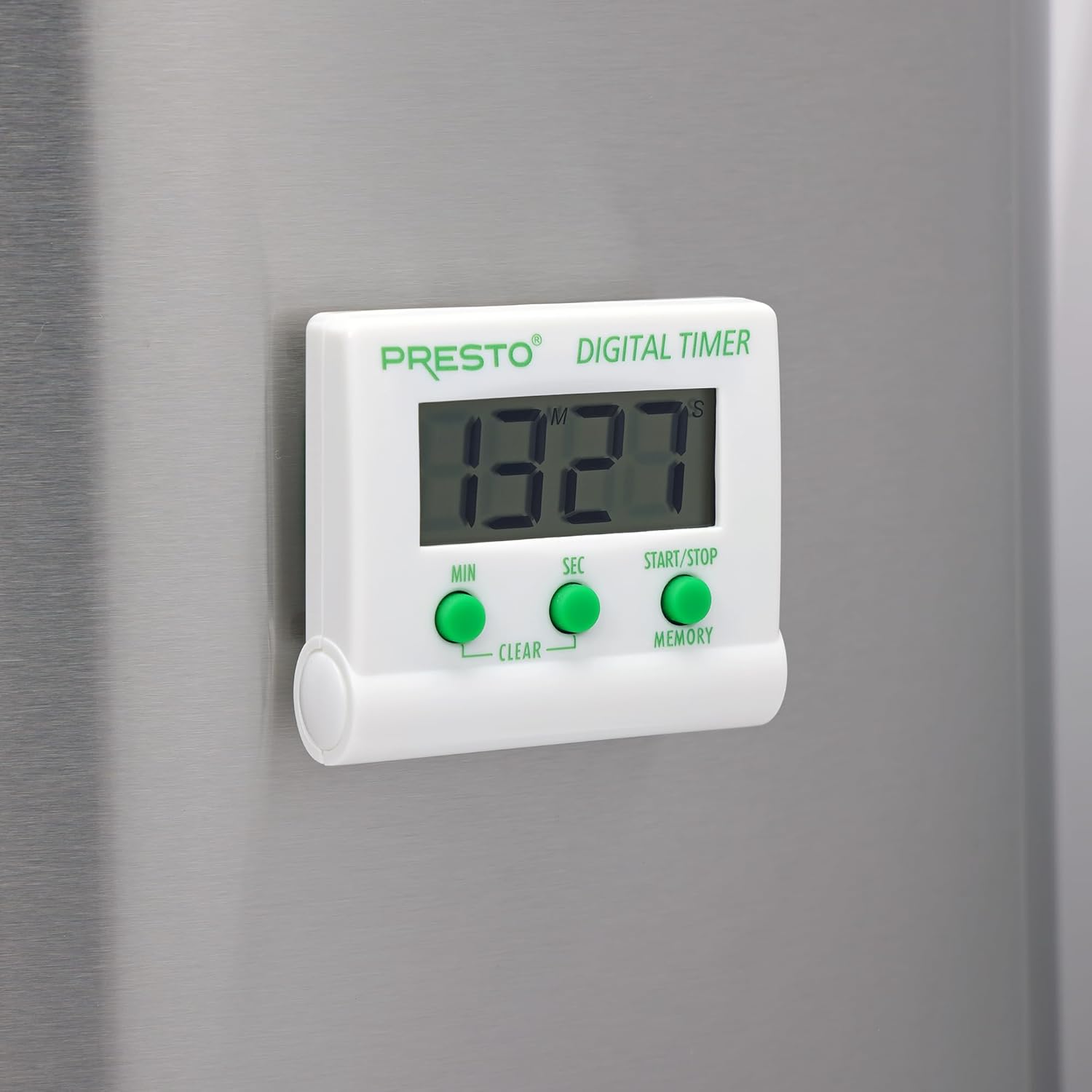
Vaizdas: priekis view of the Presto Digital Timer, displaying the time and showing the MIN, SEC, and START/STOP/MEMORY buttons.
Atgalinės atskaitos laikmačio nustatymas
- Paspauskite MIN button to set the desired minutes (up to 99).
- Paspauskite SEC button to set the desired seconds (up to 59).
- To clear the current time setting, press both MIN ir SEC mygtukus vienu metu.
- Paspauskite START/STOP mygtuką, kad pradėtumėte atgalinį skaičiavimą.
- When the time reaches zero, an alarm will sound. Press START/STOP nutildyti žadintuvą.
Using the Stopwatch Function (Count-Up)
- Ensure the timer display is set to "00:00". If not, press both MIN ir SEC buttons to clear it.
- Paspauskite START/STOP mygtuką, kad pradėtumėte skaičiuoti pirmyn.
- Paspauskite START/STOP dar kartą, kad pristabdytumėte chronometrą.
- Norėdami tęsti, paspauskite START/STOP. To reset to "00:00", press both MIN ir SEC buttons while the stopwatch is paused.
Atminties funkcija
The timer automatically stores the last countdown setting. After the alarm sounds and is silenced, or if the timer is stopped before reaching zero, pressing the ATMINTIS button will recall the last set countdown time for quick reuse.
Savybės
- Counts down from any time up to 99 minutes and 59 seconds.
- Functions as a stopwatch (counts up).
- Easy-to-read digital display shows minutes and seconds.
- Audible alarm signals when countdown is complete.
- Memory feature stores the last countdown setting.
- Versatile design with a convenient clip, easel stand, and magnet for various mounting options.
- Operates on one AAA battery.
Priežiūra
Valymas
To clean the timer, carefully wipe it with a slightly damp cloth. Do not immerse the timer in water or use abrasive cleaners, as this can damage the electronic components.
Baterijos keitimas
When the display becomes dim or the timer stops functioning, replace the AAA battery following the installation steps in the "Setup" section.
Trikčių šalinimas
- Laikmatis neįsijungia: Ensure the AAA battery is correctly installed with proper polarity and is not depleted. Replace the battery if necessary.
- Ekranas blankus arba tuščias: This indicates a low battery. Replace the AAA battery.
- Signalizacija neskamba: Check if the timer reached zero. Ensure there are no obstructions to the speaker.
- Mygtukai nereaguoja: Ensure the timer is clean and free from debris around the buttons. If the issue persists after battery replacement, contact customer support.
Specifikacijos
| Modelio numeris | 04213 |
| Prekės ženklas | Presto |
| Medžiaga | Plastikiniai |
| Matmenys (G x P x A) | 0.5" x 2.25" x 2.5" |
| Prekės svoris | 2.88 uncijos |
| Maitinimo šaltinis | 1 AAA baterijos |
| Max Countdown | 99 minutės 59 sekundės |
| Spalva | Baltas |

Image: The Presto Digital Timer with its dimensions (2.5" H, 2.25" W, 0.5" D) clearly indicated.
Garantija ir palaikymas
Informacija apie garantiją
This Presto 04213 Digital Timer comes with a 1 metų ribota garantija nuo įsigijimo datos. Ši garantija taikoma medžiagų ir gamybos defektams įprasto naudojimo sąlygomis. Ji netaikoma žalai, atsiradusiai dėl netinkamo naudojimo, nelaimingo atsitikimo, pakeitimų ar neleistino remonto.
Pagalba klientams
For warranty claims, technical assistance, or any questions regarding your Presto Digital Timer, please contact Presto customer service. Refer to the official Presto webNaujausią kontaktinę informaciją rasite svetainėje arba produkto pakuotėje.
Taip pat galite apsilankyti Presto Store on Amazon jei reikia papildomos informacijos apie produktą ir pagalbos išteklių.