
1. Įvadas
This user manual provides comprehensive instructions for the setup, operation, and maintenance of your new Microsoft Wired Keyboard, Modelis ANB-00021Prieš naudodami gaminį, atidžiai perskaitykite šį vadovą, kad užtikrintumėte optimalų veikimą ir ilgaamžiškumą.

Figure 1: Microsoft Wired Keyboard (Model ANB-00021)
This image displays the Microsoft Wired Keyboard from an angled perspective, showcasing its full layout, including the numeric keypad and special function keys. The keyboard is black with a standard QWERTY layout and a wired USB connection.
2. Produkto ypatybės
The Microsoft Wired Keyboard is designed for efficiency and durability, offering a comfortable typing experience. Key features include:
- Black, English/International Layout: Standard QWERTY layout suitable for various regions.
- USB jungtis: Simple and reliable wired connection.
- Ultra-Flat Design: „Slim Pro“file for a modern aesthetic and comfortable wrist position.
- Short Key Travel: Responsive keys with a short actuation distance for efficient typing.
- Atsparus purslams: Designed to withstand minor spills, protecting internal components.
- Specialūs karštieji klavišai: Includes 5 special keys for quick access to common functions.
- Skaičiuoklės raktas: Instant access to the calculator application.
- Gently Inclined Key Block: Ergonomic design for reduced strain during extended use.
- Classic Keyboard Layout: Familiar and intuitive key arrangement.
- Plug and Play: No software installation required; simply connect and use.
3. Sąranka
Setting up your Microsoft Wired Keyboard is a straightforward process due to its Plug and Play functionality.
- Išpakuokite klaviatūrą: Atsargiai išimkite klaviatūrą iš pakuotės.
- Prijunkite prie USB prievado: Locate an available USB port on your computer (desktop PC, laptop, or compatible device). Insert the USB connector of the keyboard firmly into the USB port.
- Sistemos atpažinimas: Your operating system (Windows, macOS, Linux, etc.) will automatically detect and install the necessary drivers. This process usually takes a few seconds.
- Paruošta naudoti: Once the drivers are installed, the keyboard is ready for immediate use. No additional software or configuration is typically required.
For optimal performance, ensure the USB cable is not kinked or strained.
4. Naudojimo instrukcijos
The Microsoft Wired Keyboard operates like any standard QWERTY keyboard, with additional convenience features.
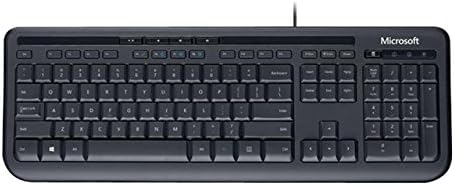
2 pav.: Iš viršaus į apačią view of the keyboard layout
Šis paveikslėlis aiškiai matomas iš viršaus į apačią view of the Microsoft Wired Keyboard, highlighting the full QWERTY key layout, function keys, numeric keypad, and the row of special hotkeys located above the function keys.
Standard Key Functions
- Raidžių ir skaitmenų klavišai: Naudojamas raidėms, skaičiams ir simboliams įvesti.
- Funkciniai klavišai (F1–F12): Perform various tasks depending on the active application or operating system.
- Skaitmeninė klaviatūra: Located on the right, for efficient data entry.
- Naršymo mygtukai: Arrow keys, Home, End, Page Up, Page Down for cursor movement and scrolling.
- Modifikavimo klavišai: Shift, Ctrl, Alt, Windows key for combination shortcuts.
Special Keys (Hotkeys)
The keyboard features a row of dedicated hotkeys above the function keys for quick access to multimedia and system functions:
- Medijos valdymo klavišai: Groti / Pauzė, Stop, Ankstesnis takelis, Kitas takelis.
- Volume Control Keys: Nutildyti, Garsumo mažinimas, Garsumo didinimas.
- Skaičiuoklės raktas: Instantly launches the system's calculator application.
- Other Programmable Keys: Some models may include additional keys that can be customized through operating system settings or Microsoft keyboard software (if available).
Familiarize yourself with these keys to enhance your productivity.
5. Priežiūra
Proper care and maintenance will extend the life of your Microsoft Wired Keyboard.
- Valymas:
- Prieš valydami atjunkite klaviatūrą nuo kompiuterio.
- Lengvai naudokite minkštą, nepūkuotą audinį dampnuplaukite vandeniu arba švelniu, neabrazyviniu valymo tirpalu.
- Wipe the surface of the keys and the keyboard casing.
- Dulkėms ir šiukšlėms tarp klavišų pašalinti naudokite suslėgtą orą.
- Negalima Nemerkite klaviatūros į vandenį arba nenaudokite stiprių cheminių medžiagų.
- Atsparumas purslams: While the keyboard is splash-resistant, it is not waterproof. Avoid exposing it to excessive liquids. In case of a spill, disconnect immediately, wipe dry, and allow to air dry completely before reconnecting.
- Saugykla: Kai klaviatūra ilgesnį laiką nenaudojama, laikykite ją švarioje, sausoje vietoje, apsaugotoje nuo ekstremalių temperatūrų.
- Kabelio priežiūra: Venkite staigių USB kabelio lenkimų ar užlenkimų, kad nepažeistumėte jo.
6. Problemų sprendimas
Jei kyla problemų dėl klaviatūros, žr. toliau pateiktas dažniausiai pasitaikančias problemas ir sprendimus:
| Problema | Galima priežastis | Sprendimas |
|---|---|---|
| Klaviatūra nereaguoja | Atsilaisvinęs USB prijungimas, neteisingas USB prievadas, tvarkyklės problema. | Įsitikinkite, kad USB laidas tvirtai prijungtas prie veikiančio USB prievado. Išbandykite kitą USB prievadą. Paleiskite kompiuterį iš naujo. |
| Neveikia tam tikri klavišai | Debris under the key, key mechanism damage. | Use compressed air to clear debris. If the key is physically damaged, contact support. |
| Hotkeys not functioning | Programinės įrangos konfliktas, operacinės sistemos nustatymai. | Ensure your operating system is up to date. Check keyboard settings in your OS control panel. |
| Unexpected behavior after liquid exposure | Internal components affected by liquid. | Immediately disconnect the keyboard. Allow it to dry completely for at least 24-48 hours in a well-ventilated area before attempting to reconnect. If issues persist, the keyboard may be damaged. |
Jei problema išlieka ir išbandžius šiuos sprendimus, žr. skyrių „Palaikymas“.
7. Specifikacijos
Detailed technical specifications for the Microsoft Wired Keyboard (Model ANB-00021):
| Atributas | Detalė |
|---|---|
| Modelio numeris | ANB-00021 |
| Prekės ženklas | Microsoft |
| Ryšio technologija | USB (laidinis) |
| Klaviatūros aprašymas | Standard QWERTY, USB |
| Ypatinga funkcija | Atsparus purslams |
| Spalva | Juoda |
| Raktų skaičius | 600 (Note: This number is as per product specifications and may refer to total keypresses lifespan or a specific internal metric, not physical keys.) |
| Klaviatūros apšvietimas | None (Single Color support listed, but typically implies no backlighting for this model) |
| Stilius | Modernus |
| Medžiaga | Plastikiniai |
| Gaminio matmenys (I x P x A) | 8.66 x 3.15 x 1.18 colio (apytiksliai 22 x 8 x 3 cm) |
| Prekės svoris | 1.31 svaro (apie 0.59 kg) |
| Suderinami įrenginiai | Laptop, PC, Tablet, Smartphone (via appropriate adapters if needed) |
| Gamintojas | Microsoft |
| Pasiekiama pirmoji data | 9 m. kovo 2011 d |
8. Garantija ir palaikymas
For warranty information and technical support regarding your Microsoft Wired Keyboard, please refer to the official Microsoft support channels.
- Palaikymas internetu: Apsilankykite oficialioje „Microsoft“ palaikymo svetainėje websvetainė, kurioje rasite DUK, trikčių šalinimo vadovus ir tvarkyklių atsisiuntimus.
- Susisiekite su palaikymo komanda: For direct assistance, contact Microsoft customer service through their provided contact methods (phone, chat, email).
- Pirkimo įrodymas: Visada išsaugokite pirkimo įrodymą garantiniams reikalavimams.
Specific warranty terms and conditions may vary by region and purchase date. Please consult the documentation included with your product or the Microsoft websvetainėje, kurioje rasite tiksliausią ir naujausią informaciją apie garantiją.