
Įvadas
This manual provides detailed instructions for the proper use and maintenance of your Royal DM2070 Electronic Organizer. Please read this manual thoroughly before operating the device to ensure safe and efficient use. Keep this manual for future reference.
Saugos informacija
- Nelaikykite prietaiso ekstremaliose temperatūrose, tiesioginiuose saulės spinduliuose ar didelėje drėgmėje.
- Saugokitės, kad prietaisas nenukristų ir nepatirtų stipraus smūgio.
- Nebandykite patys ardyti ar taisyti įrenginio. Visus techninės priežiūros darbus patikėkite kvalifikuotiems specialistams.
- Saugokite prietaisą nuo vandens ir kitų skysčių.
- Keitimui naudokite tik nurodyto tipo baterijas.
Pakuotės turinys
Patikrinkite, ar pakuotėje yra visi reikalingi daiktai:
- Royal DM2070 Electronic Organizer
- Stylus (if applicable)
- Greitos pradžios vadovas
- Garantijos kortelė
Sąranka
1. Akumuliatoriaus įdėjimas
The Royal DM2070 requires batteries for operation. Follow these steps to install them:
- Suraskite baterijų skyriaus dangtelį įrenginio gale.
- Norėdami atidaryti skyrių, pastumkite arba pakelkite dangtelį.
- Insert the required batteries, ensuring correct polarity (+ and -) as indicated inside the compartment.
- Saugiai uždėkite akumuliatoriaus skyriaus dangtelį.
2. Initial Power-On and Settings
After installing batteries, power on your device and configure basic settings:
- Paspauskite ir palaikykite GALIA mygtuką, kol ekranas įsijungs.
- The device may prompt you to set the date and time. Use the navigation buttons or stylus to enter the correct information.
- Patvirtinkite nustatymus, kad užbaigtumėte pradinę sąranką.
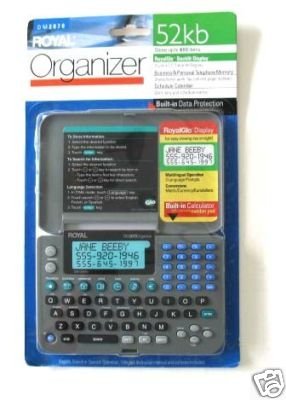
Image: Royal DM2070 Electronic Organizer. This image displays the device's front view, highlighting its screen and keypad, essential for navigation and data entry.
Naudojimo instrukcijos
1. Navigacija
The DM2070 features a keypad and potentially a stylus for navigation. Use the arrow keys to move between menu options and press ENTER or a designated selection button to confirm.
2. Entering Data
To enter information such as contacts, appointments, or notes:
- Navigate to the desired application (e.g., 'Contacts', 'Calendar', 'Notes').
- Select 'New Entry' or a similar option.
- Use the alphanumeric keypad to input text. Some models may offer an on-screen keyboard via stylus.
- Save your entry before exiting the application.
3. Programų naudojimas
The DM2070 includes various applications:
- Kalendorius: View daily, weekly, or monthly schedules. Add and edit appointments.
- Kontaktai: Store names, phone numbers, addresses, and email information.
- Pastabos: Create and manage text notes or memos.
- Skaičiuotuvas: Atlikti pagrindinius aritmetinius skaičiavimus.
- Valiutos keitiklis: Convert between different currencies (requires manual update of exchange rates on some models).
Priežiūra
1. Prietaiso valymas
To keep your DM2070 in optimal condition:
- Nuvalykite ekraną ir casing minkštu, sausu, nepūkuotu skudurėliu.
- Įsisenėjusioms dėmėms šiek tiek pamirkykiteampNuvalykite šluostę vandeniu; venkite stiprių cheminių medžiagų ar abrazyvinių valiklių.
- Ensure no moisture enters openings.
2. Akumuliatoriaus priežiūra
- Kai pasirodys išsikrovusių baterijų indikatorius, nedelsdami pakeiskite baterijas.
- Jei prietaisas ilgesnį laiką nebus naudojamas, išimkite baterijas, kad išvengtumėte elektrolito pratekėjimo.
Trikčių šalinimas
If you encounter issues with your Royal DM2070, refer to the following common solutions:
| Problema | Galima priežastis | Sprendimas |
|---|---|---|
| Įrenginys neįsijungia. | Neišsikrovusios arba neteisingai įdėtos baterijos. | Pakeiskite baterijas naujomis, užtikrindami teisingą poliškumą. |
| Ekranas tuščias arba užstrigo. | Programinės įrangos gedimas arba senka baterija. | Try a soft reset (refer to Quick Start Guide for specific button combination) or replace batteries. |
| Data loss. | Battery depletion or improper shutdown. | Ensure batteries are fresh. Always save data before powering off. |
| Klaviatūra nereaguoja. | Dulkės / šiukšlės po klavišais arba vidinė problema. | Clean keypad gently. If problem persists, contact support. |
Specifikacijos
Key technical specifications for the Royal DM2070 Electronic Organizer:
| Funkcija | Detalė |
|---|---|
| Prekės ženklas | ROYAL |
| Modelio numeris | 2070 DM |
| Viršelio medžiaga | Oda |
| Formatas | Organizatorius |
| Prekės svoris | 181 g |
| Prekės matmenys (IxPxH) | 24.4x14.5x1 cm |
| Tikslinė auditorija | Suaugęs |
Garantija ir palaikymas
The Royal DM2070 Electronic Organizer comes with a standard manufacturer's warranty. Please refer to the warranty card included in your package for specific terms and conditions. For technical support, service, or inquiries, please contact Royal customer service through the contact information provided on the warranty card or the official Royal websvetainę.