
1. Įvadas
The Davis Instruments 6250 Vantage Vue is a wireless weather station designed to provide accurate and reliable weather monitoring. This self-contained system includes an Integrated Sensor Suite (ISS) for outdoor data collection and an LCD console for displaying and analyzing weather information. The system is engineered for ease of installation and use, offering real-time updates on various environmental conditions.
This manual provides detailed instructions to help you set up, operate, and maintain your Vantage Vue weather station, ensuring optimal performance and longevity.
2. Saugos informacija
Please read and understand all safety precautions before installing or operating your weather station. Failure to follow these instructions may result in injury or damage to the equipment.
- Montavimo vieta: Choose a mounting location for the Integrated Sensor Suite (ISS) that is free from obstructions to ensure accurate wind and rain measurements. Avoid areas near power lines or other electrical hazards.
- Elektros sauga: Ensure all power connections are secure and protected from moisture. Do not attempt to open or repair the console or ISS if you are not qualified.
- Baterijos valdymas: Use only the specified battery types. Do not mix old and new batteries, or different types of batteries. Dispose of used batteries responsibly.
- Apsauga nuo žaibo: Consider installing lightning protection for the outdoor sensor suite, especially in areas prone to electrical storms.
3. Pakuotės turinys
Your Davis Instruments 6250 Vantage Vue Wireless Weather Station package should include the following components:
- Integrated Sensor Suite (ISS) with anemometer, wind vane, rain collector, temperature, and humidity sensors.
- LCD Console with backlit display and keypad.
- Mounting hardware for the ISS (mounting pole sold separately).
- AC power adapter for the console.
- User Manual (this document).
Pastaba: 1 CR123A battery is required for the ISS (not included) and 3 C-cell batteries are required for the console (not included) for backup power.
4. Sąranka ir diegimas
Proper installation of the Integrated Sensor Suite (ISS) is crucial for accurate readings. The console setup involves basic configuration to receive data.
4.1. Integrated Sensor Suite (ISS) Installation
The ISS collects outdoor weather data and transmits it wirelessly to the console. It should be mounted in an open area, away from obstructions.
- Pasirinkite vietą: Select a site that is free from obstacles like trees, buildings, or fences that could interfere with wind, rain, or solar radiation measurements. Ideally, the anemometer should be at least 10 feet (3 meters) above the ground.
- Mounting Pole: A mounting pole (not included) with a diameter of approximately 1.5 inches is recommended. Secure the pole firmly to the ground or a sturdy structure.
- Attach ISS: Use the provided U-bolts and mounting hardware to attach the ISS to the top of the mounting pole. Ensure the ISS is level using the integrated bubble level. The solar panel on the ISS should face true South in the Northern Hemisphere (or true North in the Southern Hemisphere) for optimal charging.
- Įdėkite akumuliatorių: Open the battery compartment on the ISS and insert the 1 CR123A battery. This provides backup power for the solar-powered unit.

Figure 1: The Integrated Sensor Suite (ISS) mounted outdoors, showing the anemometer, wind vane, and rain collector.
4.2. Konsolės sąranka
The console is your indoor display unit. It receives data wirelessly from the ISS.
- Maitinimas: Connect the AC power adapter to the console and plug it into a wall outlet. For backup power, install 3 C-cell batteries into the console's battery compartment.
- Pradinė konfigūracija: Upon first power-up, the console will guide you through an initial setup wizard. You will need to enter:
- Laikas ir data: Set the current time, date, and time zone.
- Vietos duomenys: Input your geographical longitude, latitude, and elevation. This information is crucial for accurate sunrise/sunset times and other calculations. You can typically find this using online mapping services or a GPS device.
- Wireless Reception: Ensure the console is within range of the ISS (up to 1,000 feet / 300 meters line-of-sight). The console will automatically attempt to establish a connection.
- Wind Direction Correction: If your wind direction appears to be 180 degrees off after installation, consult the troubleshooting section or the Davis Instruments website for specific console settings to correct this.
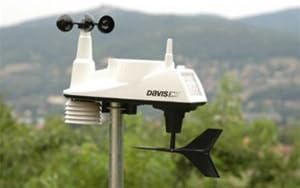
Figure 2: The LCD Console displaying indoor and outdoor temperature, humidity, wind speed, barometric pressure, and rainfall data.
5. Operating Your Weather Station
Furgonastage Vue console provides a wealth of real-time and historical weather data. Familiarize yourself with the keypad and display to access all features.
5.1. Console Display and Keypad
The console features an easy-to-read, backlit 3 by 4.375-inch LCD display with a glow-in-the-dark keypad. The buttons allow you to navigate through different screens and settings.
- ŠVIESA: Įjungia ekrano foninį apšvietimą.
- TEMP: Displays temperature data (indoor/outdoor, heat index, wind chill).
- HUM: Shows humidity levels (indoor/outdoor, dew point).
- VĖJAS: Provides current wind speed, direction, and 2-minute/10-minute averages.
- LIETUS: Displays daily, monthly, and yearly rainfall totals, as well as rainfall rate.
- BARAS: Shows barometric pressure and its trend.
- GRAFIKAS: Accesses graphical representations of various weather trends over time.
- HI/LOW: View daily, monthly, or yearly high and low records for different parameters.
- LAIKAS: Accesses time-related functions, including alarms and sunrise/sunset times.
- 2-oji vieta: Naudojamas kartu su kitais mygtukais, norint pasiekti antrines funkcijas.
5.2. Interpreting Weather Data
The console provides comprehensive data points:
- Temperatūra ir drėgmė: Displays both indoor and outdoor readings.
- Barometrinis slėgis: Indicates atmospheric pressure, which can help predict short-term weather changes. A falling barometer often suggests approaching stormy weather.
- Vėjo greitis ir kryptis: Essential for understanding local wind patterns.
- Rasos taškas: The temperature at which air becomes saturated with water vapor, indicating the likelihood of dew, fog, or precipitation.
- Krituliai: Tracks precipitation over various periods.
- Orų prognozės piktogramos: Graphical representations on the display provide a short-term weather forecast based on barometric pressure trends.
- Moon Phase & Sunrise/Sunset: Useful astronomical data.
6. Priežiūra
Regular maintenance ensures the accuracy and longevity of your Vantage Vue weather station.
- Cleaning the ISS: Periodically inspect the rain collector for debris (leaves, insects) and clean it as needed. Ensure the anemometer and wind vane spin freely. Gently wipe the solar panel with a soft, damp šluoste, kad išlaikytumėte įkrovimo efektyvumą.
- Baterijos keitimas:
- ISS Battery: The CR123A battery in the ISS typically lasts for several years, providing backup power when solar charging is insufficient. Replace it when the console indicates a low battery warning for the outdoor unit.
- Console Batteries: Replace the 3 C-cell batteries in the console when the low battery indicator appears. These batteries provide backup power during outages or if the AC adapter is disconnected.
- Jutiklio kalibravimas: While the Vantage Vue is factory-calibrated, some sensors (like rainfall) can be adjusted if you suspect inaccuracies. Refer to the advanced settings in your console manual for calibration procedures.
7. Problemų sprendimas
Here are solutions to common issues you might encounter with your weather station:
| Problema | Galima priežastis | Sprendimas |
|---|---|---|
| No outdoor data on console | No wireless signal from ISS; ISS battery low or dead; ISS too far from console. | Check ISS battery. Ensure ISS and console are within range and not blocked by major obstructions. Re-establish wireless connection via console setup. |
| Netikslus vėjo greitis / kryptis | Obstructions near ISS; Anemometer/wind vane stuck; Incorrect wind direction calibration. | Relocate ISS if possible. Clean and ensure free movement of wind sensors. Check console settings for wind direction offset. |
| Incorrect rainfall readings | Rain collector blocked by debris; Tipping bucket mechanism stuck. | Clear any debris from the rain collector funnel. Gently check if the tipping bucket moves freely. |
| Console display is dim or blank | AC adapter disconnected; Console batteries low or dead. | Check AC adapter connection. Replace console batteries. |
8. Specifikacijos
| Funkcija | Detalė |
|---|---|
| Modelio numeris | 6250 |
| Prekės ženklas | Daviso instrumentai |
| Ryšio technologija | Radijo dažnis (belaidis) |
| Belaidžio perdavimo diapazonas | Iki 300 metro (1,000 pėdų) tiesioginio matomumo |
| Atnaujinimo intervalas | Kas 2.5 sekundžių |
| Power Source (ISS) | Solar-powered with 1 CR123A battery backup |
| Power Source (Console) | AC adapter with 3 C-cell battery backup |
| Ekrano tipas | LCD su foniniu apšvietimu |
| Temperatūros tikslumas | ±1 °C (±1.8 °F) |
| Gaminio matmenys | 19"D x 15"W x 7"H (ISS) |
| Prekės svoris | 4.54 g |
9. Informacija apie garantiją
Davis Instruments products are known for their quality and durability. For specific warranty terms and conditions, please refer to the warranty card included with your product or visit the official Davis Instruments website. Typically, weather stations come with a limited warranty covering defects in materials and workmanship for a specified period from the date of purchase.
Išsaugokite pirkimo įrodymą, jei prireiktų garantijos.
10. Pagalba klientams
If you require further assistance with your Davis Instruments 6250 Vantage Vue Wireless Weather Station, please contact customer support:
- Palaikymas internetu: Visit the official Davis Instruments website for FAQs, support articles, and software downloads.
- Kontaktinė informacija: Refer to the contact section on the Davis Instruments websvetainė, kurioje pateikiami telefono numeriai arba el. pašto palaikymas.
- Bendruomenės forumai: Engage with other users and experts on official or unofficial forums for tips and advice.
When contacting support, please have your model number (6250) and purchase date ready.