
Įvadas
Ačiū, kad pirkoteasing the Snakebyte Wireless Bluetooth Premium PS3 Controller. This manual provides detailed instructions for setting up, operating, maintaining, and troubleshooting your new controller. Please read this manual thoroughly before use to ensure optimal performance and longevity of your device.
Pakuotės turinys
Prašome patikrinti, ar pakuotėje yra visi reikalingi daiktai:
- Snakebyte Wireless Bluetooth Premium PS3 Controller
- USB Charging Cable (approximately 3 meters)
- Instrukcijų vadovas (šis dokumentas)

Image: The Snakebyte Wireless Bluetooth Premium PS3 Controller shown in its retail blister packaging, indicating the product and included cable.
Sąranka
1. Valdiklio įkrovimas
Before initial use, fully charge the controller. Connect the supplied USB charging cable to the controller's charging port and the other end to a USB port on your PlayStation 3 console or a compatible USB power adapter. The indicator lights on the controller will show charging status and turn off or change color when fully charged.
2. Prijungimas prie „PlayStation 3“
To connect the controller wirelessly to your PlayStation 3 console:
- Įsitikinkite, kad jūsų „PlayStation 3“ konsolė įjungta.
- Connect the controller to the PS3 console using the supplied USB charging cable. This will register the controller with the console.
- Paspauskite PS mygtukas (located in the center of the controller) once. The controller will power on and attempt to establish a connection.
- Once the controller is registered and connected, the indicator lights will illuminate, typically assigning a player number.
- You can now disconnect the USB cable for wireless gameplay. If the connection is lost, reconnect the USB cable and press the PS button again.

Vaizdas: priekis view of the Snakebyte Wireless Bluetooth Premium PS3 Controller, showing the button layout including the central PS button.
Naudojimo instrukcijos
Controller Layout and Functions
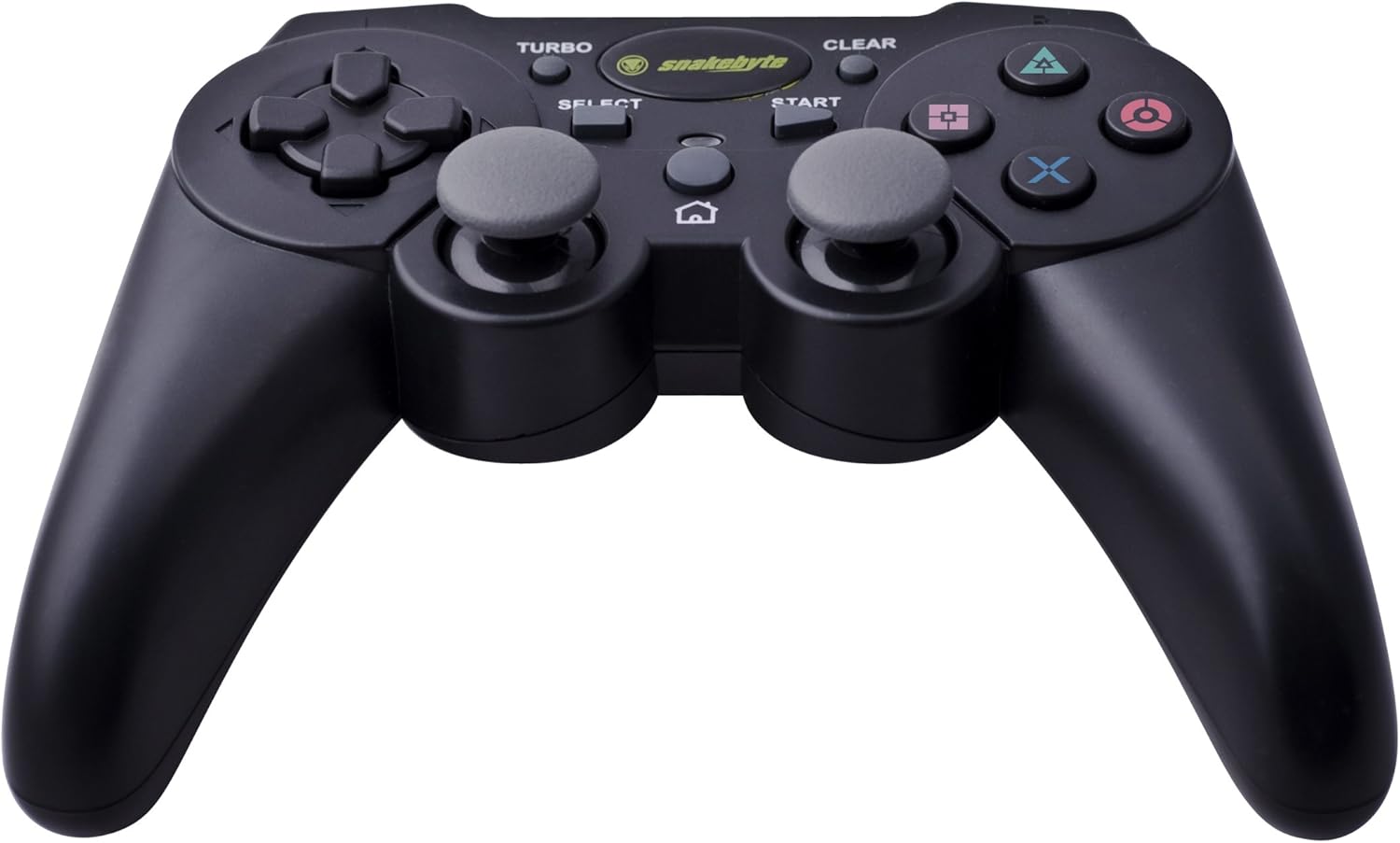
Image: The Snakebyte Wireless Bluetooth Premium PS3 Controller, highlighting the dual analog sticks and various buttons.
- Krypties valdikliai (D-Pad): For precise directional input in games.
- Kairysis analoginis vairasvirtis: Pirminis judesių valdymas.
- Dešinė analoginė svirtis: Kameros valdymas arba antrinis judėjimas.
- Veiksmų mygtukai (trikampis, apskritimas, kryžius, kvadratas): Žaidimui būdingi veiksmai.
- L1/R1 mygtukai: Pečių mygtukai įvairioms žaidimo funkcijoms.
- L2/R2 paleidikliai: Analog triggers for pressure-sensitive input, often used for acceleration/braking or aiming/firing.
- START mygtukas: Pauses games or opens menus.
- SELECT mygtukas: Opens in-game maps, inventories, or other menus.
- PS mygtukas: Powers on the controller, accesses the PS3 XMB (Cross Media Bar) menu, or turns off the controller/console.
- TURBO mygtukas: Įjungia turbo funkciją kitiems mygtukams.
- CLEAR mygtukas: Išjungia turbo funkciją.
Turbo funkcija
The controller features a TURBO function, allowing a selected button to register multiple presses rapidly with a single hold. This can be useful for certain game mechanics.
- To activate TURBO: Press and hold the TURBO mygtukas, then press the desired action button (e.g., Cross, Square, Circle, Triangle, L1, R1, L2, R2). Release both buttons. The selected button will now have the TURBO function enabled.
- To deactivate TURBO for a specific button: Press and hold the CLEAR mygtukas, then press the button for which TURBO is currently active. Release both buttons.
- To deactivate all TURBO functions: Press the CLEAR mygtukas once without holding it down.
Motion Sensing and Vibration Feedback
This controller supports motion sensing capabilities, allowing for intuitive control in compatible games. It also provides vibration feedback to enhance immersion during gameplay, reacting to in-game events such as impacts or explosions.
Įjungimas ir išjungimas
- Norėdami įjungti: paspauskite PS mygtukas.
- To power off: The controller will automatically enter sleep mode after a period of inactivity to conserve battery. Alternatively, you can hold the PS mygtukas for several seconds to bring up the PS3 menu, where you can choose to turn off the controller.
Priežiūra
- Valymas: Valdiklį valykite minkšta, sausa šluoste. Nenaudokite abrazyvinių valiklių ar tirpiklių.
- Saugykla: Laikykite valdiklį vėsioje, sausoje vietoje, apsaugotoje nuo tiesioginių saulės spindulių ir ekstremalių temperatūrų.
- Akumuliatoriaus priežiūra: Norėdami pailginti baterijos veikimo laiką, venkite dažnai visiškai iškrauti valdiklį. Reguliariai jį įkraukite, net jei nenaudojate nuolat.
- Venkite žalos: Do not drop the controller or expose it to excessive force or moisture.
Trikčių šalinimas
| Problema | Galimas sprendimas |
|---|---|
| Valdiklis neprisijungia belaidžiu ryšiu. |
|
| Mygtukai arba analoginės vairalazdės nereaguoja. |
|
| Valdiklis neįkraunamas. |
|
Valdiklio nustatymas iš naujo
If the controller behaves erratically or becomes unresponsive, you can perform a reset. Locate the small reset button on the back of the controller (often in a small hole). Use a thin, pointed object (like a straightened paperclip) to press and hold the reset button for a few seconds. This will restart the controller's internal electronics.
Specifikacijos
- Prekinis ženklas: Snakebyte
- Modelio numeris: SB904714
- Suderinama platforma: Sony PlayStation 3
- Ryšys: Belaidis ryšys („Bluetooth“)
- Mygtukų skaičius: 16
- Matmenys (P x P x A): Apytiksliai 23.01 x 16.31 x 8.51 cm (9.06 x 6.42 x 3.35 colio)
- Svoris: Maždaug 419.99 g (0.93 svaro)
- Spalva: Juoda
Garantija ir palaikymas
For warranty information and technical support, please refer to the documentation provided with your purchase or contact your retailer. You may also visit the official Snakebyte websvetainę, kurioje rasite daugiau pagalbos ir informacijos apie produktą.