
HEWLETT PACKARD J9450A
HP Procurve 1810G-24 komutatoriaus (J9450A) naudotojo vadovas
Modelis: J9450A
Įvadas
The HP Procurve 1810G-24 Switch (J9450A) is a managed Gigabit Ethernet switch designed for small and medium-sized businesses. It provides reliable network connectivity with advanced features for enhanced performance and security. This manual provides essential information for the setup, operation, maintenance, and troubleshooting of your switch.

Figure 1: HP Procurve 1810G-24 Switch (J9450A) - Front Angled View
This image shows the overall design of the HP Procurve 1810G-24 Switch, highlighting its compact form factor and the arrangement of its ports and indicators.
Pakuotės turinys
Patikrinkite, ar pakuotėje yra visi reikalingi daiktai:
- HP Procurve 1810G-24 Switch (J9450A)
- Maitinimo kabelis
- Stovo montavimo komplektas
- Konsolės laidas
Sąranka
1. Fizinis įrengimas
The HP Procurve 1810G-24 Switch can be placed on a desktop or mounted in a standard 19-inch equipment rack using the included rack-mount kit.
- Stovo montavimas: Attach the rack-mount brackets to the sides of the switch using the provided screws. Secure the switch into the rack.
- Vieta darbalaukyje: Ensure adequate ventilation around the switch. Do not block any ventilation openings.
2. Maitinimo prijungimas
Connect the provided power cable to the power inlet on the rear of the switch and then to a grounded AC power outlet. The switch will power on automatically.

Figure 2: Rear Panel of the Switch
This image displays the rear panel of the HP Procurve 1810G-24 Switch, showing the power input and product labels.
3. Tinklo ryšiai
Connect your network devices (computers, servers, other switches) to the RJ45 ports on the front panel of the switch using standard Ethernet cables. The switch supports 10/100/1000 Mbps connections.

Figure 3: Front Panel of the Switch
Šis paveikslėlis suteikia aiškų vaizdą view of the front panel of the HP Procurve 1810G-24 Switch, detailing the 24 Gigabit Ethernet ports and indicator lights.
The switch also features dual-personality ports (ports 23 and 24) which can function as either 10/100/1000 RJ45 ports or mini-GBIC (SFP) slots for optional fiber connectivity (e.g., Gigabit-SX, -LX, -LH, or 100-FX).

Figure 4: Front Panel Indicators and Controls
This close-up image highlights the power indicator, fault locator, LED mode, and speed indicators on the front panel of the HP Procurve 1810G-24 Switch.
Jungiklio valdymas
Web Sąsajos valdymas
The HP Procurve 1810G-24 Switch features an intuitive web-based management interface for configuration, monitoring, and administration. To access the web sąsaja:
- Įsitikinkite, kad jūsų kompiuteris prijungtas prie komutatoriaus.
- Atidarykite a web browser and enter the default IP address of the switch (refer to the product documentation or sticker for the default IP).
- Log in using the default credentials (if applicable).
- Iš web interface, you can configure various settings, including:
- VLAN Support and Tagging: Configure up to 64 port-based VLANs and dynamic IEEE 802.1Q VLAN tagging for network segmentation and security.
- Prievado konfigūracija: Adjust port speed, duplex settings, and enable/disable ports.
- Nuorodų kaupimas: Sujunkite kelis prievadus, kad padidintumėte pralaidumą ir perteklių.
- Paslaugos kokybė (QoS): Teikite pirmenybę tinklo srautui, skirtam svarbiausioms programoms.
LED indikatoriai
Priekinio skydelio šviesos diodai rodo komutatoriaus ir jo prievadų būseną:
- Maitinimo šviesos diodas: Nurodo maitinimo būseną.
- Fault Locator LED: Indicates system faults.
- Link/Activity LEDs (per port):
- Žalia spalva šviečia nuolat: Ryšys užmegztas.
- Mirksi žaliai: aktyvumas prievade.
- Greičio šviesos diodai (kiekvienam prievadui):
- Off: 10 Mbps
- Flash: 100 Mbps
- On: 1000 Mbps (Gigabit)
Priežiūra
The HP Procurve 1810G-24 Switch is designed for low maintenance. It operates without internal fans, contributing to a quiet environment and reduced dust accumulation.
- Firmware atnaujinimai: Periodically check the official HP website for firmware updates to ensure optimal performance and security. Follow the instructions provided with the firmware update package.
- Valymas: Jungiklio išorę valykite minkštu, sausu skudurėliu. Nenaudokite skystų ar aerozolinių valiklių.
- Vėdinimas: Įsitikinkite, kad ventiliacijos angos nėra užblokuotos, kad išvengtumėte perkaitimo.
Trikčių šalinimas
Nėra galios
- Patikrinkite, ar maitinimo laidas yra tvirtai prijungtas tiek prie jungiklio, tiek prie maitinimo lizdo.
- Įsitikinkite, kad maitinimo lizdas veikia, išbandydami jį su kitu įrenginiu.
No Link Light on Port
- Check the Ethernet cable connection at both ends (switch and connected device).
- Išbandykite kitą Ethernet kabelį.
- Test the port with a known working device.
- Įsitikinkite, kad prijungtas įrenginys įjungtas ir veikia tinkamai.
Connectivity Issues After Power Failure
In some rare instances, the switch may not fully restore network connectivity to all ports immediately after a power outage. If this occurs:
- Maitinimo ciklas: Disconnect the power cable from the switch, wait for approximately 30 seconds, and then reconnect it.
- Reseat Cables: Physically disconnect and reconnect the Ethernet cables for affected devices.
- Gamykliniai nustatymai: If issues persist, a factory reset may be necessary. This will revert all settings to their default values. Consult the detailed product manual for the specific procedure, which often involves using a small pointed object (like a paperclip) to press a reset button.
Web Sąsaja nepasiekiama
- Verify your computer's IP address is in the same subnet as the switch's default IP address.
- Išvalykite naršyklės talpyklą ir slapukus.
- Išbandykite kitą web naršyklė.
- Perform a factory reset if you have forgotten the login credentials or if the interface remains unresponsive.
Specifikacijos
| Funkcija | Aprašymas |
|---|---|
| Modelio numeris | J9450A |
| Jungiklio tipas | Valdomas Gigabit Ethernet jungiklis |
| Prievadų skaičius | 24 (22 x 10/100/1000BASE-T, 2 x Dual-Personality 10/100/1000BASE-T or SFP) |
| Duomenų perdavimo sparta | 1000 megabitų per sekundę (gigabitas) |
| Sąsajos tipas | RJ45, SFP |
| Bylos medžiaga | Metalas |
| Matmenys (I x P x A) | 17 x 7 x 2 colio (apytiksliai) |
| Prekės svoris | 5 svaro |
| Maitinimo įvestis | 100-127V ~ 0.75A (0.75A), 200-240V ~ 0.4A (0.4A) |
| Darbinė temperatūra | nuo 0°C iki 40°C (32°F iki 104°F) |
| Aušinimas | Be ventiliatoriaus |
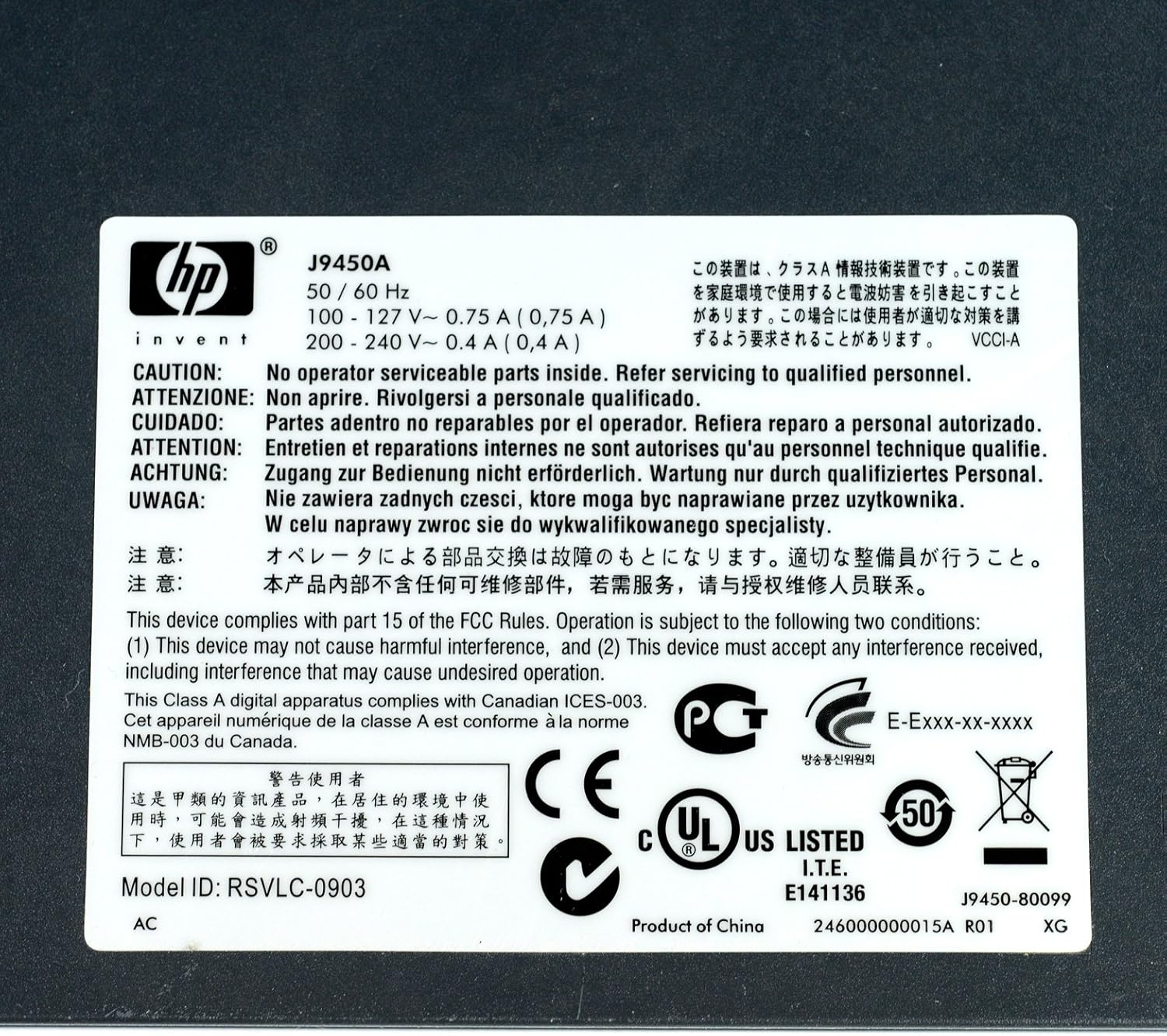
Figure 5: Product Label with Specifications
This image displays the product label, which includes the model number, electrical ratings, and various compliance marks.
Garantija ir palaikymas
Informacija apie garantiją
The HP Procurve 1810G-24 Switch typically comes with a Visą gyvenimą trunkanti pakeitimo garantija for the original owner. Please refer to the official HP warranty documentation for complete terms and conditions, as warranty details may vary by region and purchase date.
Techninė pagalba
For technical assistance, product registration, or to download the latest drivers and firmware, please visit the official HP support website. Have your product model number (J9450A) and serial number ready when contacting support.
You can typically find support resources at: www.hp.com/support
Ask a question about this manual
Ask about setup, troubleshooting, compatibility, parts, safety, or missing instructions. Manuals+ will review the question and use this page’s manual context to help answer it.