
Įvadas
This manual provides detailed instructions for the operation and maintenance of your Calypso K5558/2 Digital Quartz Watch. Please read this manual thoroughly to ensure proper use and to maximize the lifespan of your watch. This watch features a digital display, backlight, stopwatch, intermediate times, and an alarm function, all housed in a durable plastic case with a multicolored rubber strap.
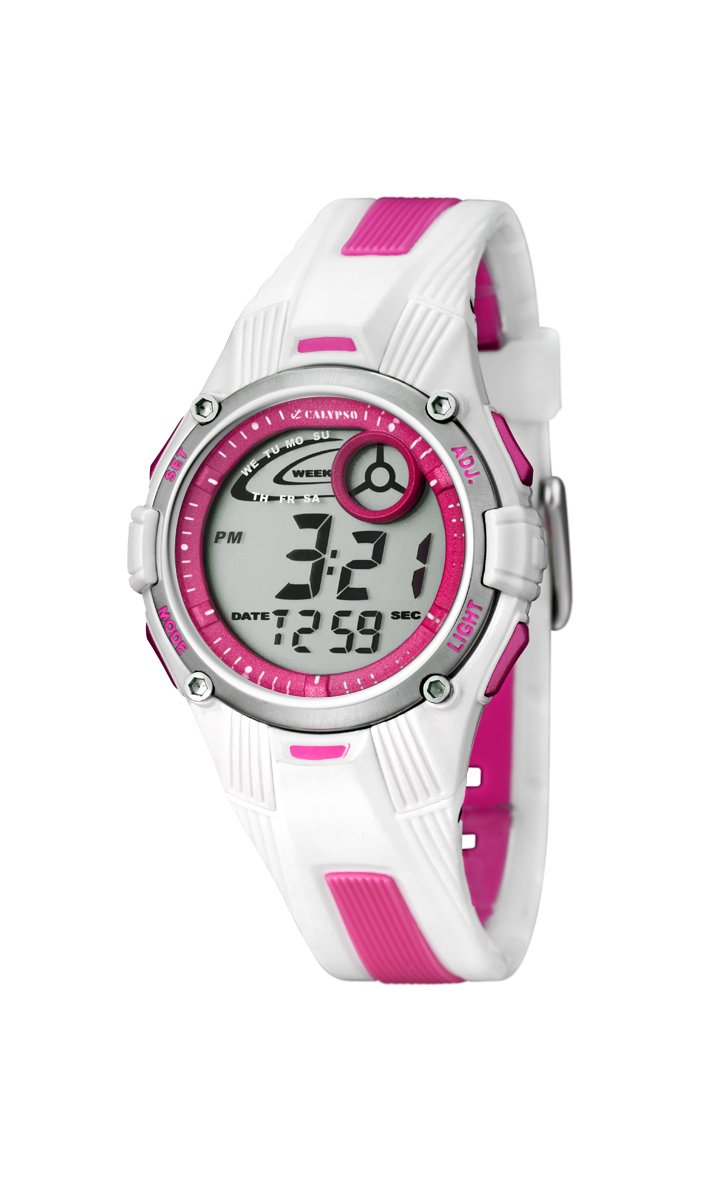
Vaizdas: priekis view of the Calypso K5558/2 Digital Quartz Watch. This image shows the watch's digital display and the overall design.
Sąranka
Pradinis aktyvinimas
Your Calypso K5558/2 watch comes with a battery pre-installed. If the display is not active, gently press any button to activate it. If the watch remains inactive, the battery may need to be replaced (refer to the Maintenance section).
Laiko ir datos nustatymas
- Įeikite į nustatymų režimą: Paspauskite ir palaikykite REŽIMAS button (usually located on the bottom left) until the seconds start flashing.
- Koreguoti sekundes: Paspauskite RESET button (usually top right) to reset the seconds to zero.
- Pasirinkite kitą elementą: Paspauskite REŽIMAS button again to move to the next setting item (e.g., hours, minutes, month, date, day).
- Koreguoti reikšmę: Naudokite PRADĖTI button (usually top left) to increase the value of the flashing item.
- Patvirtinkite nustatymus: Spauskite toliau REŽIMAS to cycle through all settings. Once all adjustments are made, press REŽIMAS paskutinį kartą, kad išeitumėte iš nustatymų režimo.

Vaizdas: kampuotas view of the Calypso K5558/2 Digital Quartz Watch, showing the watch face and side buttons.
Naudojimo instrukcijos
Laiko rodymo režimai
Paspauskite REŽIMAS button to cycle through different display modes: Time, Stopwatch, and Alarm.
Foninio apšvietimo naudojimas
Norėdami apšviesti ekraną esant prastam apšvietimui, paspauskite ŠVIESA button (usually located on the top right). The backlight will remain active for a few seconds.
Stopwatch Function (Chronometer and Intermediate Times)
- Įjunkite chronometro režimą: Paspauskite REŽIMAS button until "00:00:00" appears on the display.
- Pradėti/sustabdyti: Paspauskite PRADĖTI mygtuką, kad pradėtumėte matuoti laiką. Paspauskite dar kartą, kad pristabdytumėte.
- Ratų/tarpo laikas: Kai chronometras veikia, paspauskite RESET button to record an intermediate (lap/split) time. The display will show the lap time for a few seconds before returning to the running total.
- Atstatyti: When the stopwatch is paused, press the RESET button to clear the time to "00:00:00".
Signalo nustatymas ir naudojimas
- Įjunkite aliarmo režimą: Paspauskite REŽIMAS button until the alarm time is displayed (e.g., "AL").
- Nustatyti žadintuvo laiką: Paspauskite ir palaikykite RESET button until the alarm hours start flashing. Use the PRADĖTI button to adjust the hours. Press REŽIMAS to move to minutes and adjust with PRADĖTI.
- Įjungti/išjungti signalą: Žadintuvo režimu paspauskite PRADĖTI button to toggle the alarm ON/OFF. An alarm icon (e.g., a bell) will appear on the display when activated.
- Sustabdyti aliarmo garsą: Kai suskamba žadintuvas, paspauskite bet kurį mygtuką, kad jį sustabdytumėte.
Atsparumas vandeniui
This watch is water-resistant up to 100 meters (10 ATM). This means it is suitable for swimming and snorkeling. Nespauskite jokių mygtukų, kai laikrodis yra panardintas į vandenį. Venkite laikrodžio sąlyčio su karštu vandeniu ar garais, nes tai gali pažeisti atsparumo vandeniui sandariklius.
Priežiūra
Laikrodžio valymas
Reguliariai valykite laikrodžio korpusą ir dirželį minkšta šluosteamp cloth. For stubborn dirt, a mild soap solution can be used, followed by rinsing with clean water and drying thoroughly. Avoid using harsh chemicals or abrasive cleaners, as these can damage the watch materials.
Dirželių priežiūra
The rubber strap may show signs of discoloration over time, especially lighter colors, due to exposure to dirt, sweat, and UV light. Regular cleaning can help mitigate this. If discoloration becomes significant or the strap shows signs of wear, consider replacing it with an official Calypso replacement strap.
Baterijos keitimas
When the display becomes dim or the watch stops functioning, the battery may need replacement. This watch uses a "C" type battery. Battery replacement should ideally be performed by a qualified watch technician to ensure proper sealing and maintain water resistance. Attempting to replace the battery yourself may void any implied warranty and compromise the watch's water resistance.
Trikčių šalinimas
| Problema | Galima priežastis | Sprendimas |
|---|---|---|
| Ekranas tuščias arba blankus. | Žemas arba išsikrovęs akumuliatorius. | Pakeiskite bateriją (žr. skyrių „Priežiūra“). |
| Mygtukai nereaguoja. | Laikrodis gali būti užrakintas arba jame gali būti vidinių gedimų. | Try pressing all buttons firmly. If issue persists, consult a technician. |
| Laikas netikslus. | Neteisingas laiko nustatymas arba išsikrovusi baterija. | Reset the time (refer to Setup section). If problem continues, replace battery. |
| Vanduo laikrodžio viduje. | Water resistance compromised (e.g., buttons pressed underwater, seals damaged). | Nedelsdami nuneškite laikrodį kvalifikuotam specialistui apžiūrai ir remontui. Nebandykite jo džiovinti patys. |
Specifikacijos
- Modelio numeris: K5558/2
- Ekrano tipas: Skaitmeninis
- Judėjimo tipas: Kvarcas
- Korpuso medžiaga: Plastikiniai
- Dirželio medžiaga: Rubber (Multicolored)
- Korpuso skersmuo: 36 milimetrų
- Korpuso storis: 10 milimetrų
- Atsparumo vandeniui gylis: 100 metrų (10 bankomatai)
- Ypatingos savybės: Alarm, Stopwatch, Backlight, Intermediate Times
- Užsegimo tipas: Sagtis
- Maitinimo šaltinis: Maitinamas baterijomis (pridedama 1 C tipo baterija)
- Prekės svoris: 34 gramų
Garantija ir palaikymas
Garantija: This product is sold without a manufacturer's warranty ("Pas de garantie"). Please refer to your retailer's return policy for any initial defects.
Palaikymas: For further assistance or inquiries regarding your Calypso K5558/2 watch, please contact your point of purchase or visit the official Calypso websvetainė, kurioje pateikiama informacija apie klientų aptarnavimą.