
Įvadas
The Avaya BM32 Button Module is an expansion unit designed to enhance the functionality of your Avaya 1616 or 1616-I IP phone. It provides 32 additional programmable line and feature buttons, allowing for increased call handling capacity and quick access to frequently used features. This manual provides essential information for the proper setup, operation, and maintenance of your BM32 Button Module.
Saugos informacija
- Prieš naudodami atidžiai perskaitykite visas instrukcijas.
- Nelaikykite prietaiso nuo drėgmės ar ekstremalių temperatūrų.
- Use only with compatible Avaya 1616/1616-I IP phones.
- Nebandykite patys atidaryti ar taisyti įrenginio. Visus techninės priežiūros darbus patikėkite kvalifikuotiems specialistams.
- Laikyti vaikams nepasiekiamoje vietoje.
Pakuotės turinys
Patikrinkite, ar jūsų pakuotėje yra šie elementai:
- Avaya BM32 Button Module (Model 700415573)
- Connecting cable (usually integrated or supplied with the phone)
- Dokumentacija (šis vadovas)
Sąranka
The Avaya BM32 Button Module is designed for easy integration with compatible Avaya IP phones. Follow these steps for proper installation.
Suderinamumas
The BM32 Button Module is compatible with:
- Avaya 1616 IP Phone
- Avaya 1616-I IP Phone
- Avaya IP Office R4.2 or higher
- Avaya Communication Manager R3.0 or higher
Up to three BM32 button modules can be connected to a single 1616 or 1616-I IP phone.
Connecting the Button Module
- Ensure your Avaya 1616 or 1616-I IP phone is powered off.
- Locate the expansion port on the back or side of your IP phone.
- Connect the provided cable from the BM32 Button Module to the expansion port on the IP phone. Ensure the connection is secure.
- If connecting multiple BM32 modules, connect them in a daisy-chain fashion, connecting the first module to the phone, the second to the first, and so on.
- Power on your Avaya IP phone. The BM32 module does not require an additional power supply; power is drawn directly from the connected 1616/1616-I telephone, which is powered either via Power over Ethernet (PoE) or a 5V external power supply.
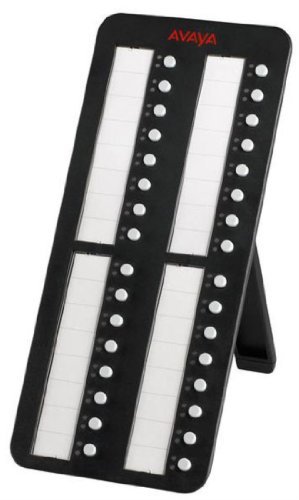
Image: Avaya BM32 Button Module connected to an Avaya IP phone. This image illustrates the physical connection of the BM32 module to the main IP phone unit, highlighting its side profile ir integruotas stovas.
Operating the BM32 Button Module
The BM32 Button Module provides 32 additional buttons, each with dual LEDs, to extend the functionality of your Avaya 1616/1616-I IP phone.
Programuojami mygtukai
Each of the 32 buttons can be programmed to perform various functions, such as:
- Linijų išvaizda: Assign additional incoming or outgoing lines.
- Feature Buttons: Quick access to phone features like call transfer, conference, hold, or voicemail.
- Greitasis rinkimas: Užprogramuokite dažnai naudojamus numerius rinkimui vienu paspaudimu.
- Bridged Line Appearances (BLA): Monitor and answer calls for other extensions.

Vaizdas: priekis view of the Avaya BM32 Button Module. This image displays the 32 programmable buttons, each accompanied by dual LEDs, which indicate the status of the assigned line or feature.
Dual LEDs
Each button is equipped with dual LEDs (typically red and green) that provide visual status indicators:
- Žalias šviesos diodas: Indicates an active line, an available line, or a feature that is currently enabled.
- Raudonas šviesos diodas: Indicates a line on hold, a busy line, or a feature that is currently in use or unavailable.
- Mirksintis šviesos diodas: May indicate an incoming call, a held call, or a waiting message, depending on system configuration.
Mygtukų konfigūracija
The programming of the BM32 buttons is typically managed through your Avaya IP Office or Communication Manager system by your system administrator. Consult your system administrator for specific instructions on how to program or reconfigure the buttons to suit your needs.
Priežiūra
Proper maintenance ensures the longevity and optimal performance of your BM32 Button Module.
Valymas
- Disconnect the module from the IP phone before cleaning.
- Išorinius paviršius valykite minkštu, sausu, nepūkuotu skudurėliu.
- Įsisenėjusioms dėmėms lengvai nuvalykiteampNuvalykite šluostę vandeniu arba švelniu, neabrazyviniu valikliu. Venkite purkšti skysčius tiesiai ant įrenginio.
- Do not use harsh chemicals, solvents, or abrasive materials, as these can damage the finish and internal components.
Sandėliavimas
If storing the module for an extended period, keep it in a cool, dry place, away from direct sunlight and extreme temperatures. It is recommended to store it in its original packaging to protect it from dust and physical damage.
Trikčių šalinimas
If you encounter issues with your BM32 Button Module, try the following troubleshooting steps:
Module Not Powering On / No LED Activity
- Patikrinkite ryšį: Ensure the connecting cable between the BM32 module and the IP phone is securely plugged in at both ends.
- Check IP Phone Power: Verify that the Avaya 1616/1616-I IP phone itself is powered on and functioning correctly. The BM32 draws power from the IP phone.
- Reboot IP Phone: Power cycle the connected IP phone (unplug and replug its power source or PoE connection).
- Suderinamumas: Confirm that your IP phone model and system software version meet the compatibility requirements (Avaya 1616/1616-I, IP Office R4.2+, Communication Manager R3.0+).
Buttons Not Responding / Incorrect Functionality
- Sistemos konfigūracija: The buttons require programming by your system administrator. Contact your administrator to ensure the buttons are correctly configured for your desired functions.
- Reboot IP Phone: A power cycle of the IP phone can sometimes resolve minor communication issues.
- Patikrinkite, ar nėra fizinės žalos: Inspect the buttons for any visible damage or obstructions.
If these steps do not resolve the issue, contact your system administrator or Avaya support for further assistance.
Specifikacijos
| Funkcija | Aprašymas |
|---|---|
| Modelio numeris | 700415573 |
| Mygtukai | 32 programmable line/feature buttons |
| šviesos diodai | Dual LEDs per button (red/green) |
| Suderinamumas | Avaya 1616/1616-I IP Phones, IP Office R4.2+, Communication Manager R3.0+ |
| Max Modules per Phone | Iki 3 |
| Galia | Powered by host IP phone (no separate power supply required) |
| Gaminio matmenys | 10 x 10 x 6 colio |
| Prekės svoris | 1.1 svaro |
| Gamintojas | Avaya |
Garantija ir palaikymas
For warranty information, please refer to the documentation provided with your original Avaya IP phone or contact your Avaya reseller or system administrator. Avaya provides support resources through its official website and authorized service partners.
For technical assistance or further inquiries, please contact your Avaya system administrator or visit the official Avaya support portal.