
1. Įvadas
The D-Link DES-1008E is an 8-Port Fast Ethernet Desktop Switch designed to expand your network connectivity. This unmanaged switch provides eight 10/100 Mbps Ethernet ports, allowing you to connect multiple devices such as computers, printers, and network-attached storage (NAS) to your network. It supports full-duplex mode, delivering up to 200 Mbps throughput per port for efficient data transfer. The plug-and-play design ensures easy installation without the need for software configuration.
2. Pakuotės turinys
Patikrinkite, ar jūsų pakuotėje yra šie elementai:
- D-Link DES-1008E 8-Port Fast Ethernet Desktop Switch
- Maitinimo adapteris
- Greito montavimo vadovas
Jei trūksta kokių nors daiktų arba jie pažeisti, kreipkitės pagalbos į vietinį „D-Link“ platintoją.
3. Sąranka
Follow these steps to set up your D-Link DES-1008E switch:
- Jungiklio padėtis: Place the switch on a flat, stable surface or mount it to a wall using appropriate hardware (not included). Ensure adequate ventilation around the device.
- Prijunkite maitinimo adapterį: Plug the provided power adapter into the power port on the back of the DES-1008E switch. Connect the other end of the power adapter to a standard electrical outlet. The power LED on the front of the switch should illuminate.
- Prijunkite tinklo įrenginius: Connect your network devices (e.g., computers, routers, game consoles) to any of the eight Ethernet ports on the switch using standard Ethernet cables. The corresponding port LED on the front of the switch will illuminate when a connection is established.
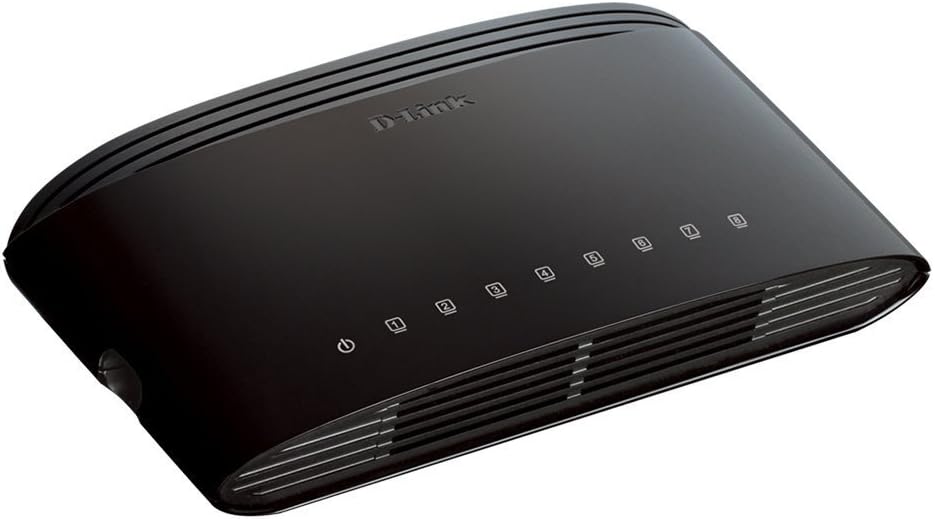
1 pav.: priekis view of the D-Link DES-1008E switch, showing the power indicator and eight port status LEDs.

2 pav.: galinis view of the D-Link DES-1008E switch, illustrating the eight Ethernet ports for device connections.
The D-Link DES-1008E is a plug-and-play device, requiring no software installation or configuration. Once connected, your devices should automatically detect the network connection.
4. Jungiklio valdymas
The DES-1008E operates automatically once powered on and connected. It functions as an unmanaged switch, meaning it requires no user intervention for basic network traffic management.
LED indikatoriai:
- Maitinimo šviesos diodas: Illuminates green when the switch is receiving power.
- Prievadų šviesos diodai (1–8): Each port has an associated LED. This LED illuminates green when a device is connected to the port and flashes to indicate network activity (data transmission).
5. Priežiūra
To ensure optimal performance and longevity of your D-Link DES-1008E switch, consider the following maintenance guidelines:
- Valymas: Gently wipe the exterior of the switch with a soft, dry cloth. Avoid using liquid or aerosol cleaners directly on the device.
- Vėdinimas: Ensure that the ventilation slots on the switch are not blocked. Proper airflow prevents overheating.
- Aplinka: Jungiklį naudokite nurodytose temperatūros ir drėgmės ribose. Saugokite jį nuo tiesioginių saulės spindulių, per didelio karščio ar drėgmės.
- Maitinimo ciklas: If the switch experiences issues, a simple power cycle (unplugging and replugging the power adapter) can often resolve minor problems.
6. Problemų sprendimas
If you encounter issues with your D-Link DES-1008E switch, refer to the following troubleshooting tips:
- Nėra galios:
- Įsitikinkite, kad maitinimo adapteris yra tvirtai prijungtas tiek prie jungiklio, tiek prie veikiančio elektros lizdo.
- Patikrinkite, ar elektros lizdas veikia, prijungdami prie jo kitą įrenginį.
- Patikrinkite maitinimo adapterį, ar nėra matomų pažeidimų.
- Nėra ryšio / veiklos prievade:
- Įsitikinkite, kad Ethernet kabelis yra tvirtai prijungtas prie komutatoriaus prievado ir prijungto įrenginio.
- Išbandykite kitą Ethernet kabelį, kad atmestumėte gedimo galimybę.
- Connect a different device to the same port to check if the port is functional.
- Įsitikinkite, kad prijungtas įrenginys įjungtas ir jo tinklo adapteris įjungtas.
- Lėtas tinklo našumas:
- Patikrinkite, ar visi prijungti įrenginiai veikia numatytu greičiu.
- Patikrinkite, ar prijungtuose įrenginiuose nėra per didelio tinklo srauto arba neveikia daug pralaidumo reikalaujančios programos.
- Ensure your internet service provider (ISP) is delivering the expected speeds to your router.
- High-Pitched Sound from Power Adapter:
- Some users have reported a high-pitched sound from the included power adapter. If this occurs, consider using an alternative 5V power supply with compatible specifications. Ensure the replacement power supply meets the voltage and current requirements of the switch to avoid damage.
7. Specifikacijos
| Modelio numeris | DES-1008E |
| Prievadų skaičius | 8 |
| Ethernet standartas | 10/100 Mbps Fast Ethernet |
| Duomenų perdavimo sparta | Up to 200 Mbps (full-duplex) |
| Perjungimo talpa | 1.6 Gbps |
| MAC adresų lentelės dydis | 1K įrašai |
| Maitinimo įvestis | 5V DC |
| Prekės svoris | 9.44 uncijos |
| Spalva | Juoda |
8. Garantija ir palaikymas
The D-Link DES-1008E 8-Port Fast Ethernet Desktop Switch comes with a Ribota viso gyvenimo garantija. For detailed warranty terms and conditions, please refer to the warranty information provided with your product or visit the official D-Link websvetainę.
For technical support, product registration, or to download the latest firmware and documentation, please visit the D-Link support website or contact D-Link customer service in your region. Support contact information can typically be found on the D-Link official websvetainę.