
Įvadas
The GIGABYTE GM-M7600 is a wireless precision optical mouse designed for comfortable and reliable use. This manual provides instructions for setting up, operating, maintaining, and troubleshooting your device.
Pakuotės turinys
Patikrinkite pakuotės turinį, kad įsitikintumėte, jog yra visi reikalingi daiktai:
- GIGABYTE GM-M7600 Wireless Optical Mouse
- Portable Nano USB Receiver
- 2x AAA baterijos
Sąranka
1. Baterijų įdėjimas
The GM-M7600 mouse requires two AAA batteries for operation. The batteries are included in the package.
- Raskite baterijų skyriaus dangtelį pelės apačioje.
- Švelniai pastumkite arba pakelkite dangtelį, kad atidarytumėte skyrių.
- Insert the two AAA batteries, ensuring the positive (+) and negative (-) terminals align correctly with the markings inside the compartment.
- Saugiai uždarykite akumuliatoriaus skyriaus dangtelį.
2. USB imtuvo prijungimas
The mouse connects to your computer via a portable Nano USB receiver.
- Locate the Nano USB receiver. It may be stored inside the mouse's battery compartment or packaged separately.
- Plug the Nano USB receiver into an available USB port on your computer (Laptop or Personal Computer).
- Your operating system (e.g., Windows XP, Linux) should automatically detect and install the necessary drivers. This process may take a few moments.
- Įdiegus tvarkykles, pelė yra paruošta naudoti.
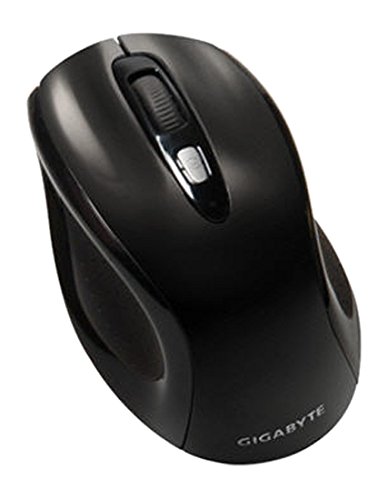
1 paveikslas: GIGABYTE GM-M7600 Wireless Optical Mouse. This image displays the ergonomic design of the mouse, highlighting its form factor and the location of its buttons. The Nano USB receiver is typically stored within the mouse or connected to a computer's USB port.
Naudojimo instrukcijos
1. Įjungimas/išjungimas
The mouse typically has a power switch on its underside. Slide the switch to the 'ON' position to activate the mouse. Slide it to 'OFF' when not in use to conserve battery life.
2. DPI (jautrumo) reguliavimas
The GM-M7600 features an adjustable DPI switch, allowing you to change the mouse sensitivity between 800 DPI and 1600 DPI. This switch is usually located near the scroll wheel. Press the DPI button to toggle between the two sensitivity settings.
3. Pagrindinės pelės funkcijos
- Kairysis spustelėjimas: Pagrindinis mygtukas elementams pasirinkti, atidaryti fileir sąveikaujant su programine įranga.
- Dešiniuoju pelės mygtuku spustelėkite: Antrinis mygtukas, skirtas pasiekti kontekstinius meniu ir papildomas parinktis.
- Slinkties ratukas: Naudojamas dokumentams slinkti ir web pages. It can also function as a middle click button.
Priežiūra
1. Valymas
Norint išlaikyti optimalų našumą ir išvaizdą:
- Disconnect the mouse from your computer and turn off the power switch.
- Šiek tiek naudokite minkštą, be pūkelių šluostę dampnuvalykite pelės paviršių vandeniu arba švelniu valymo tirpalu.
- Venkite naudoti stiprias chemines medžiagas, abrazyvinius valiklius ir nepurkšti skysčių tiesiai ant pelės.
- Clean the optical sensor area on the underside of the mouse with a dry cotton swab to remove any dust or debris.
2. Baterijos keitimas
When the mouse performance degrades or it stops responding, it may be time to replace the batteries.
- Išjunkite pelę naudodami maitinimo jungiklį.
- Open the battery compartment as described in the 'Installing Batteries' section.
- Išimkite senas AAA baterijas.
- Įdėkite dvi naujas AAA tipo baterijas, laikydamiesi teisingo poliškumo (+/-).
- Close the battery compartment and turn the mouse back on.
Trikčių šalinimas
If you encounter issues with your GIGABYTE GM-M7600 mouse, try the following solutions:
- Pelė nereaguoja:
- Įsitikinkite, kad pelė įjungta.
- Patikrinkite, ar baterijos tinkamai įdėtos ir ar jos pakankamai įkrautos. Jei reikia, pakeiskite.
- Ensure the Nano USB receiver is securely plugged into a working USB port on your computer. Try a different USB port.
- Iš naujo paleiskite kompiuterį.
- Nereguliarus žymeklio judėjimas:
- Nuvalykite optinį jutiklį pelės apačioje.
- Įsitikinkite, kad pelę naudojate ant tinkamo paviršiaus. Venkite labai atspindinčių ar skaidrių paviršių.
- Check for any wireless interference. Move the mouse closer to the receiver or away from other wireless devices.
- DPI switch not working:
- Įsitikinkite, kad pelė įjungta ir prijungta.
- Tvirtai paspauskite DPI mygtuką.
Specifikacijos
| Modelio pavadinimas | GM-M7600 |
| Prekės ženklas | GIGABITAS |
| Ryšio technologija | 2.4GHz Radio Frequency Wireless |
| Judesio aptikimas | Optinis |
| Reguliuojamas DPI | 800/1600 DPI |
| Mygtukų skaičius | 3 (kairėn, dešinėn, slinkties ratukas / spustelėjimas viduriniu pelės mygtuku) |
| Maitinimo šaltinis | 2 x AAA baterijos (pridedamos) |
| Imtuvo tipas | Portable Nano USB Receiver |
| Suderinami įrenginiai | Nešiojamasis kompiuteris, asmeninis kompiuteris |
| Operacinės sistemos palaikymas | Linux, Windows XP |
| Korpuso medžiaga | Plastic with Rubberized Finish |
| Spalva | Juoda |
Garantija ir palaikymas
For warranty information and technical support, please refer to the warranty card included with your product or visit the official GIGABYTE websvetainę. Išsaugokite pirkimo čekį garantiniams reikalavimams.