
Lexmark E360H11A
„Lexmark E360“, „E460“, „E462“ serijos didelės talpos grąžinimo programos tonerio kasečių naudotojo vadovas
Prekinis ženklas: Lexmark | Modelis: E360H11A
Įvadas
This manual provides essential information for the safe and effective use of your Lexmark E360, E460, E462 Series High Yield Return Program Toner Cartridge (Part Number E360H11A). This genuine Lexmark product is designed to deliver consistent, high-quality monochrome laser prints with an estimated yield of 9,000 pages. Please read this manual thoroughly before installation and use.
Saugos informacija
- Tonerio kasetes laikykite vaikams nepasiekiamoje vietoje.
- Do not incinerate toner cartridges. Residual toner dust can ignite.
- Avoid inhaling toner dust. If toner gets on your skin or clothing, wash it off immediately with soap and cold water.
- Nebandykite ardyti tonerio kasetės.
- Store cartridges in their original packaging in a cool, dry place away from direct sunlight.
Kas yra dėžutėje
Jūsų pakuotėje turėtų būti šis elementas:
- One (1) Lexmark E360, E460, E462 Series High Yield Return Program Toner Cartridge (Part Number E360H11A)
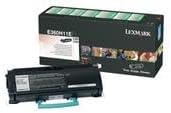
This image displays the Lexmark E360H11A High Yield Return Program Toner Cartridge alongside its retail packaging. The cartridge is black with a light blue handle, and the box features Lexmark branding and product details.
Sąranka ir diegimas
Follow these steps to properly install the toner cartridge in your Lexmark E360, E460, or E462 series printer:
- Išjunkite spausdintuvą: Ensure your printer is turned off and unplugged from the power outlet before beginning the installation process.
- Atidaryti priekinį viršelį: Open the front cover of your Lexmark printer to access the toner cartridge compartment.
- Išimkite seną kasetę (jei taikoma): If replacing an old cartridge, carefully pull it straight out of the printer. Place it in a protective bag for recycling.
- Išpakuokite naują kasetę: Remove the new Lexmark E360H11A toner cartridge from its packaging. Avoid touching the green drum surface.
- Purtymo kasetė: Gently shake the new cartridge horizontally 5-6 times to distribute the toner evenly.
- Nuimkite apsauginius sandariklius: Carefully remove any protective tapes or seals from the cartridge as indicated in your printer's specific manual.
- Įdėkite naują kasetę: Sulygiuokite naują kasetę su spausdintuvo viduje esančiais kreiptuvais ir tvirtai stumkite ją, kol ji spragtelės ir užsifiksuos vietoje.
- Uždaryti priekinį viršelį: Uždarykite priekinį spausdintuvo dangtį.
- Spausdintuvo įjungimas: Plug in and turn on your printer. The printer will typically perform a self-test and recognize the new cartridge.
Refer to your specific Lexmark printer's user manual for detailed instructions and illustrations.
Naudojimo instrukcijos
Once the Lexmark E360H11A toner cartridge is installed, your printer is ready for operation. The cartridge functions automatically as part of the printing process.
- Spausdinimas: Initiate print jobs from your computer or device as you normally would. The printer will draw toner from the cartridge to create monochrome prints.
- Tonerio lygio stebėjimas: Most Lexmark printers provide a way to monitor toner levels through the printer's control panel or software utility. Monitor these levels to know when a replacement cartridge will be needed.
- Spausdinimo kokybė: If print quality degrades (e.g., faded prints, streaks), it may indicate a low toner level or an issue with the cartridge. Refer to the Troubleshooting section.
Priežiūra
Tinkamas tvarkymas ir laikymas gali pailginti jūsų dažų kasetės tarnavimo laiką ir našumą:
- Saugykla: Store unused cartridges in their original sealed packaging in a cool, dry environment, away from direct sunlight and extreme temperatures.
- Tvarkymas: Always handle the cartridge by its designated handles or edges. Avoid touching the imaging drum.
- Išmetimas/perdirbimas: This is a Lexmark Return Program Toner Cartridge. Please return the empty cartridge to Lexmark for proper recycling. Instructions for return are typically included with the new cartridge or can be found on the official Lexmark website. Do not dispose of cartridges in regular waste.
Trikčių šalinimas
Jei kyla problemų dėl dažų kasetės, apsvarstykite šiuos dažniausiai pasitaikančius sprendimus:
| Problema | Galima priežastis | Sprendimas |
|---|---|---|
| Išblukę arba šviesūs atspaudai | Low toner level; uneven toner distribution. | Švelniai pakratykite kasetę horizontaliai. Jei problema išlieka, pakeiskite kasetę. |
| Dryžiai arba linijos atspauduose | Dirty imaging drum; damaged cartridge. | Do not touch the drum. If the cartridge is new, ensure all seals are removed. If problem persists, replace the cartridge. |
| "Toner Low" or "Replace Cartridge" Message | Toner is genuinely low; cartridge not seated correctly. | Reseat the cartridge firmly. If message persists, replace with a new cartridge. |
| Kasetė neatpažinta | Improper installation; faulty cartridge. | Remove and reinsert the cartridge, ensuring it clicks into place. Restart the printer. If issue continues, contact Lexmark support. |
For more complex issues, consult your printer's specific user manual or the Lexmark support websvetainę.
Specifikacijos
| Funkcija | Detalė |
|---|---|
| Produkto tipas | Tonerio kasetė |
| Prekės ženklas | Lexmark |
| Dalies numeris | E360H11A |
| Suderinamumas | Lexmark E360, E460, E462 Series Monochrome Laser Printers |
| Spaudos technologija | Vienspalvis lazeris |
| Puslapių išeiga | Up to 9,000 pages (ISO/IEC 19752) |
| Ypatinga funkcija | High Yield, Return Program Cartridge |
| Įtraukti komponentai | Tonerio kasetė |
| ASIN | B00434R3GI |
| Pasiekiama pirmoji data | 15 m. rugsėjo 2010 d |
Informacija apie garantiją
Lexmark toner cartridges are manufactured to high quality standards. For specific warranty terms and conditions applicable to your Lexmark E360H11A toner cartridge, please refer to the documentation included with your printer or visit the official Lexmark website. Warranty coverage typically addresses defects in materials and workmanship under normal use.
Palaikymas
If you require further assistance or have questions regarding your Lexmark E360, E460, E462 Series High Yield Return Program Toner Cartridge, please contact Lexmark Customer Support:
- „Lexmark“ oficialus asmuo Websvetainė: www.lexmark.com/support
- Internetiniai ištekliai: Access FAQs, drivers, and troubleshooting guides.
- Kontaktinė informacija: Find phone numbers or chat options for direct support on the Lexmark support websvetainę.
When contacting support, please have your printer model and toner cartridge part number (E360H11A) ready.
Ask a question about this manual
Ask about setup, troubleshooting, compatibility, parts, safety, or missing instructions. Manuals+ will review the question and use this page’s manual context to help answer it.