Įvadas
This manual provides instructions for the safe and effective use of your Generic SC-D163 Halogen Light. This light is designed to provide supplementary illumination for digital cameras and camcorders, enhancing photo and video quality in various lighting conditions. Please read this manual thoroughly before operating the device and retain it for future reference.
Saugos informacija
- Įspėjimas apie karštį: The halogen bulb generates significant heat during operation. Do not touch the bulb or the light housing immediately after use. Allow it to cool down completely before handling.
- Akių apsauga: Avoid looking directly into the light when it is on, as it can cause eye strain or damage.
- Vėdinimas: Ensure adequate ventilation around the light during operation to prevent overheating.
- Maitinimo šaltinis: Use only the specified AAA batteries and charger. Incorrect power sources can damage the device or pose a fire hazard.
- Vandens ekspozicija: This device is not waterproof. Do not expose it to rain, moisture, or immerse it in water.
- Vaikai: Prietaisą laikykite vaikams nepasiekiamoje vietoje.
- Šalinimas: Išmeskite baterijas ir prietaisą pagal vietinius reikalavimus.
Pakuotės turinys
Patikrinkite, ar pakuotėje yra visi reikalingi daiktai:
- Generic SC-D163 Halogen Light Unit
- 2x AAA baterijos
- Akumuliatoriaus įkroviklis
- Vartotojo vadovas (šis dokumentas)
Produktas baigtasview
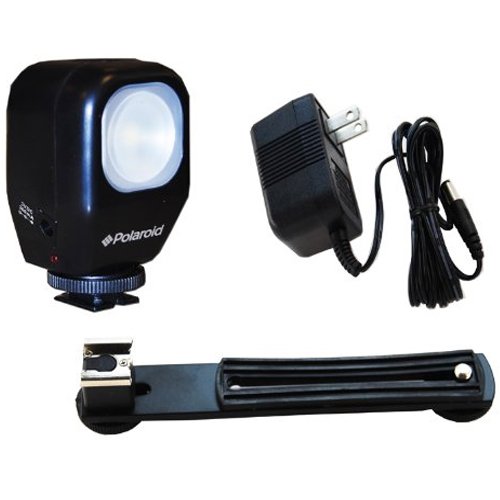
1 pav.: priekis view of the Generic SC-D163 Halogen Light, showing the light panel and mounting bracket.
The SC-D163 Halogen Light features a compact design with a 3-watt halogen bulb, providing bright, consistent illumination. It includes a universal mounting bracket for easy attachment to most digital cameras and camcorders. The unit is powered by two AAA batteries, which can be recharged using the included charger.
Sąranka
- Įkrauti baterijas: Before first use, fully charge the two AAA batteries using the provided charger. Insert the batteries into the charger according to the polarity markings and plug the charger into a suitable power outlet.
- Įdėkite baterijas: Open the battery compartment on the light unit. Insert the charged AAA batteries, ensuring correct polarity (+/-) as indicated inside the compartment. Close the battery compartment securely.
- Šviesos montavimas:
- Locate the accessory shoe or mounting point on your camera or camcorder.
- Slide the mounting bracket of the SC-D163 Halogen Light into the accessory shoe.
- Tighten the locking screw (if present on your camera/camcorder or the light's bracket) to secure the light in place. Do not overtighten.
Naudojimo instrukcijos
- Maitinimo įjungimas/išjungimas: Locate the power switch on the light unit. Slide the switch to the "ON" position to turn on the halogen light. Slide it to the "OFF" position to turn off the light.
- Padėties nustatymas: Adjust the angle of the light as needed to illuminate your subject. Ensure the light does not cast harsh shadows or create glare.
- Baterijos veikimo laikas: The operating time will vary depending on the battery charge level and quality. If the light dims significantly, it indicates low battery power.
Priežiūra
- Valymas: Use a soft, dry cloth to clean the exterior of the light unit. Do not use abrasive cleaners or solvents. For the halogen bulb, use a clean, lint-free cloth and avoid touching the glass directly with bare hands, as oils can reduce bulb life.
- Lemputės keitimas: The 3-watt halogen bulb is replaceable. If the bulb burns out, ensure the unit is off and cool. Carefully remove the old bulb and insert a new, compatible 3-watt halogen bulb. Refer to the bulb's packaging for specific replacement instructions.
- Akumuliatoriaus priežiūra: Remove batteries if the light will not be used for an extended period to prevent leakage. Store batteries in a cool, dry place.
Trikčių šalinimas
| Problema | Galima priežastis | Sprendimas |
|---|---|---|
| Šviesa neįsijungia. |
|
|
| Šviesa blanki. |
|
|
| Šviesos mirgėjimas. |
|
|
Specifikacijos
| Modelio numeris: | SC-D163-ZE-VLK18 |
| Šviesos tipas: | Halogenas |
| Lemputė Wattage: | 3 vatų |
| Maitinimo šaltinis: | 2x AAA baterijos |
| Prekės svoris: | 1 svaras (maždaug 0.45 kg) |
| Gamintojas: | General Brand |
Garantija ir palaikymas
For warranty information and customer support, please refer to the documentation provided by your retailer at the time of purchase. As this is a Generic branded product, specific warranty terms may vary. For technical assistance or inquiries, please contact the retailer or the manufacturer, General Brand, directly.
Pirmą kartą prieinama: 2010 m. gruodžio 2 d.


