
1. Įvadas
The APC SMT2200RM2U Smart-UPS is a 2200VA/1980W line-interactive uninterruptible power supply designed to provide reliable power protection for servers, storage, routers, and switches in network wiring closets and cabinets. This unit features a sine wave output, high-efficiency green mode, and includes serial and USB connectivity with a SmartSlot for accessory cards. It is designed for 2U rackmount installations.
Pagrindinės funkcijos:
- 2U ant stovo montuojamas dizainas
- Sine Wave Output for sensitive electronics
- High-Efficiency Green Mode to save energy
- Serial & USB with SmartSlot for accessory cards
- Automatinis ttage reglamentas (AVR)
- Hot-swappable batteries for easy maintenance
2. Saugos informacija
Please read and understand all safety instructions before installing, operating, or maintaining the UPS. Failure to follow these instructions may result in serious injury or equipment damage.
Bendra sauga:
- Šis UPS skirtas naudoti tik patalpose.
- Nenaudokite UPS tiesioginiuose saulės spinduliuose, ten, kur yra sąlyčio su skysčiais arba kur yra per daug dulkių ar drėgmės.
- Užtikrinkite tinkamą vėdinimą aplink UPS.
- Do not open the UPS enclosure. There are no user-serviceable parts inside except for the battery.
Elektros sauga:
- Connect the UPS power cable directly to a grounded wall outlet. Do not use extension cords or adapters.
- Įsitikinkite, kad įvesties ttage of the UPS matches the local utility voltage (120 V).
- Prieš atlikdami bet kokią techninę priežiūrą ar remontą, visada atjunkite UPS nuo elektros tinklo.
- Batteries can present a risk of electrical shock and high short-circuit current. Observe proper precautions.
3. Fizinis viršusview
Priekinis skydelis:
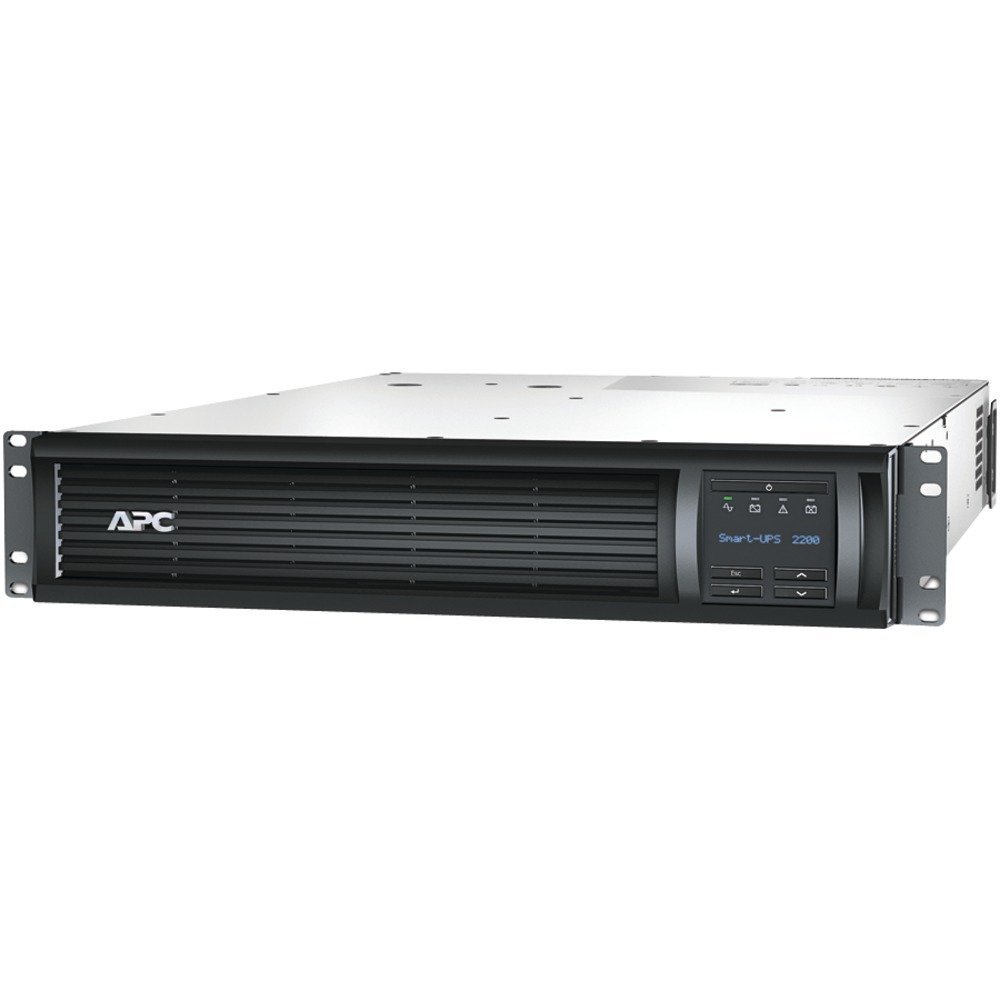
1 pav.: priekis view of the APC SMT2200RM2U Smart-UPS. This image shows the front of the rackmount UPS unit, featuring the APC logo on the left, a ventilated grille across the center, and an LCD display panel with control buttons on the right. The display shows 'Smart-UPS 2200'.
The front panel features an LCD display that provides real-time status information and allows for configuration. Control buttons are located next to the display for navigation and selection.
Galinis skydas:

2 pav.: galinis view of the APC SMT2200RM2U Smart-UPS. This image displays the back of the UPS, showing various power outlets (NEMA 5-15R and NEMA 5-20R), an input power cord, communication ports (USB, Serial), and a SmartSlot for expansion cards. Overload protectors are also visible.
The rear panel includes the main power input, multiple NEMA 5-15R and NEMA 5-20R receptacles for connecting protected equipment, communication ports (USB and Serial), and a SmartSlot for network management cards or other accessories.
4. Sąranka
Stovo montavimas:
The SMT2200RM2U is designed for installation in a standard 19-inch equipment rack, occupying 2U of rack space. Ensure the rack is stable and capable of supporting the UPS's weight (approximately 110.7 pounds). Follow the rack manufacturer's instructions for proper mounting.
Jungtys:
- Prijunkite įvesties maitinimą: Plug the UPS's input power cord into a dedicated, grounded 120V AC outlet.
- Prijunkite įrangą: Plug your critical equipment into the NEMA 5-15R and NEMA 5-20R outlets on the rear panel of the UPS. Distribute the load evenly across the available outlets.
- Ryšio jungtys: Connect the provided USB or serial cable from the UPS to your server for power management software communication. Install an optional network management card into the SmartSlot for remote monitoring and control.
- Pradinis akumuliatoriaus įkrovimas: Allow the UPS to charge for at least 24 hours before connecting critical loads to ensure full battery capacity.
5. Operacija
Maitinimo įjungimas/išjungimas:
- Norėdami įjungti: Press and hold the power button on the front panel until the LCD display illuminates.
- Norėdami išjungti: Press and hold the power button until the UPS powers down. For a graceful shutdown of connected equipment, use the power management software.
LCD ekranas ir valdikliai:
The interactive LCD display provides comprehensive information about the UPS status and allows for various settings adjustments. Use the navigation buttons (up, down, enter, escape) to scroll through menus and select options.
Ekrane paprastai rodoma:
- Įvesties / išvesties tomastage ir dažnis
- Battery Capacity and Charge State
- Apkrovos proctage and Power (Watts/VA)
- Estimated Runtime on Battery
- Operating Mode (On Utility, On Battery, Green Mode)
- Efektyvumas
- Self-Test Results
Automatinis ttage reglamentas (AVR):
UPS funkcija – automatinis garsumo reguliavimas.tage reguliavimas (AVR), skirtas nedideliam tūrio ištaisymuitage fluctuations (sags and surges) without switching to battery power. This preserves battery life and ensures a stable power supply to your connected equipment.
6. Priežiūra
Baterijos keitimas:
The SMT2200RM2U is equipped with hot-swappable batteries, allowing for replacement without powering down connected equipment. Refer to the specific battery replacement instructions provided with your replacement battery kit (e.g., RBC133). Always use genuine APC replacement batteries.
Valymas:
Periodically clean the exterior of the UPS with a dry cloth. Ensure ventilation openings are free from dust and debris to maintain proper airflow and cooling.
7. Problemų sprendimas
If you encounter issues with your UPS, consult the LCD display for error messages or status indicators. Common issues and basic troubleshooting steps include:
- UPS neįsijungia: Check the input power connection and ensure the battery is properly connected and charged.
- Trumpas veikimo laikas su baterija: The battery may be old or not fully charged. Perform a battery self-test or consider battery replacement.
- Perkrovos signalas: Reduce the load connected to the UPS. Ensure the total power consumption of connected devices does not exceed the UPS's capacity (1980W).
- No communication with software: Verify USB/serial cable connections and ensure the network management card (if installed) is properly configured and connected to the network.
For more detailed troubleshooting, refer to the comprehensive user manual available on the APC websvetainėje arba susisiekite su APC technine pagalba.
8. Specifikacijos
| Funkcija | Specifikacija |
|---|---|
| Modelio numeris | SMT2200RM2U |
| Išėjimo galia | 2200 1980 VA / XNUMX W |
| Įvesties tomastage | 120 voltų |
| Išvesties bangos forma | Sinusinės bangos |
| Formos faktorius | 2U stovo laikiklis |
| Baterijos tipas | Uždaryta švino rūgštis |
| Prekės svoris | 110.7 svaro |
| Spalva | Juoda |
| Medžiaga | Metalas |
9. Produkto vaizdo įrašasview
Video 1: Smart-UPS X Video. This video provides a general overview of the Smart-UPS X series, highlighting its features and benefits for power protection.
10. Garantija ir palaikymas
Dėl garantijos informacijos, techninės pagalbos ar paslaugų užklausų apsilankykite oficialioje „APC by Schneider Electric“ svetainėje. website or contact their customer service department. Keep your product's model number (SMT2200RM2U) and serial number readily available when seeking support.