
1. Įvadas
The InFocus IN1112 Ultra Mobile Widescreen DLP Projector is designed for professionals requiring a portable and high-performance display solution. Its combination of high brightness, lightweight design, and compact size makes it suitable for various environments, from brightly lit rooms to limited spaces. This manual provides essential information for setting up, operating, maintaining, and troubleshooting your projector.
Pagrindinės funkcijos:
- Compact and lightweight (approximately 2.7 lbs / 1.2 kg) for easy portability.
- 2200 lumens of brightness for clear projection in various lighting conditions.
- HDMI input for versatile connectivity with modern devices including laptops, smartphones, and gaming consoles.
- Durable design built for frequent travel.
- Widescreen (WXGA) resolution to match contemporary laptop displays.
2. Saugos informacija
Prieš naudodami projektorių, perskaitykite visas saugos instrukcijas, kad išvengtumėte sužalojimų ar įrenginio pažeidimo.
- Do not look directly into the projector lens kai lamp įjungtas. Intensyvi šviesa gali pažeisti akis.
- Ensure proper ventilation. Do not block ventilation openings, as this can lead to overheating and damage.
- Padėkite projektorių ant stabilaus, lygaus paviršiaus, kad jis nenukristų.
- Naudokite tik prie projektoriaus pridėtą maitinimo laidą.
- Saugokite projektorių nuo lietaus, drėgmės ar per didelės drėgmės.
- Visus techninės priežiūros darbus patikėkite kvalifikuotiems techninės priežiūros specialistams. Nebandykite patys atidaryti ar taisyti projektoriaus.
- Projektorių laikykite atokiau nuo šilumos šaltinių ir tiesioginių saulės spindulių.
3. Pakuotės turinys
Patikrinkite, ar pakuotėje yra visi reikalingi daiktai:
- InFocus IN1112 Projector
- Maitinimo kabelis
- Nuotolinio valdymo pultas (su baterijomis)
- VGA laidas
- HDMI kabelis
- Vartotojo vadovas (šis dokumentas)
- Nešiojimo dėklas (gali skirtis priklausomai nuo regiono)
4. Produktas baigtasview
Familiarize yourself with the main components of your InFocus IN1112 projector.
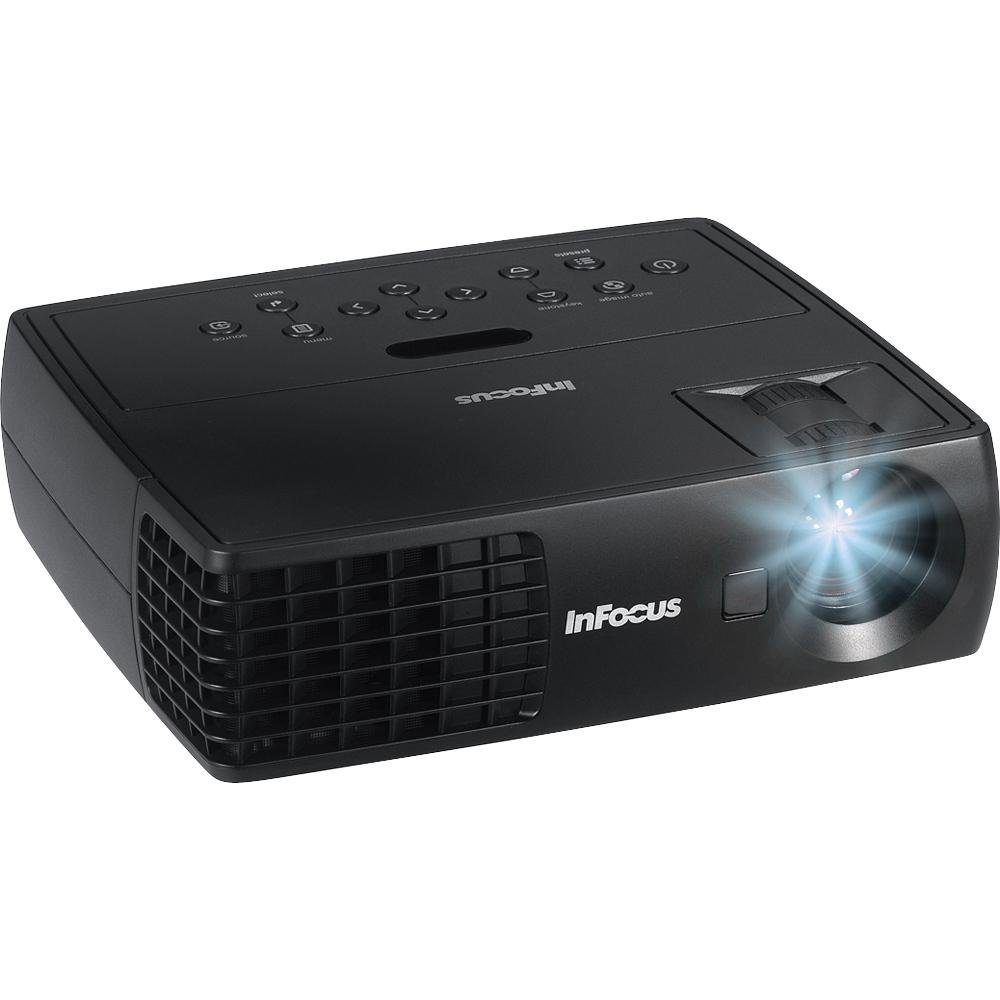
4.1 pav.: priekis view of the InFocus IN1112 Projector. This image displays the projector's lens, ventilation, and part of the control panel.

4.2 pav.: šonas view of an InFocus projector, illustrating typical connectivity ports such as HDMI and VGA.
4.1. Priekinis skydelis
- Projekcinis objektyvas: Perkelia vaizdą į ekraną.
- Fokusavimo žiedas: Reguliuoja projektuojamo vaizdo ryškumą.
- Priartinimo svirtis: Reguliuoja projektuojamo vaizdo dydį.
4.2. Top Panel (Control Panel)
- Maitinimo mygtukas: Įjungia arba išjungia projektorių.
- Meniu mygtukas: Atidaro ekrano meniu (OSD).
- Naršymo mygtukai (aukštyn / žemyn / kairėn / dešinėn): Naršo meniu parinktis.
- Įvesties mygtukas: Patvirtina meniu pasirinkimus.
- Šaltinio mygtukas: Selects the input source (HDMI, VGA, USB).
4.3. Rear Panel (Connectivity)
- HDMI prievadas: Connects to devices with HDMI output (laptops, media players).
- VGA prievadas: Jungiamas prie kompiuterių su VGA išvestimi.
- USB prievadas: Dėl techninės priežiūros arba suderinamų USB įrenginių prijungimo.
- Maitinimo įvestis: Prijungia maitinimo laidą.
5. Sąranka
5.1. Įdėjimas
- Padėkite projektorių ant lygaus, stabilaus paviršiaus.
- Ensure there is adequate space around the projector for ventilation (at least 30 cm / 12 inches).
- Position the projector at an appropriate distance from the screen to achieve the desired image size.
5.2. Maitinimo prijungimas
- Prijunkite maitinimo laidą prie projektoriaus maitinimo įvesties prievado.
- Kitą maitinimo laido galą prijunkite prie įžeminto elektros lizdo.
5.3. Connecting a Source Device
Choose the appropriate cable for your source device:
- HDMI: Connect one end of the HDMI cable to the projector's HDMI port and the other end to your laptop, media player, or other HDMI-enabled device.
- VGA: Connect one end of the VGA cable to the projector's VGA port and the other end to your computer's VGA output. Secure the screws on the VGA connector if available.
6. Operacinis
6.1. Įjungimas/išjungimas
- Norėdami įjungti: Paspauskite projektoriaus valdymo skydelio arba nuotolinio valdymo pulto maitinimo mygtuką. Maitinimo indikatoriaus lemputė ims nuolat šviesti mėlyna spalva.
- Norėdami išjungti: Press the Power button again. A confirmation message may appear. Press Power again to confirm shutdown. The projector will enter a cooling cycle, and the power indicator will flash before turning off.
6.2. Įvesties šaltinio pasirinkimas
Paspauskite Šaltinis button on the projector or remote control repeatedly to cycle through available input sources (e.g., HDMI, VGA). The projector will automatically detect an active signal if connected.
6.3. Vaizdo koregavimas
- Fokusas: Sukite fokusavimo žiedą ant objektyvo, kol vaizdas taps ryškus ir aiškus.
- Mastelio keitimas: Use the zoom lever on the lens to adjust the size of the projected image.
- Keystone korekcija: If the image appears trapezoidal, use the Keystone Correction function in the OSD menu to square the image.
6.4. Using the On-Screen Display (OSD) Menu
- Paspauskite Meniu button on the projector or remote control to open the OSD menu.
- Naudokite Navigacija mygtukais (aukštyn / žemyn / kairėn / dešinėn), kad pereitumėte per meniu parinktis.
- Paspauskite Įeikite mygtuką, kad pasirinktumėte parinktį arba patvirtintumėte nustatymą.
- Naudokite Navigacija mygtukais, kad reguliuotumėte vertes arba pasirinktumėte papildomas parinktis.
- Paspauskite Meniu mygtuką dar kartą, kad išeitumėte iš OSD meniu.
Common OSD settings include Brightness, Contrast, Color Temperature, Aspect Ratio, and Advanced Settings.
7. Priežiūra
7.1. Projektoriaus valymas
- Casing: Šiek tiek naudokite minkštą, be pūkelių šluostę dampened with water or a mild cleaner. Do not use abrasive cleaners or solvents.
- Objektyvas: Use a professional lens cleaning cloth and lens cleaning solution. Gently wipe the lens in a circular motion. Avoid touching the lens with your fingers.
- Vėdinimo angos: Periodically clean the ventilation openings with a soft brush or compressed air to prevent dust buildup.
7.2. Lamp Priežiūra
Projektorius lamp has an operating life of approximately 5000 hours. When the lamp reaches the end of its life, the image brightness may decrease, or the lamp indicator may illuminate. Refer to the full service manual for lamp replacement procedures, which should be performed by qualified personnel.
8. Problemų sprendimas
Šiame skyriuje aptariamos dažniausiai pasitaikančios problemos, su kuriomis galite susidurti naudodami projektoriumi.
| Problema | Galima priežastis | Sprendimas |
|---|---|---|
| Neprojektuojamas vaizdas | Power cable loose; Source not selected; Input device off; Lamp problema. | Check power connection; Select correct input source; Ensure input device is on; Contact support if lamp indicator is active. |
| Vaizdas neryškus | Objektyvas nesufokusuotas; projektorius per arti/toli nuo ekrano. | Sureguliuokite objektyvo fokusavimo žiedą; reguliuokite projektoriaus atstumą arba priartinimą. |
| Vaizdas yra trapecijos formos | Projektorius nėra statmenas ekranui. | Use Keystone Correction in the OSD menu; Reposition the projector. |
| Nuotolinio valdymo pultas neveikia | Batteries dead; Obstruction between remote and projector; Remote sensor blocked. | Replace batteries; Remove obstructions; Ensure remote is pointed at the projector's sensor. |
| Projektorius perkaito ir išsijungia | Užblokuota ventiliacija; Aukšta aplinkos temperatūra. | Ensure ventilation openings are clear; Operate in a well-ventilated area. |
9. Specifikacijos
Detailed technical specifications for the InFocus IN1112 Projector.
| Funkcija | Specifikacija |
|---|---|
| Prekės ženklas | InFocus |
| Modelio pavadinimas | IN1112 Ultra |
| Ekrano tipas | DLP |
| Ryškumas | 2200 liumenų (2100 ANSI liumenų) |
| Gimtoji raiška | 1920 x 1080 (Full HD, though WXGA is mentioned in title, 1920x1080 is in specs) |
| Maksimali ekrano skiriamoji geba | 1920 x 1080 |
| Kontrasto santykis | 2600:1 |
| Ryšio technologija | HDMI, VGA, USB |
| Šviesos šaltinio veikimo laikas | 5000 valandos |
| Prekės svoris | 1.2 kg (2.65 svaro) |
| Vattage | 185 watts (Lamp Vattage: 165 vatai) |
| Spalva | Black (Note: Product images may show white units for illustration) |
| Rekomenduojami naudojimo būdai | Business, Traveling |
| Montavimo tipas | Stalviršio laikiklis |
| Kontrolės metodas | Remote, Button Control |
10. Garantija ir palaikymas
10.1. Informacija apie garantiją
The InFocus IN1112 Projector typically comes with a manufacturer's limited warranty. Please refer to the warranty card included with your product or visit the official InFocus webKonkrečias garantijos sąlygas, įskaitant galiojimo laiką ir aprėpties informaciją, rasite svetainėje. Išsaugokite pirkimo įrodymą, jei prireiktų pateikti garantijos pretenzijas.
10.2. Pagalba klientams
For technical assistance, troubleshooting beyond this manual, or service inquiries, please contact InFocus customer support. You can find contact information, FAQs, and additional resources on the official InFocus websvetainė: www.infocus.com