
Lockwood DGT002-DP-SC
„Lockwood“ mechaninė skaitmeninė spyna SC naudotojo vadovas
Model: DGT002-DP-SC
Brand: Lockwood
1. Įvadas
This manual provides comprehensive instructions for the installation, operation, maintenance, and troubleshooting of your Lockwood Mechanical Digital Lock SC. This lock features mechanical retraction of the latch upon entry of the correct code, a non-sequential code system, and non-handed units for versatile installation. It includes a protective clutch mechanism and is designed to suit doors 28-45mm thick.
The lock operates with a thumbturn on the outside after code entry and a free-exit thumbturn on the inside. It supports one code, always prefixed by 'C', with several thousand combinations possible and a code length of 4 to 6 digits. A holdback feature is included, and it utilizes a medium duty 20mm rim deadlatch. Available finishes include Satin Chrome or Polished Brass.
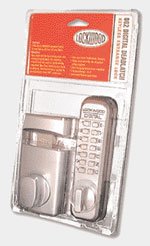
Figure 1: Lockwood Mechanical Digital Lock SC in its retail packaging, showcasing the digital keypad and the lock mechanism.
2. Sąranka ir diegimas
Before beginning installation, ensure all components are present and undamaged. Refer to the included installation template for precise drilling instructions.
2.1 Išpakavimas ir komponentų patikrinimas
- Atsargiai išimkite visus daiktus iš pakuotės.
- Patikrinkite, ar yra visos pakavimo sąraše išvardytos dalys.
- Inspect components for any signs of damage. Do not proceed with installation if parts are damaged.
2.2 Durų paruošimas
- Determine the desired height for the lock on the door.
- Affix the provided drilling template to the door, ensuring it is level and correctly positioned.
- Drill holes according to the template for the spindle, fixing bolts, and latch mechanism.
- Prepare the door edge for the latch plate mortise.
2.3 Lock Assembly and Mounting
- Insert the latch into the prepared mortise in the door edge and secure it with screws.
- Attach the exterior keypad unit, ensuring the spindle is correctly aligned with the latch mechanism.
- Mount the interior thumbturn unit, connecting it to the spindle and securing it with the provided fixing bolts.
- Test the mechanical operation of the latch and thumbturns before closing the door.
3. Naudojimo instrukcijos
The Lockwood Mechanical Digital Lock SC operates using a numerical code. The code is non-sequential, meaning the order of pressing the digits does not matter, only that all correct digits are pressed. The code must always be prefixed by the 'C' button.
3.1 Opening the Lock from Outside
- Press the 'C' button to clear any previous entries.
- Enter your 4 to 6 digit code by pressing the correct numerical buttons. The order of the digits does not matter.
- Once all correct code digits are pressed, turn the thumbturn to retract the latch and open the door.
- Release the thumbturn to allow the latch to extend and secure the door.
3.2 Opening the Lock from Inside
From the inside, the lock provides a free-exit mechanism.
- Simply turn the interior thumbturn to retract the latch and open the door.
- Release the thumbturn to allow the latch to extend and secure the door.
3.3 Changing the Code
Refer to the specific instructions provided with your lock for changing the code. This typically involves removing the lock from the door and adjusting internal tumblers or pins according to the desired new code. It is recommended to perform this operation carefully and test the new code thoroughly before re-installing the lock.
4. Priežiūra
Regular maintenance ensures the longevity and optimal performance of your Lockwood Mechanical Digital Lock SC.
4.1 Valymas
- Išorinius paviršius nuvalykite minkšta, damp audinys.
- Venkite naudoti abrazyvinius valiklius, tirpiklius ar stiprias chemines medžiagas, nes jos gali pažeisti apdailą ir vidinius komponentus.
- For satin chrome finishes, a mild, non-abrasive polish can be used sparingly to maintain luster.
4.2 Tepimas
- Periodically apply a small amount of silicone-based lubricant to the latch bolt and internal moving parts (if accessible without disassembly).
- Do not use oil-based lubricants, as they can attract dust and debris, leading to sluggish operation.
4.3 Bendras patikrinimas
- Check all screws and fixings periodically to ensure they are tight.
- Ensure the door and frame are not warped or misaligned, as this can put undue stress on the lock mechanism.
5. Problemų sprendimas
This section addresses common issues you might encounter with your digital lock.
| Problema | Galima priežastis | Sprendimas |
|---|---|---|
| Lock does not open after code entry. | Incorrect code entered; 'C' button not pressed first; internal mechanism jammed. | Ensure 'C' is pressed before entering the code. Verify the correct code. Check for obstructions around the latch. If issue persists, consult a locksmith. |
| Thumbturn feels stiff or difficult to operate. | Lack of lubrication; misalignment of lock components; debris in mechanism. | Apply silicone lubricant to the latch bolt. Check door and frame alignment. Clean any visible debris. |
| Latch does not fully extend or retract. | Strike plate misalignment; latch bolt obstruction; worn mechanism. | Adjust the strike plate on the door frame. Clear any obstructions. If worn, professional repair or replacement may be necessary. |
| Code change mechanism not working. | Incorrect procedure followed; damaged internal components. | Review the code change instructions carefully. Ensure the lock is fully removed from the door for internal adjustments. If damaged, seek professional assistance. |
6. Specifikacijos
| Funkcija | Detalė |
|---|---|
| Prekės ženklas | Lokvudas |
| Modelio numeris | DGT002-DP-SC |
| Ypatinga funkcija | Be rakto |
| Medžiaga | Žalvaris |
| Stilius | Modernus |
| Vienetų skaičius | 1 |
| Apdailos tipas | Polished (also available in Satin Chrome) |
| Prekės svoris | 2.1 kilogramų (4.62 svarai) |
| Case Depth Required | 92 mm |
| Backset | 60 mm |
| Door Thickness Suitability | 28-45 mm |
| Kodo ilgis | 4 to 6 digits (non-sequential) |
| Užrakto tipas | Medium duty 20mm rim deadlatch |
| Atsparus oro sąlygoms | Taip |
7. Garantija ir palaikymas
Lockwood products are manufactured to high standards and are backed by a manufacturer's warranty. For specific warranty terms and conditions, please refer to the warranty card included with your product or visit the official Lockwood websvetainę.
For technical support, troubleshooting assistance beyond this manual, or to inquire about replacement parts, please contact Lockwood customer service. Contact details can typically be found on the product packaging or the official Lockwood websvetainę.
When contacting support, please have your product model number (DGT002-DP-SC) and purchase date readily available.
Ask a question about this manual
Ask about setup, troubleshooting, compatibility, parts, safety, or missing instructions. Manuals+ will review the question and use this page’s manual context to help answer it.