
Įvadas
This manual provides comprehensive instructions for the safe and effective installation, operation, and maintenance of the Lutron NFTV-WH Standard Switch. The NFTV-WH is a 0-10VDC single-pole slide-to-off dimmer designed for fluorescent lighting applications. It incorporates advanced lighting innovations such as voltage compensation, radio frequency interference suppression, and an accessible Air gap switch for enhanced safety and quality. The dimmer also features power failure memory, which restores the last-used setting after a power interruption.
Produktas baigtasview
The Lutron NFTV-WH dimmer is engineered for durability and reliable performance. It is constructed from heavy-duty materials, including brass and copper, ensuring a long product life. A matching wall plate is included for a complete installation.
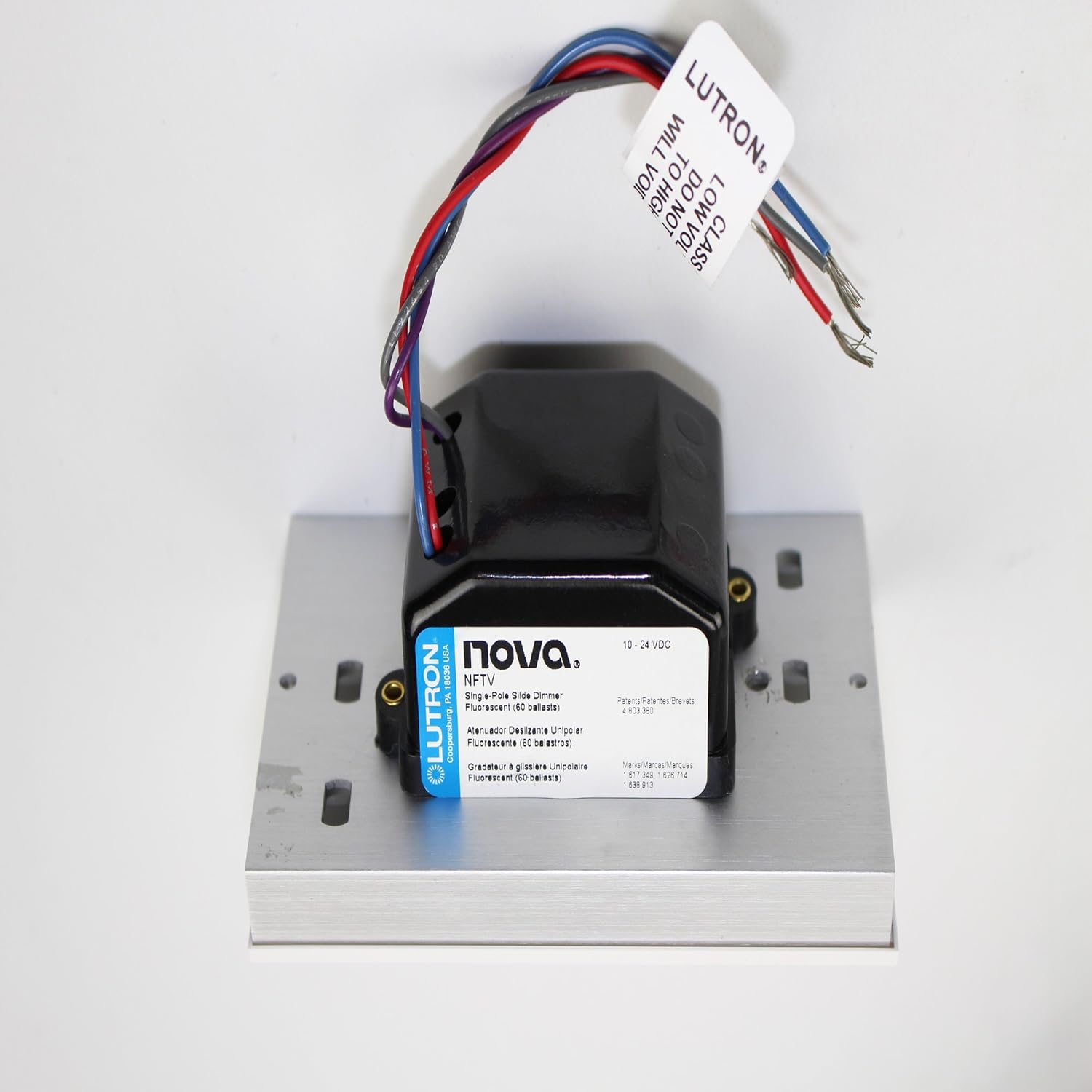
1 paveikslas: Lutron NFTV-WH 0-10VDC Fluorescent Dimmer Module. This image displays the dimmer module with its connected wires, illustrating the compact design and wiring terminals essential for installation.

2 paveikslas: Lutron NFTV-WH Product Packaging. This image shows the retail packaging for the Lutron NFTV-WH, highlighting the brand, model number, and key product information as it appears on the box.
Sąranka ir diegimas
Svarbi saugos informacija: Before beginning installation, ensure power is turned off at the circuit breaker. Installation should be performed by a qualified electrician or in accordance with local electrical codes.
- Maitinimo atjungimas: Suraskite šviestuvą valdantį grandinės pertraukiklį ir išjunkite maitinimą. Patikrinkite, ar maitinimas išjungtas, naudodami įtampos reguliatorių.tage testeris.
- Pašalinti esamą jungiklį: Atsargiai nuimkite esamą sieninę plokštę ir jungiklį nuo sieninės dėžutės. Atjunkite laidus nuo seno jungiklio.
- Wiring the NFTV-WH:
- Connect the line (hot) wire to the appropriate terminal on the NFTV-WH.
- Connect the load wire (to the light fixture) to the appropriate terminal.
- Connect the neutral wire (if present and required by local code) and ground wire according to standard electrical practices.
- Connect the 0-10VDC control wires to the compatible fluorescent dimming ballasts. Refer to the ballast manufacturer's instructions for specific wiring details.
Note: The NFTV-WH is a single-pole switch, meaning it controls a light from one location.
- Montavimas: Carefully fold the wires into the wall box and secure the NFTV-WH dimmer to the wall box using the provided screws.
- Įdiekite sieninę plokštę: Attach the included wall plate over the dimmer.
- Atkurti maitinimą: Prie grandinės pertraukiklio vėl įjunkite maitinimą.
Naudojimo instrukcijos
The Lutron NFTV-WH dimmer provides intuitive control over your fluorescent lighting.
- Įjungimas / išjungimas: Use the slide switch to turn the lights on or off. The switch operates in a slide-to-off manner.
- Pritemdymas: Move the slide control up or down to adjust the light level. Moving the slide up increases brightness, and moving it down decreases brightness.
- Oro tarpo jungiklis: For maintenance or bulb replacement, pull the Air gap switch (located on the dimmer) to completely disconnect power to the fixture, ensuring safety. Push it back in for normal operation.
- Maitinimo gedimo atmintis: In the event of a power interruption, the dimmer will recall and restore the last set light level once power is restored.
- ttage Atlyginimas: The dimmer features square law dimming, which increases voltage response at low control levels to compensate for infrared loss, providing a smoother dimming experience.
Priežiūra
The Lutron NFTV-WH dimmer is designed for minimal maintenance. To clean the surface, wipe with a soft, damp cloth. Do not use abrasive cleaners or solvents, as these can damage the finish. Ensure the Air gap switch is pulled out before cleaning to disconnect power.
Trikčių šalinimas
- Šviesos neįsijungia:
- Patikrinkite grandinės pertraukiklį, kad įsitikintumėte, jog įjungtas maitinimas.
- Verify the Air gap switch is fully pushed in.
- Įsitikinkite, kad visos laidų jungtys yra saugios.
- Confirm that the fluorescent ballasts are compatible with 0-10VDC dimming.
- Lights do not dim properly:
- Ensure the 0-10VDC control wires are correctly connected to the ballasts.
- Verify the ballasts are functioning correctly and are designed for dimming.
- Check for any loose connections in the control wiring.
- Pertraukiamas veikimas:
- Check for loose wiring connections at the dimmer and the light fixture.
- Ensure the dimmer is not overloaded (refer to specifications for wattagir).
Specifikacijos
| Modelis | NFTV-WH |
| Veikimo režimas | Off, Slide Switch |
| Dabartinis reitingas | 16 Amps |
| Kontakto tipas | Paprastai atidarytas |
| Jungties tipas | Sraigtiniai gnybtai |
| Jungiklio tipas | Dimmer jungiklis |
| Terminalas | Varžtas |
| Medžiaga | Brass, Copper |
| Matmenys (I x P x A) | 2.75 x 4.56 x 4.56 colio |
| Grandinės tipas | 1 krypties (vienpolis) |
| Montavimo tipas | Sieninis laikiklis |
| Pavaros tipas | Skaidrė |
| Pozicijos skaičius | 1 |
| Kontrolės metodas | Touch (Slide) |
| Ryšio protokolas | Infrared (Internal control, not user-facing) |
| Vattage | 1920 vatų |
| Spalva | Baltas |
| Tarptautinis apsaugos įvertinimas | IP54 |
| Specifikacija atitiko | UL |
| UPC | 027557752701 |
| Prekės svoris | 1 svaras |
| Įtraukti komponentai | Nova Fluor. 0-10V Control Wh, Wall Plate |
Informacija apie garantiją
The Lutron NFTV-WH Standard Switch is covered by a manufacturer's warranty. For specific details regarding warranty coverage, duration, and claims process, please refer to the documentation included with your product or contact Lutron customer support directly.
Pagalba klientams
For further assistance, technical support, or to explore other Lutron products, please visit the official Lutron websvetainėje arba susisiekite su klientų aptarnavimo skyriumi.
Daugiau informacijos ir pagalbos išteklių galite rasti apsilankę „Lutron“ parduotuvė „Amazon“ platformoje.