
1. Įvadas
This manual provides instructions for the installation, operation, and maintenance of your D-Link DWA-123 Wireless N 150 USB Adapter. This device allows you to connect your desktop or notebook computer to a wireless network with speeds up to 150 Mbps, ideal for web naršymas, file sharing, and streaming.
2. Produktas baigtasview
The D-Link DWA-123 is a compact USB adapter designed for easy integration into your computer system. It supports Wireless N 150 technology, offering enhanced speed and range compared to older wireless standards.
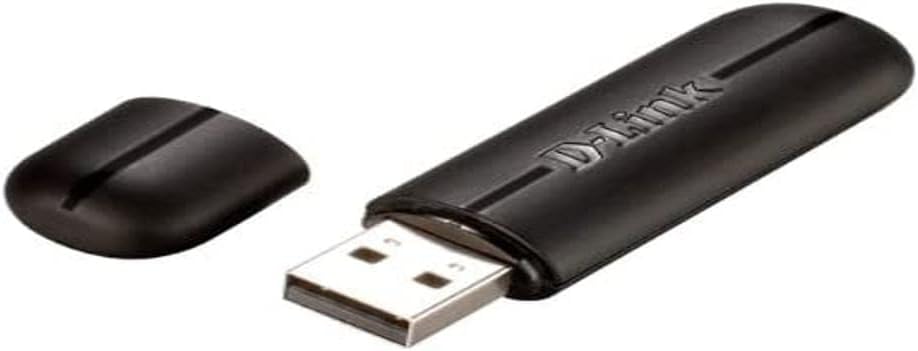
Figure 2.1: The D-Link DWA-123 Wireless N 150 USB Adapter. This image shows the adapter with its protective cap removed, revealing the standard USB Type-A connector. The D-Link logo is visible on the adapter's body.
Pagrindinės funkcijos:
- Wireless N 150 Technology: Provides faster wireless speeds and better coverage.
- Up to 150 Mbps Data Rate: Suitable for various internet activities.
- WPS External Button Design: Simplifies secure wireless connection setup.
- Išplėstinė sauga: Supports WPA/WPA2 (PSK, AES, TKIP) and 128/64-bit WEP for secure network access.
- Veikimo dažnis: 2.4 GHz iki 2.48 GHz.
- Standartai: IEEE 802.11 b/g/n compliant.

2.2 pav. Iš arti view of the D-Link DWA-123 adapter. This image highlights a small indicator light, typically used to show network activity or connection status.
2.3 pav. Išsamus view of the D-Link DWA-123 adapter's casing. This image focuses on the textured surface and design elements of the adapter's black plastic housing.
3. Sąrankos instrukcijos
Follow these steps to install your D-Link DWA-123 Wireless N 150 USB Adapter:
- Įdėkite adapterį: Plug the DWA-123 USB adapter into an available USB port on your desktop or notebook computer. Ensure it is fully seated.
- Tvarkyklės diegimas:
- Automatic Installation (Windows): In most modern Windows operating systems, the necessary drivers may install automatically. Wait for a notification indicating that the device is ready for use.
- Rankinis montavimas: If drivers do not install automatically, you may need to use the included driver CD (if provided) or download the latest drivers from the official D-Link support websvetainę. Tvarkyklės diegimo metu vykdykite ekrane pateikiamus nurodymus.
- Patikrinkite įdiegimą: After driver installation, check your computer's Device Manager (Windows) or System Information (macOS) to confirm that the DWA-123 adapter is recognized and functioning correctly.
4. Naudojimo instrukcijos
Once the DWA-123 adapter is installed, you can connect to a wireless network:
- Prieiga prie belaidžio ryšio nustatymų:
- „Windows“: Click the wireless network icon in the system tray (usually in the bottom-right corner of the screen).
- macOS: Click the Wi-Fi icon in the menu bar (usually in the top-right corner of the screen).
- Pasirinkite tinklą: Atsiras galimų belaidžių tinklų sąrašas. Pasirinkite norimą tinklą (SSID).
- Prisijunkite:
- Rankinis prijungimas: Enter the network security key or passphrase when prompted.
- WPS („Wi-Fi“ apsaugota sąranka): If your router supports WPS and has a WPS button, you can press the WPS button on your router and then press the WPS button on the DWA-123 adapter (if available, or follow software prompts) within two minutes to establish a secure connection automatically.
- Patikrinkite ryšį: Once connected, the wireless network icon will indicate a successful connection, and you should be able to access the internet.
5. Priežiūra
To ensure optimal performance and longevity of your D-Link DWA-123 adapter:
- Laikyti švarų: Gently wipe the adapter with a soft, dry cloth to remove dust. Avoid using liquid cleaners or solvents.
- Apsaugokite USB jungtį: When not in use, keep the protective cap on the USB connector to prevent dust and damage.
- Venkite ekstremalių sąlygų: Nelaikykite adapterio ekstremalioje temperatūroje, drėgmėje ar tiesioginiuose saulės spinduliuose.
- Tvarkyklės atnaujinimai: Reguliariai tikrinkite „D-Link“ palaikymo tarnybą websvetainę, kurioje rasite atnaujintų tvarkyklių, kad būtų užtikrintas suderinamumas ir našumo patobulinimai.
6. Problemų sprendimas
If you encounter issues with your DWA-123 adapter, consider the following:
- Neaptikta jokių belaidžių tinklų:
- Įsitikinkite, kad adapteris tinkamai įdėtas į USB prievadą.
- Verify that the drivers are correctly installed.
- Check if your wireless router is powered on and broadcasting a signal.
- Try moving closer to the wireless router.
- Nepavyksta prisijungti prie tinklo:
- Double-check the network security key or passphrase. It is case-sensitive.
- Paleiskite kompiuterį ir belaidį maršrutizatorių iš naujo.
- Ensure your network is not configured to block new devices (e.g., MAC address filtering).
- Lėtas ryšio greitis:
- Įsitikinkite, kad esate optimaliame belaidžio maršrutizatoriaus diapazone.
- Patikrinkite, ar nėra trukdžių iš kitų elektroninių prietaisų (pvz., mikrobangų krosnelių, belaidžių telefonų).
- Atnaujinkite adapterio tvarkykles į naujausią versiją.
- Verify that your router is configured for Wireless N mode if you expect 150 Mbps speeds.
7. Techninės specifikacijos
| Funkcija | Detalė |
|---|---|
| Modelio numeris | DWA-123 |
| bevielio ryšio standartas | IEEE 802.11b/g/n |
| Belaidis greitis | Up to 150 Mbps (Wireless N 150) |
| Dažnių diapazonas | 2.4 GHz–2.48 GHz |
| Saugumas | WPA/WPA2 (PSK, AES, TKIP), 128/64-bit WEP, WPS |
| Sąsaja | USB 2.0 |
| Veiklos ttage | 5V DC |
| Matmenys | Approximately 25.02 x 12.54 x 16.38 cm (Product dimensions from data, likely packaging) |
| Svoris | Maždaug 100 g |
| Suderinami įrenginiai | Desktop computers (and notebooks) |
8. Garantija ir palaikymas
For warranty information and technical support, please refer to the documentation included with your product or visit the official D-Link website. D-Link provides various support resources, including FAQs, driver downloads, and contact information for technical assistance.
Palaikymas internetu: www.dlink.com/support