
1. Įvadas
This manual provides detailed instructions for the installation, configuration, and operation of the D-Link Xstack DGS-3120-48PC Managed L3 Switch. The DGS-3120-48PC is a high-performance Layer 3 managed switch designed for enterprise and campus networks, offering advanced features for network management, security, and quality of service.
2. Pagrindinės savybės
- 44 x 10/100/1000BASE-T PoE Ports: Provides power and data over a single Ethernet cable to connected devices.
- 4 x Combo SFP Ports: Offers flexible uplink options using fiber or copper transceivers.
- Layer 3 Management: Supports static routing for efficient network segmentation and traffic management.
- Išplėstinė QoS: Prioritizes network traffic to ensure optimal performance for critical applications.
- Tvirtos saugos savybės: Includes access control lists (ACLs), port security, and authentication mechanisms.
- Standard and Enhanced Software Images: Offers different feature sets (SI for basic L2/L3, EI for advanced L3 features like ERPS, Double VLAN, IPv6).
3. Pakuotės turinys
Verify the following items are included in your DGS-3120-48PC package:
- D-Link DGS-3120-48PC Switch
- Maitinimo laidas
- Stovo tvirtinimo komplektas (laikikliai ir varžtai)
- Konsolės laidas (RJ-45 iki DB-9)
- Guminės kojelės (montuojant darbalaukyje)
- Greito montavimo vadovas
Jei kurio nors elemento trūksta arba jis pažeistas, kreipkitės pagalbos į vietinį „D-Link“ platintoją.
4. Fizinis aprašymas
4.1. Priekinis skydelis
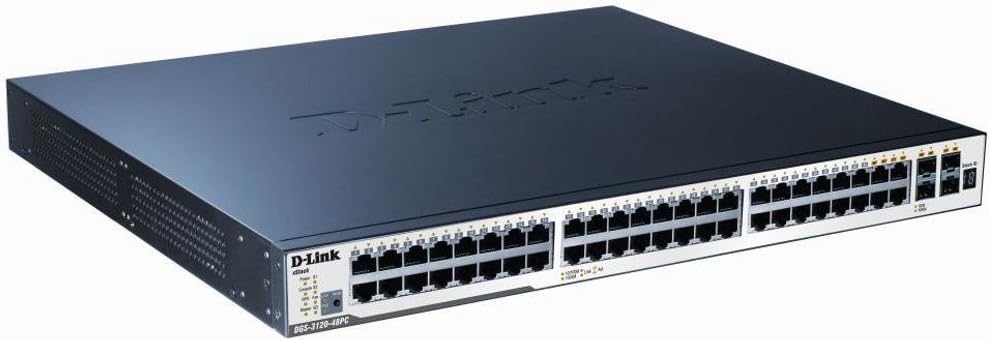
Figure 1: D-Link DGS-3120-48PC Front Panel
The front panel of the DGS-3120-48PC switch features 44 Gigabit Ethernet ports with Power over Ethernet (PoE) capabilities, and 4 additional combo SFP ports for flexible uplink connections. LED indicators provide status information for power, system, and individual port activity.
LED indikatoriai:
- Maitinimo šviesos diodas: Rodo maitinimo būseną (įjungta / išjungta).
- Sistemos šviesos diodas: Rodo sistemos veikimo būseną.
- Link/Act/Speed LEDs (per port): Indicates link status, activity, and connection speed (10/100/1000 Mbps).
- „PoE“ būsenos šviesos diodai (kiekvienam „PoE“ prievadui): Nurodo PoE energijos tiekimo būseną.
Prievadai:
- RJ-45 Ports (1-44): 10/100/1000BASE-T Gigabit Ethernet ports with PoE.
- Combo SFP Ports (45-48): Can be used with SFP transceivers for fiber connections or with corresponding RJ-45 ports for copper connections.
- Konsolės prievadas: RJ-45 port for command-line interface (CLI) management.
4.2. Galinis skydelis
The rear panel typically includes the AC power inlet, grounding screw, and possibly ventilation openings. Specific details may vary slightly.
- Kintamosios srovės maitinimo įvadas: Jungiamas prie maitinimo laido.
- Įžeminimo varžtas: Įžeminimo kabelio prijungimui.
5. Sąranka ir diegimas
5.1. Saugos priemonės
- Užtikrinkite maitinimo šaltinio ttage matches the switch's requirements.
- Neuždenkite vėdinimo angų.
- Avoid placing the switch in direct sunlight, near heat sources, or in areas with high humidity.
- Užtikrinkite tinkamą įžeminimą, kad išvengtumėte elektros pavojaus.
5.2. Jungiklio montavimas
Darbalaukio diegimas:
- Pritvirtinkite pridedamas gumines kojeles prie jungiklio apačios.
- Padėkite jungiklį ant lygaus, stabilaus paviršiaus, kuriame būtų tinkama ventiliacija.
Stovo montavimas:
- Attach the two rack-mounting brackets to the sides of the switch using the provided screws.
- Secure the switch in a standard 19-inch equipment rack using appropriate rack screws.
5.3. Maitinimo prijungimas
- Connect one end of the AC power cord to the power inlet on the rear panel of the switch.
- Kitą maitinimo laido galą prijunkite prie įžeminto elektros lizdo.
- Ensure the Power LED on the front panel illuminates, indicating the switch is receiving power.
5.4. Tinklo įrenginių prijungimas
- Connect Ethernet cables from your network devices (e.g., computers, servers, access points) to the RJ-45 ports (1-44) on the switch.
- For fiber uplinks, insert compatible SFP transceivers into the SFP ports (45-48) and connect fiber optic cables.
- Observe the Link/Act/Speed LEDs for each connected port to confirm proper connection and activity.
6. Jungiklio valdymas
6.1. Pradinė konfigūracija
The DGS-3120-48PC can be configured via a webgrafinę vartotojo sąsają (GUI) arba komandinės eilutės sąsają (CLI) per konsolės prievadą.
Web- pagrįsta GUI:
- Connect a computer to any of the switch's Ethernet ports.
- Nustatykite kompiuterio IP adresą taip, kad jis būtų tame pačiame potinklyje kaip ir numatytasis komutatoriaus IP adresas (numatytąjį IP adresą žr. greitojo diegimo vadove).
- Atidarykite a web naršyklę ir įveskite numatytąjį komutatoriaus IP adresą.
- Log in using the default username and password (refer to documentation).
Komandinės eilutės sąsaja (CLI):
- Connect the console cable from your computer's serial port to the switch's console port.
- Use a terminal emulation program (e.g., PuTTY, Tera Term) with appropriate serial port settings (e.g., 115200 baud, 8 data bits, no parity, 1 stop bit, no flow control).
- Prisijunkite naudodami numatytąjį vartotojo vardą ir slaptažodį.
6.2. Pagrindinė tinklo konfigūracija
After initial access, it is recommended to:
- Pakeiskite numatytąjį administratoriaus slaptažodį.
- Configure the switch's IP address, subnet mask, and default gateway.
- Set up system time and NTP synchronization.
6.3. Išplėstinės funkcijos
The DGS-3120-48PC supports a wide range of advanced features:
- VLAN (virtualūs vietiniai tinklai): Segmentuokite savo tinklą, kad pagerintumėte saugumą ir našumą.
- Aprėpiančio medžio protokolas (STP/RSTP/MSTP): Prevents network loops.
- Ryšių agregavimas (LACP): Padidina pralaidumą ir užtikrina ryšio perteklių.
- Paslaugos kokybė (QoS): Prioritizes traffic based on various criteria.
- Prieigos kontrolės sąrašai (ACL): Filtruoja tinklo srautą pagal apibrėžtas taisykles.
- PoE Management: Control power delivery to connected PoE devices.
- Statinis maršrutas: Configure routes for inter-VLAN or inter-network communication.
Refer to the D-Link DGS-3120 Series User Manual for detailed configuration instructions on these advanced features.
7. Priežiūra
7.1. Firmware atnaujinimai
Reguliariai tikrinkite „D-Link“ palaikymo tarnybą website for the latest firmware versions. Firmware updates can provide new features, performance improvements, and security patches. Follow the instructions provided with the firmware download carefully.
7.2. Valymas
Norėdami išlaikyti optimalų našumą ir pailginti jungiklio tarnavimo laiką:
- Ensure the switch is powered off and unplugged before cleaning.
- Jungiklio išorę nuvalykite minkštu, sausu skudurėliu.
- Dulkėms iš ventiliacijos angų valyti naudokite suslėgtą orą.
- Nenaudokite skystų ar aerozolinių valiklių.
8. Problemų sprendimas
This section provides solutions to common issues you may encounter with the DGS-3120-48PC switch.
| Problema | Galima priežastis | Sprendimas |
|---|---|---|
| Nėra maitinimo LED indikacijos | Power cord not connected; Power outlet faulty; Switch power supply issue. | Ensure power cord is securely connected. Test power outlet with another device. Contact D-Link support if issue persists. |
| No Link/Act LED on connected port | Incorrect cable type; Faulty cable; Connected device is off or faulty; Port configuration issue. | Use appropriate Ethernet cable (Cat5e/6). Replace cable. Ensure connected device is powered on and functioning. Check port status in switch management interface. |
| Negaliu prieiti web GUI | Incorrect IP address configuration on PC; Switch IP address changed; Network connectivity issue. | Verify PC's IP address is in the same subnet as the switch. Try accessing via console CLI. Check network cable connection. |
| PoE įrenginys negauna maitinimo | PoE budget exceeded; Device not PoE compatible; Cable issue; PoE port disabled. | Check PoE budget in switch management. Ensure device is 802.3af/at compliant. Verify cable integrity. Enable PoE on the port if disabled. |
9. Specifikacijos
| Funkcija | Aprašymas |
|---|---|
| Modelis | DGS-3120-48PC |
| Prekės ženklas | D-Link |
| Uostai | 44 x 10/100/1000BASE-T PoE, 4 x Combo SFP |
| Sąsajos tipas | PoE, SFP |
| Duomenų perdavimo sparta | 1 gigabitas per sekundę (vienam prievadui) |
| Sluoksnių palaikymas | Tvarkomas 3 sluoksnis |
| Gaminio matmenys | 14.96 x 17.32 x 1.73 colio (38 x 44 x 4.4 cm) |
| Prekės svoris | 19.98 svaro (9.08 kilogramo) |
| UPC | 790069344510 |
| Pirmas prieinamas | 8 m. rugpjūčio 2012 d |
10. Garantija ir techninė pagalba
For information regarding the warranty policy, please refer to the warranty card included with your product or visit the official D-Link website. Technical support resources, including FAQs, documentation, and software downloads, are available on the D-Link support portal. Please have your product model and serial number ready when contacting support.
D-Link Websvetainė: www.dlink.com


