
InFocus IN126
InFocus IN126 DLP projektoriaus vartotojo vadovas
Model: IN126 | Brand: InFocus
1. Produktas baigtasview
The InFocus IN126 is a DLP projector designed for various projection needs, offering high brightness and a clear image. This manual provides essential information for the proper setup, operation, and maintenance of your projector.
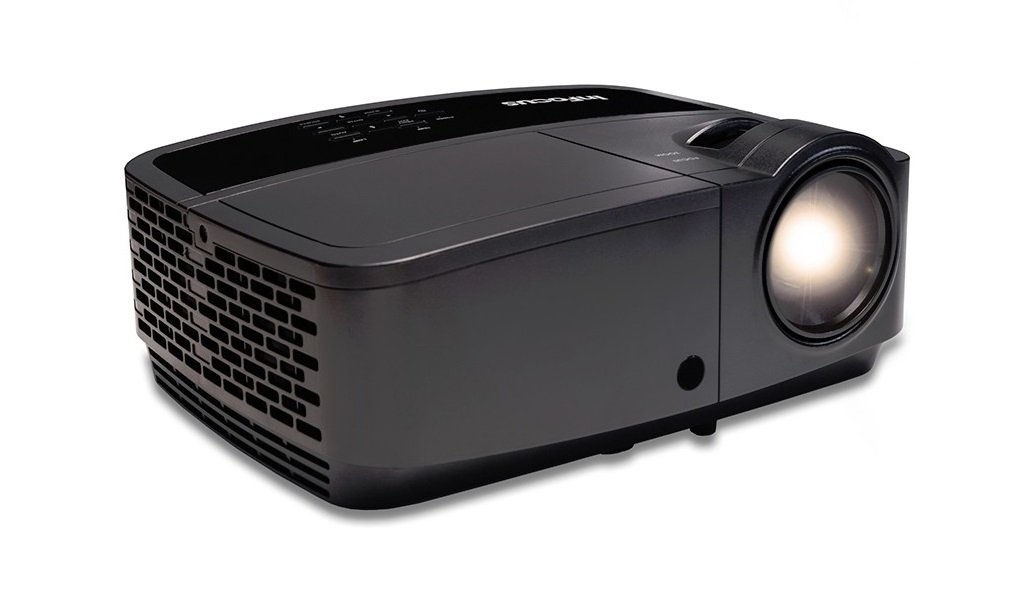
1.1 vaizdas: priekis view of the InFocus IN126 DLP Projector.
Pagrindinės funkcijos:
- High brightness of up to 3200 lumens for clear images in various lighting conditions.
- High 3000:1 contrast ratio for sharp detail.
- Compact and portable design, weighing approximately 4.8 lbs. (2.17 kg).
- 3D-Ready capability for immersive viewišgyvenimų.
- HDMI connectivity for versatile input options.
2. Sąranka ir diegimas
2.1 Išpakavimas
Carefully remove the projector and all accessories from the packaging. Verify that all components are present according to the packing list.
2.2 Projektoriaus išdėstymas
Place the projector on a stable, flat surface or mount it securely. Ensure adequate ventilation around the projector to prevent overheating. Position the projector at an appropriate distance from the screen to achieve the desired image size.
2.3 Įrenginių prijungimas
Connect your video source (e.g., laptop, gaming console) to the projector using an HDMI cable. Ensure the cable is securely plugged into both the source device and the projector's HDMI input port.

Image 2.1: An InFocus projector set up for a business presentation, demonstrating typical usage.
2.4 Įjungimas / išjungimas
- Norėdami įjungti: Connect the power cord to the projector and a power outlet. Press the power button on the projector or remote control. The power indicator light will illuminate.
- Norėdami išjungti: Press the power button twice. The projector will enter a cooling cycle before completely shutting down. Do not unplug the projector during the cooling cycle.
2.5 Vaizdo koregavimas
- Fokusas: Sukite fokusavimo žiedą ant objektyvo, kol vaizdas taps ryškus ir aiškus.
- Keystone korekcija: Use the keystone adjustment feature (usually found in the projector's menu or via dedicated buttons) to correct trapezoidal image distortion if the projector is not perfectly perpendicular to the screen.
3. Projektoriaus valdymas
3.1 Įvesties šaltinio pasirinkimas
Press the 'Source' or 'Input' button on the remote control or projector control panel to cycle through available input sources (e.g., HDMI, VGA). Select the input corresponding to your connected device.
3.2 Meniu naršymas
Use the arrow buttons on the remote or control panel to navigate the on-screen display (OSD) menu. Press 'Enter' or 'OK' to confirm selections and 'Menu' or 'Exit' to go back or close the menu.
3.3 Picture Adjustments
Within the OSD menu, you can adjust various picture settings:
- Ryškumas: Reguliuoja bendrą vaizdo šviesumą arba tamsumą.
- Kontrastas: Valdo skirtumą tarp šviesiausių ir tamsiausių vaizdo dalių.
- Spalva: Reguliuoja spalvų intensyvumą.
- Kraštinių santykis: Pasirenkamas rodymo formatas (pvz., 4:3, 16:9).
3.4 Garso nustatymai
If your projector has built-in speakers or is connected to an external audio system, you can adjust the volume and other audio settings through the OSD menu.
3.5 3D veikimas
The IN126 projector is 3D-Ready. To view 3D content, you will need compatible 3D glasses, a 3D-enabled source device, and 3D content. Refer to your 3D glasses and source device manuals for specific instructions on enabling 3D mode.
4. Priežiūra
4.1 Objektyvo valymas
Projektoriaus objektyvą švelniai nuvalykite minkštu, nepūkuotu audiniu, specialiai skirtu optiniams lęšiams. Venkite naudoti abrazyvinius valiklius ar per didelę jėgą, nes jie gali subraižyti objektyvą.
4.2 Cleaning the Projector Casing
Nuvalykite projektoriaus išorę casing su minkštu, damp audinys. Nenaudokite stiprių cheminių medžiagų ar tirpiklių.
4.3 Oro filtro priežiūra
Regularly check and clean the air filter to ensure proper airflow and prevent overheating. Refer to the full product manual for instructions on locating and cleaning or replacing the air filter.
4.4 Lamp Pakeitimas
Projektorius lamp has an estimated operating life of up to 20,000 hours. When the lamp reaches the end of its life, a warning message may appear, or the image brightness may significantly decrease. Refer to the full product manual for detailed instructions on safe lamp replacement. Always use genuine InFocus replacement lamps.
5. Problemų sprendimas
This section addresses common issues you might encounter with your InFocus IN126 projector.
5.1 Ekrane nėra vaizdo
- Įsitikinkite, kad projektorius įjungtas ir maitinimo indikatoriaus lemputė šviečia nuolat.
- Patikrinkite, ar visos kabelių jungtys (HDMI, maitinimo) yra tvirtai prijungtos.
- Patikrinkite, ar projektoriuje pasirinktas teisingas įvesties šaltinis.
- Confirm the source device (laptop, etc.) is powered on and outputting a signal.
5.2 Image is Distorted or Blurry
- Sureguliuokite fokusavimo žiedą ant objektyvo.
- Use keystone correction to fix trapezoidal distortion.
- Ensure the projector is placed on a stable surface and is not vibrating.
- Check the resolution settings of your source device; ensure it is compatible with the projector's native resolution (1280 x 720).
5.3 Nėra garso
- Padidinkite garsumą tiek projektoriuje, tiek šaltinio įrenginyje.
- Jei naudojate išorinius garsiakalbius, įsitikinkite, kad jie tinkamai prijungti ir įjungti.
- Check audio settings in the projector's OSD menu.
5.4 Projektoriaus perkaitimas
- Ensure there is sufficient space around the projector for ventilation.
- Clean the air filter to remove any dust buildup.
- Neužblokuokite ventiliacijos angų.
6. Specifikacijos
The following table outlines the key technical specifications for the InFocus IN126 DLP Projector:
| Funkcija | Specifikacija |
|---|---|
| Prekės ženklas | InFocus |
| Modelio pavadinimas | IN126 DLP |
| Ekrano tipas | DLP |
| Gimtoji raiška | 1280 x 720 |
| Maksimali ekrano skiriamoji geba | 1920 x 1080 |
| Ryškumas | 3200 lumens (ANSI) |
| Kontrasto santykis | 3000:1 |
| Šviesos šaltinio veikimo laikas | 20000 valandų |
| Lamp Vattage | 230 vatų |
| Ryšio technologija | HDMI |
| Ypatinga funkcija | 3D paruošta |
| Formos faktorius | Nešiojami |
| Montavimo tipas | Stalviršio laikiklis |
| Prekės svoris | 4.85 svarų (2.2 kg) |
| Išorinio testavimo sertifikavimas | UL, c-UL, FCC, CE |
7. Informacija apie garantiją
The InFocus IN126 DLP Projector comes with a limited manufacturer's warranty. For specific details regarding warranty coverage, duration, and terms, please refer to the warranty card included with your product or visit the official InFocus websvetainėje. Išsaugokite pirkimo įrodymą garantiniams reikalavimams.
8. Pagalba klientams
For further assistance, technical support, or to inquire about replacement parts, please visit the official InFocus support website or contact their customer service department. Contact information can typically be found on the InFocus website or in the documentation included with your projector.
Ask a question about this manual
Ask about setup, troubleshooting, compatibility, parts, safety, or missing instructions. Manuals+ will review the question and use this page’s manual context to help answer it.