
1. Įvadas
Thank you for choosing the SENSE7 Gaming Spellcaster Ergonomic Office Chair. This manual provides essential information for the safe assembly, operation, maintenance, and troubleshooting of your new chair. Please read these instructions carefully before use and retain them for future reference.
2. Saugos informacija
- Prieš surinkdami įsitikinkite, kad visi komponentai yra ir nepažeisti. Nenaudokite, jei trūksta dalių arba jos yra sulūžusios.
- Tiksliai laikykitės surinkimo instrukcijų. Neteisingas surinkimas gali sukelti nestabilumą ir sužalojimus.
- Nestokite ant kėdės. Naudokite ją tik sėdėjimui.
- Neviršykite maksimalaus svorio, 150 kg (330 svaro).
- Keep children and pets away from the chair during assembly. Small parts can be a choking hazard.
- Avoid exposing the chair to direct sunlight or extreme temperatures, which can damage the material.
- Reguliariai tikrinkite visus varžtus ir sraigtus, ar jie gerai priveržti. Priveržkite pagal poreikį.
3. Pakuotės turinys
Patikrinkite, ar pakuotėje yra visi šie komponentai:
- Sėdynės
- Drugelio mechanizmas
- Dujų pakėlimas
- Base (star base)
- 5 ratų
- 3 Plastic covers
- Varžtų komplektas
- Porankiai (2)
- Cushions (2 - headrest and lumbar)
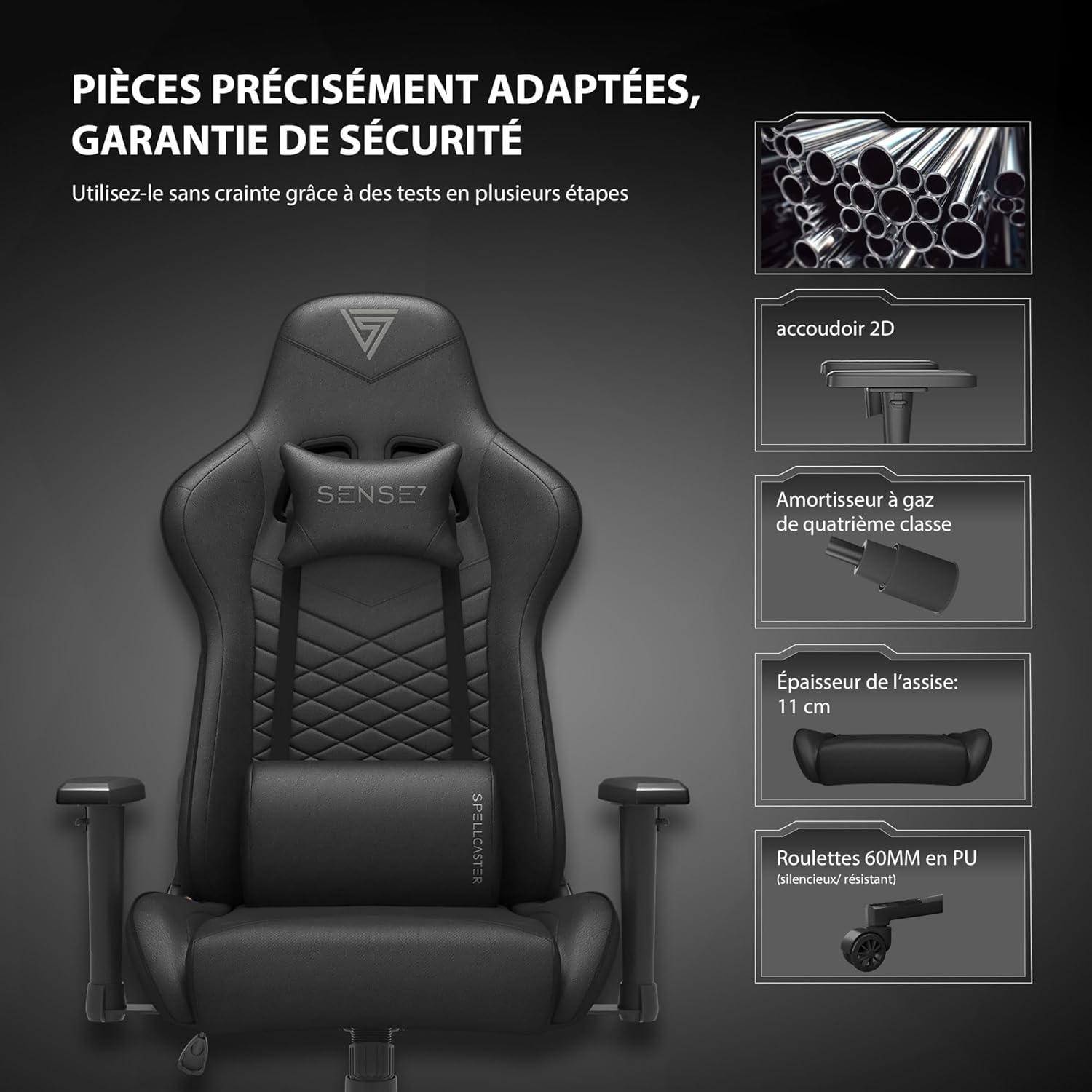
Image: Key components of the SENSE7 Gaming Spellcaster chair, including the 2D armrest, Class 4 gas lift, 11 cm thick seat, and 60mm PU wheels.
4. Surinkimo instrukcijos
Follow these steps to assemble your SENSE7 Gaming Spellcaster chair. It is recommended to assemble the chair on a soft, clean surface to prevent damage.
- Pritvirtinkite ratukus prie pagrindo: Insert each of the 5 wheels into the holes at the end of the star base until they click securely into place.
- Įdėkite dujų keltuvą: Place the gas lift cylinder into the center hole of the star base. Cover it with the plastic cover if provided.
- Pritvirtinkite mechanizmą prie sėdynės: Align the butterfly mechanism with the screw holes on the underside of the seat. Ensure the tension knob faces the front of the seat. Secure with the provided screws.
- Pritvirtinkite porankius: Secure the armrests to the underside of the seat using the designated screw holes and provided screws. Ensure they are firmly attached.
- Prijunkite atlošą prie sėdynės: Attach the backrest to the seat assembly using the side brackets and screws. Ensure the recline mechanism is correctly aligned.
- Uždėkite sėdynės konstrukciją ant dujinio keltuvo: Atsargiai uždėkite surinktą sėdynę ir atlošą ant dujinio pakėlimo cilindro, užtikrindami, kad jie būtų centre ir stabilūs.
- Pritvirtinkite pagalvėles: Attach the headrest and lumbar support cushions using their integrated straps. Adjust their positions for optimal comfort.

Image: Illustration of the chair's base assembly, highlighting the gas lift and sturdy star base.
5. Naudojimo instrukcijos
Your SENSE7 Gaming Spellcaster chair offers several adjustment options for personalized comfort.
5.1. Aukščio reguliavimas
To adjust the chair's height, locate the lever on the right side, beneath the seat. While seated, pull the lever up to lower the chair. To raise the chair, stand up and pull the lever up. Release the lever at your desired height.
5.2. Atlošo atlošas
The backrest can be reclined between 90° and 160°. Pull the recline lever on the left side of the chair upwards, lean back to your desired angle, and release the lever to lock it in place. Ensure the backrest is securely locked before applying full weight.

Image: Visual guide to the backrest recline function, illustrating 90° for PC gaming, 120° for mobile gaming, and 160° for relaxation.
5.3. Porankio reguliavimas
The FlowTechArm 2D armrests can be adjusted in height. Locate the button on the side of each armrest. Press the button and move the armrest up or down to your preferred height. Release the button to lock the armrest.
5.4. Lumbar and Headrest Cushions
The included headrest and lumbar support cushions are adjustable. Slide them along their straps to find the optimal position for your neck and lower back support.

Image: Diagram illustrating the ergonomic design of the chair, highlighting support for cervical, shoulder, back, lumbar, and hip regions, with an emphasis on the adjustable lumbar support.
5.5. Pakreipimo funkcija
The chair features a relaxing tilt function. To activate, pull the height adjustment lever outwards. To lock the tilt, push the lever inwards. The tension of the tilt can be adjusted by turning the round knob located under the seat, at the front.
5.6. Pasukimo funkcija
The chair's base allows for 360-degree swivel movement. Simply rotate the chair to your desired direction.
Produktas baigtasview Vaizdo įrašas
Vaizdo įrašas: trumpas aprašymasview šouasing the SENSE7 Gaming Spellcaster chair's features and design in a gaming environment.
Design Process Video
Video: A short video illustrating the design and development process behind SENSE7 gaming chairs, emphasizing attention to detail and quality.
6. Priežiūra ir priežiūra
Proper care will extend the life and appearance of your SENSE7 Gaming Spellcaster chair.
- Valymas: For the synthetic leather material, wipe with a soft, damp cloth. Use a mild soap solution for tougher stains, then wipe dry immediately. Avoid abrasive cleaners or solvents.
- Išsiliejimai: Išsiliejusius skysčius nedelsdami nuvalykite švaria, sausa šluoste. Netrinkite, nes dėmė gali išplisti.
- Patikra: Periodically check all screws and bolts for tightness. Retighten as needed to maintain stability and safety.
- Venkite tiesioginių saulės spindulių: Ilgalaikis tiesioginių saulės spindulių poveikis medžiagai gali išblukti arba įtrūkti.
- Svorio limitas: Adhere to the maximum weight capacity of 150 kg to prevent damage to the chair's components.

Image: Comparison of two material types, highlighting ease of maintenance for PU leather and breathability for ventilated fabric, along with softness, comfort, scratch resistance, and impermeability.
7. Problemų sprendimas
Jei kyla problemų dėl kėdės, žr. šias dažniausiai pasitaikančias problemas ir sprendimus:
- Kėdė nestabili arba nestabili:
Sprendimas: Ensure all screws and bolts are securely tightened. Check that the gas lift is properly seated in the base. - Kėdės aukštis nereguliuojamas:
Sprendimas: Verify that the height adjustment lever is fully engaged. Check if the gas lift is damaged or improperly installed. - Atlošas neatlenkiamas arba neužsifiksuoja:
Sprendimas: Ensure the recline lever is fully pulled or pushed to engage the locking mechanism. Check for any obstructions in the recline mechanism. - Cypimo garsai:
Sprendimas: Tighten all screws and bolts. A small amount of silicone lubricant can be applied to moving parts, such as the mechanism or wheel axles, if the noise persists. - Ratai rieda nelygiai:
Sprendimas: Check for debris (hair, dust) caught in the wheels. Clean them thoroughly. Ensure wheels are fully inserted into the base.
8. Specifikacijos
Detailed specifications for the SENSE7 Gaming Spellcaster chair:

Image: Comprehensive diagram showing all key dimensions of the SENSE7 Gaming Spellcaster chair, including seat height, width, depth, backrest height, and maximum load capacity of 150kg.
| Funkcija | Detalė |
|---|---|
| Modelio pavadinimas | Spellcaster |
| Prekės modelio numeris | 5907783039737 |
| Prekės ženklas | JAUSMAS7 |
| Spalva | Juoda/raudona |
| Medžiagos tipas | Sintetinė oda (Simili cuir) |
| Užpildymo medžiaga | Putos |
| Rėmo medžiaga | Legiruotasis plienas |
| Gaminio matmenys (I x P x A) | 57 x 70 x 126 cm (57 cm pločio x 70 cm ilgio x 134 cm aukščio) |
| Prekės svoris | 17.5 kilogramo |
| Rekomenduojama maksimali apkrova | 150 kilogramo |
| Atlošo padėčių skaičius | 2 (90°-160° adjustable) |
| Rankų stilius | Adjustable (2D FlowTechArm) |
| Included Cushions | 2 (Headrest, Lumbar) |
| Reikalingas surinkimas | Taip |
| Baldų pagrindo judėjimas | Pasukamas |
| Rekomenduojami naudojimo būdai | Relaxation, E-Sport, Gaming, Work |
9. Garantija ir palaikymas
For warranty information or technical support, please refer to the documentation included with your purchase or contact the retailer/manufacturer directly. Keep your proof of purchase for warranty claims.