Įvadas
This manual provides detailed instructions for the safe installation, operation, and maintenance of your Woods 59745WD 24-Hour Mechanical In-Wall Timer. Please read all instructions carefully before installation and use. Retain this manual for future reference.

Image 1: Woods 59745WD 24-Hour Mechanical In-Wall Timer. This image shows the front view of the white mechanical timer with its circular dial and two-prong outlet.
Saugos informacija
ĮSPĖJIMAS: Elektros smūgio pavojus. Installation requires working with electrical wiring. If you are not familiar with electrical wiring, consult a qualified electrician. Improper installation can result in serious injury or death.
- Prieš montuodami arba atlikdami laikmačio techninę priežiūrą, atjunkite maitinimą nuo grandinės pertraukiklio arba saugiklių dėžutės.
- Įsitikinkite, kad visi laidų sujungimai yra tvirti ir atitinka vietinius elektros kodeksus.
- This timer is designed for indoor use only.
- Neviršykite maksimalių prietaiso elektros vardinių verčių.
Pakuotės turinys
Prieš pradėdami diegti, patikrinkite, ar yra visi komponentai:
- Woods 59745WD 24-Hour Mechanical In-Wall Timer
- Instrukcijų vadovas
- Tvirtinimo varžtai (jei taikoma)
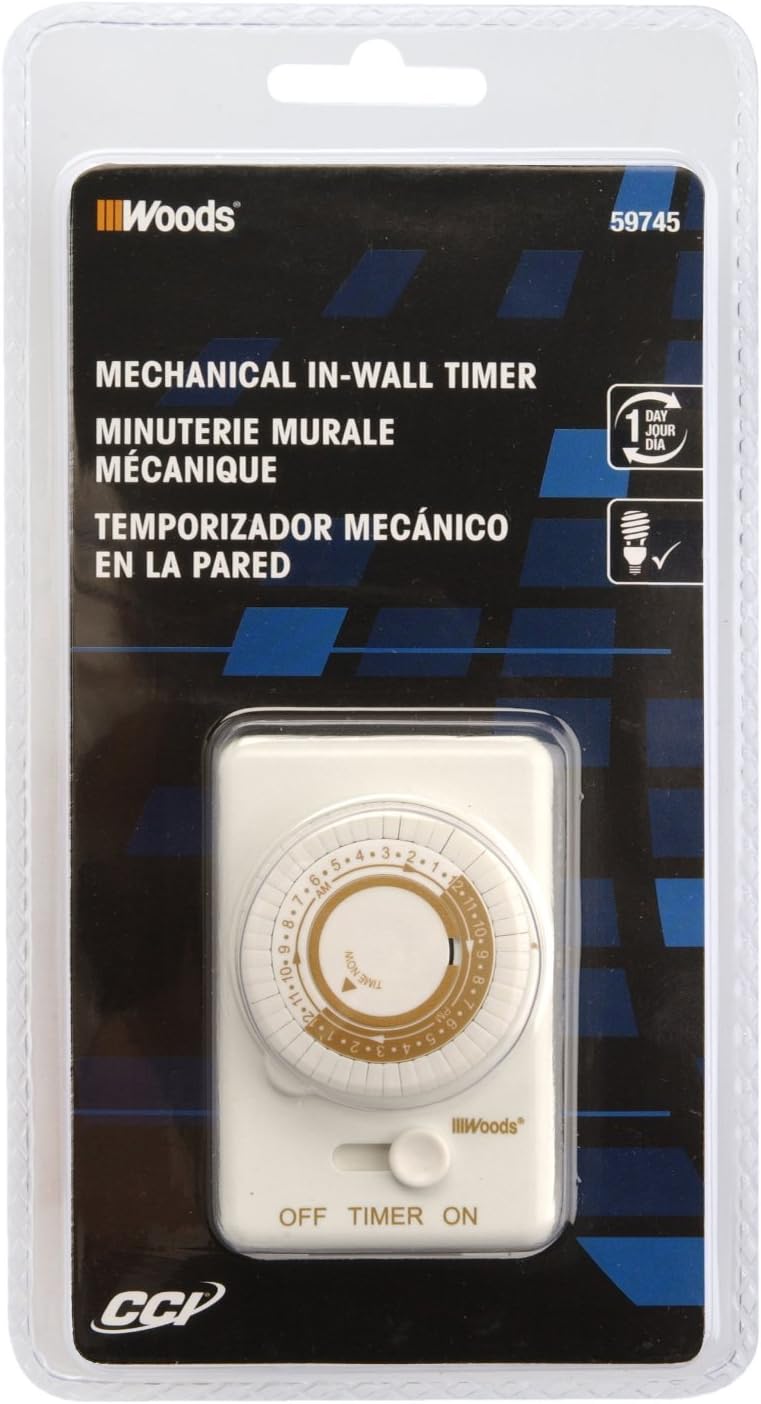
Image 2: Packaging for the Woods 59745WD In-Wall Timer. The image displays the product in its retail packaging, highlighting the brand and model number.
Sąranka ir diegimas
This timer is designed to replace a standard wall light switch. Professional installation is recommended.
- Išjungti maitinimą: Locate the circuit breaker or fuse that controls the light switch you intend to replace. Turn off the power completely to avoid electrical shock. Verify power is off using a voltage testeris.
- Seno jungiklio pašalinimas: Carefully remove the wall plate and unscrew the existing light switch from the electrical box. Disconnect the wires from the old switch. Note the connections: typically, a neutral (white), an incoming hot (black), and an outgoing load (black or red).
- Prijunkite laikmatį: Connect the Woods 59745WD timer according to the following common wiring scheme. Note: Wiring colors may vary. If unsure, consult a qualified electrician.
- Prijunkite baltas wire from the timer to the neutrali (balta) wires in the electrical box.
- Prijunkite juodas wire from the timer to the incoming hot (black) wire from the power source.
- Prijunkite raudona wire from the timer to the outgoing load (black or red) wire that goes to the light fixture.
- If a ground wire is present in the electrical box, connect it to the timer's ground terminal (if available). The product specifications indicate no explicit ground wire mentioned in some reviews, but proper grounding is always recommended.
- Laikmačio montavimas: Carefully push the wired timer into the electrical box. Secure it with the provided screws.
- Įdiekite priekinę plokštę: Attach the decorative wall plate over the timer. The instructions suggest disassembling the timer (removing the time knob and face plate held by 2 screws), installing the light according to the wiring diagram, securing the timer in the box, placing the decorative light plate over it and screwing the plate to the timer. The opening aligns to the timer as you screw the plate and the timer together. Install the timer faceplate and secure with the two screws. Replace the knobs.
- Atkurti maitinimą: Įjunkite maitinimą grandinės pertraukikliu arba saugiklių dėžute.
Naudojimo instrukcijos
The Woods 59745WD timer features a 24-hour mechanical dial with 30-minute interval settings.
- Nustatyti dabartinį laiką: Rotate the inner dial clockwise until the current time aligns with the "TIME NOW" arrow indicator. The dial is marked with 24 hours (1-12 AM/PM).
- Programos įjungimo/išjungimo laikas: The outer ring of the dial has small pins. Each pin represents a 30-minute interval.
- Norėdami nustatyti ON period, pull the pins į išorę for the desired duration.
- Norėdami nustatyti IŠJUNGTA period, push the pins į vidų for the desired duration.
Pavyzdžiui,ample, to turn a light on from 7 PM to 11 PM, pull out all pins corresponding to the 7:00 PM, 7:30 PM, 8:00 PM, 8:30 PM, 9:00 PM, 9:30 PM, 10:00 PM, and 10:30 PM segments.
- Pasirinkite veikimo režimą: Use the side switch to select the desired mode:
- ĮJUNGTA: The connected device will remain continuously on, bypassing the timer settings.
- LAIKMATIS: Prijungtas įrenginys veiks pagal užprogramuotą ĮJUNGIMO/IŠJUNGIMO laiką.
- IŠJUNGTA: The connected device will remain continuously off, bypassing the timer settings.

Image 3: Woods In-Wall Timer in a home setting. This image illustrates the timer installed in a wall, controlling a light fixture, demonstrating its practical application.
Priežiūra
The Woods 59745WD timer requires minimal maintenance.
- Valymas: Disconnect power before cleaning. Wipe the exterior with a soft, dry cloth. Do not use liquid cleaners or abrasive materials.
- Patikra: Periodically inspect the timer for any signs of damage, loose connections, or wear. If any issues are found, discontinue use and consult a qualified electrician.
Trikčių šalinimas
| Problema | Galima priežastis | Sprendimas |
|---|---|---|
| Timer does not turn ON/OFF at set times. |
|
|
| Timer stops working or does not keep accurate time. |
|
|
| Light remains ON or OFF continuously. |
|
|
Specifikacijos
| Funkcija | Detalė |
|---|---|
| Modelio numeris | 59745WD |
| Tipas | 24-Hour Mechanical In-Wall Timer |
| ttage | 125 voltų kintamoji srovė |
| Nustatymų skaičius | 24 daily settings, programmable in 30-minute intervals |
| Montavimo tipas | Sieninis laikiklis |
| Jungiklio tipas | 1 krypčių |
| Matmenys (G x P x A) | 2.25 "D x 4.25" P x 8.25" A |
| Prekės svoris | 4.69 uncijos |
| Medžiaga | Sumaišykite |
| UPC | 078693597459 |
Informacija apie garantiją
According to available product information, there is no specific warranty description provided for this product.
Palaikymas
For further assistance or technical support, please contact the manufacturer, Woods, or refer to their official website. When contacting support, please have your product model number (59745WD) and UPC (078693597459) available.
You can visit the Woods store on Amazon for more information: Woods Store