
Įvadas
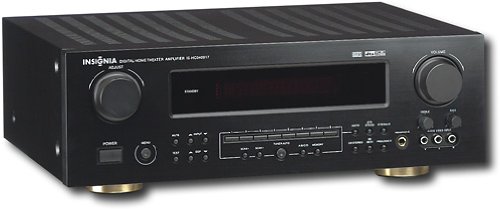
This manual provides essential instructions for the setup, operation, maintenance, and troubleshooting of your Insignia 6.1-Channel 600W Digital Home Theater Receiver, model IS-HC040917. Please read this manual thoroughly before using the receiver to ensure proper and safe operation.
Svarbios saugos instrukcijos
- Neužblokuokite jokių ventiliacijos angų. Montuokite pagal gamintojo instrukcijas.
- Nemontuokite šalia jokių šilumos šaltinių, pvz., radiatorių, šilumokaičių, viryklių ar kitų įrenginių (įskaitant ampkeltuvai), kurie gamina šilumą.
- Saugokite maitinimo laidą, kad ant jo neužeitų ar nesuspaustų, ypač prie kištukų, patogių lizdų ir toje vietoje, kur jie išeina iš aparato.
- Naudokite tik gamintojo nurodytus priedus/priedus.
- Atjunkite šį įrenginį žaibuojant arba kai nenaudojate ilgą laiką.
- Visą techninę priežiūrą patikėkite kvalifikuotam aptarnavimo personalui. Techninė priežiūra reikalinga, kai aparatas yra bet kokiu būdu pažeistas.
Sąrankos vadovas
1. Išpakavimas
Carefully remove the receiver and all accessories from the packaging. Ensure all components are present:
- Insignia IS-HC040917 Receiver
- Nuotolinio valdymo pultas
- AM kilpos antena
- FM laido antena
- Vartotojo vadovas (šis dokumentas)
2. Garsiakalbių prijungimas
The IS-HC040917 receiver supports a 6.1-channel speaker configuration. Connect your speakers to the corresponding terminals on the rear panel. Ensure correct polarity (+ to + and - to -) for each speaker.
- Priekinis kairysis/dešinysis: For main stereo sound.
- Centras: For dialogue.
- Erdvinis kairysis/dešinysis: For ambient sound effects.
- Apsauginis nugara: For additional rear channel effects in 6.1 setups.
- Subwoofer (Pre-out): Connect to a powered subwoofer's LFE input.
Note: The receiver is designed for speakers with an impedance of 8 ohms.
3. Garso / vaizdo šaltinių prijungimas
Connect your external devices (e.g., DVD player, Blu-ray player, game console, cable box) to the appropriate input jacks on the receiver.
- HDMI: Use HDMI cables for high-definition audio and video signals. The receiver has 3 HDMI input ports.
- Skaitmeninis garsas (optinis / bendraašis): For digital audio from devices like CD players or set-top boxes.
- Analoginis garsas (RCA): For standard stereo audio connections from devices like VCRs or older CD players.
- „S-Video“: For video signals from compatible devices.
4. Antenos jungtis
Connect the supplied AM loop antenna and FM wire antenna to their respective terminals on the rear panel for radio reception.
5. Maitinimo prijungimas
Once all audio/video and speaker connections are made, plug the receiver's power cord into a standard AC wall outlet.
Vaizdas: Rear panel of the Insignia IS-HC040917 receiver, showing various input and output connections for speakers, audio/video sources (HDMI, RCA, S-Video, Digital), and antenna terminals. This diagram is crucial for correctly wiring the home theater system.
Naudojimo instrukcijos
1. Maitinimo įjungimas/išjungimas
Paspauskite GALIA mygtuką priekiniame skydelyje arba nuotolinio valdymo pulte, kad įjungtumėte arba išjungtumėte imtuvą.
2. Įvesties pasirinkimas
Naudokite ĮVADŲ RINKIMAS knob/buttons on the front panel or the remote control to choose the desired audio/video source (e.g., HDMI 1, DVD, CD, Tuner).
3. Garsumo valdymas
Reguliuokite pagrindinį garsumą naudodami didelį TOMAS rankenėlę priekiniame skydelyje arba TŪRIS +/- nuotolinio valdymo pulto mygtukai.
4. Garso režimai
The receiver supports various audio modes, including 6.1-channel surround sound. Use the REŽIMAS or DSP buttons on the remote to cycle through available sound modes (e.g., Stereo, Dolby Digital, DTS, Pro Logic).
5. Tuner Operation (AM/FM Radio)
Select the "Tuner" input. Use the BAND button to switch between AM and FM. Use the TUNE +/- buttons to manually tune to stations or IŠANKSTINIS NUSTATYMAS +/- to select stored stations. Refer to the remote control for specific tuner functions.
Priežiūra
1. Valymas
Wipe the exterior of the receiver with a soft, dry cloth. Do not use liquid cleaners or aerosol sprays, as they may damage the finish or internal components. Ensure the unit is unplugged before cleaning.
2. Vėdinimas
Ensure that the ventilation openings on the top and sides of the receiver are not blocked. Proper airflow is essential to prevent overheating and ensure long-term performance.
3. Kabelių valdymas
Periodically check all cable connections to ensure they are secure. Loose connections can lead to poor audio or video quality.
Trikčių šalinimas
| Problema | Galima priežastis | Sprendimas |
|---|---|---|
| Nėra galios | Power cord unplugged; power outlet not active. | Patikrinkite maitinimo laido jungtį; pabandykite įjungti į kitą lizdą. |
| Nėra garso | Incorrect input selected; speaker wires loose; volume too low; mute activated. | Pasirinkite tinkamą įvestį; patikrinkite garsiakalbių jungtis; padidinkite garsumą; išjunkite nutildymą. |
| Nėra vaizdo įrašo | Incorrect input selected; video cables loose or incorrect. | Select correct input; check video cable connections (HDMI, S-Video, RCA). |
| Nuotolinio valdymo pultas neveikia | Batteries depleted; obstruction between remote and receiver; incorrect remote mode. | Replace batteries; remove obstructions; ensure remote is in the correct operating mode. |
Specifikacijos
- Modelis: IS-HC040917
- Prekinis ženklas: INSIGNIJA
- Išėjimo galia: 600 vatų
- Kanalų skaičius: 6.1 kanalas
- Garso išvesties režimas: Aplink
- Iš viso HDMI prievadų: 3
- Jungčių tipai: 3.5 mm lizdas, HDMI, RCA, USB
- Suderinami įrenginiai: Pranešėjas
- Kontrolės metodas: Nuotolinis
- Spalva: Juoda
- UPC: 799530659962
- ASIN: B0075C3DN2
Garantija ir palaikymas
For warranty information and customer support, please refer to the warranty card included with your product or visit the official Insignia websvetainę. Išsaugokite pirkimo čekį garantiniams reikalavimams.
For further assistance, you may contact Insignia customer service. Contact details are typically available on the manufacturer's websvetainėje arba produkto pakuotėje.