
1. Įvadas
The D-Link DGS-1500-28 SmartPro 24-Port Gigabit Switch is a high-performance Layer 3 managed switch designed for small to medium-sized businesses. It offers 24 Gigabit Ethernet ports and 4 SFP+ expansion slots, providing flexible connectivity and advanced management features. This manual provides essential information for the proper installation, configuration, operation, and maintenance of your DGS-1500-28 switch.
2. Pakuotės turinys
Verify the following items are present in your DGS-1500-28 package. If any item is missing or damaged, please contact your local D-Link reseller for assistance.
- DGS-1500-28 SmartPro 24-Port Gigabit Switch
- Maitinimo laidas
- Rack Mount Kit (two brackets and screws)
- Guminės kojelės (montuojant darbalaukyje)
- Console Cable (RJ-45 to RS-232)
- Greito montavimo vadovas
- CD-ROM (containing product documentation)
3. Fizinis aprašymas
3.1 Priekinis skydelis
The front panel of the DGS-1500-28 switch features the Gigabit Ethernet ports, SFP+ slots, and LED indicators for monitoring the switch's status and activity.
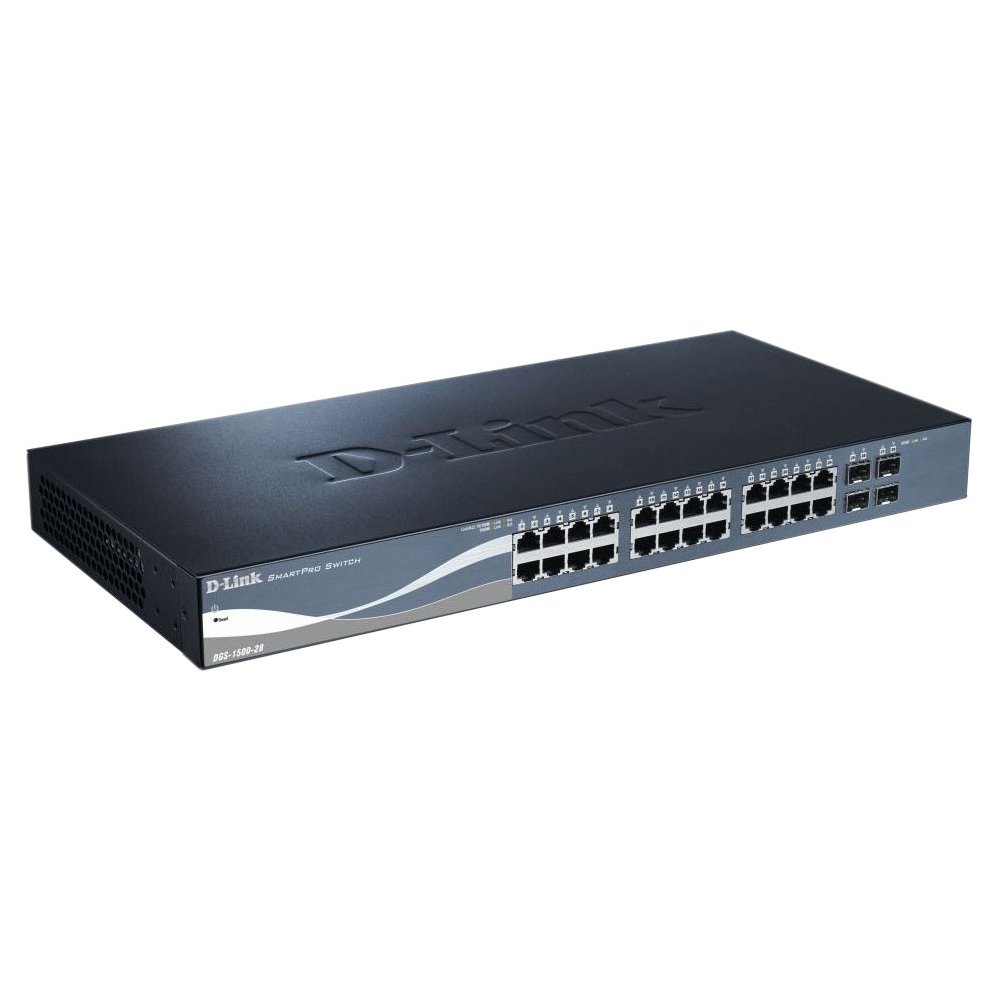
This image displays the front panel of the D-Link DGS-1500-28 switch, featuring 24 RJ-45 Gigabit Ethernet ports and LED indicators for status and activity.
- RJ-45 Ports (1-24): 10/100/1000 Mbps Gigabit Ethernet ports for connecting network devices.
- SFP+ lizdai (25–28): 10 Gigabit Ethernet SFP+ ports for fiber optic connections or stacking.
- LED indikatoriai:
- Maitinimo šviesos diodas: Nurodo maitinimo būseną.
- Ryšio / veiksmo šviesos diodas (kiekvienam prievadui): Indicates network link and data activity.
- Greičio LED (kiekvienam prievadui): Indicates connection speed (e.g., green for Gigabit, amber for 10/100 Mbps).
3.2 Galinis skydelis
The rear panel typically includes the power connector, grounding screw, and a console port for out-of-band management.
- Kintamosios srovės maitinimo lizdas: Jungiamas prie pridedamo kintamosios srovės maitinimo laido.
- Įžeminimo varžtas: Provides an optional connection for grounding the switch.
- Konsolės prievadas: RJ-45 port for connecting a console cable to a computer for command-line interface (CLI) management.
4. Montavimas
4.1 Darbalaukio diegimas
- Pritvirtinkite keturias gumines kojeles prie jungiklio apačioje esančių įdubimų.
- Place the switch on a sturdy, level surface that can support its weight.
- Užtikrinkite tinkamą vėdinimą aplink jungiklį.
4.2 Stovo montavimas
- Attach the two rack-mounting brackets to the sides of the switch using the provided screws.
- Pritvirtinkite jungiklį prie standartinio 19 colių įrangos stovo naudodami tinkamus stovo varžtus (nepridedami).
- Ensure proper airflow and avoid placing the switch near heat sources.
4.3 Jungiklio įjungimas
- Connect the AC power cord to the power receptacle on the rear panel of the switch.
- Kitą maitinimo laido galą įkiškite į tinkamą maitinimo lizdą.
- Priekiniame skydelyje užsidegs maitinimo šviesos diodas, rodantis, kad jungiklis gauna maitinimą.
5. Pradinė konfigūracija
The DGS-1500-28 switch can be managed via a webgrafinę vartotojo sąsają (GUI) arba komandinės eilutės sąsają (CLI) per konsolės prievadą.
5.1 Prieiga prie Web-pagrįsta valdymo sąsaja
- Connect a computer to any of the switch's RJ-45 ports using an Ethernet cable.
- Configure your computer's IP address to be in the same subnet as the switch's default IP address (e.g., if the switch is 10.90.90.90, set your computer to 10.90.90.100).
- Atidarykite a web browser and enter the switch's default IP address (e.g., http://10.90.90.90) adreso juostoje.
- Enter the default username and password (refer to the Quick Installation Guide for default credentials).
- Upon successful login, you will access the switch's web valdymo sąsaja.
Pastaba: It is highly recommended to change the default password immediately after initial login for security purposes.
6. Jungiklio valdymas
Once configured, the DGS-1500-28 operates as a network switch, forwarding data between connected devices. The LED indicators provide visual feedback on the operational status of the switch and its ports.
6.1 Port Functionality
- RJ-45 prievadai: Automatically detect the speed and duplex mode of connected devices (10/100/1000 Mbps).
- SFP+ Slots: Support 10 Gigabit Ethernet transceivers for high-speed uplinks or stacking. Ensure compatible SFP+ modules are used.
6.2 Išplėstinės funkcijos
The DGS-1500-28 series integrates advanced features to enhance network performance and management:
- Virtual Stacking: Allows up to 32 DGS-1500 series devices to be managed as a single unit with one IP address, simplifying network administration and scalability.
- Layer 3 Static Routing: Enables the switch to forward IP packets between different IP subnets based on static routes configured by the administrator. This feature is crucial for inter-VLAN routing and basic network segmentation.
7. Priežiūra
Regular maintenance ensures optimal performance and longevity of your DGS-1500-28 switch.
- Firmware atnaujinimai: Reguliariai tikrinkite „D-Link“ palaikymo tarnybą websvetainėje, kurioje rasite naujausias programinės įrangos versijas. Atnaujinus programinę įrangą, galite gauti naujų funkcijų, našumo pataisymų ir saugos pataisų.
- Aplinkos sąlygos: Ensure the switch operates within recommended temperature and humidity ranges. Keep ventilation openings clear of obstructions.
- Valymas: Jungiklio išorę valykite minkštu, sausu skudurėliu. Nenaudokite skystų ar aerozolinių valiklių.
- Konfigūracijos atsarginė kopija: Regularly back up your switch configuration to an external device. This allows for quick restoration in case of a factory reset or device replacement.
8. Problemų sprendimas
This section provides solutions to common issues you might encounter with your DGS-1500-28 switch.
8.1 Maitinimo šviesos diodas nešviečia
- Įsitikinkite, kad maitinimo laidas yra tvirtai prijungtas tiek prie jungiklio, tiek prie veikiančio maitinimo lizdo.
- Patikrinkite, ar maitinimo lizdas veikia, prijungdami prie jo kitą įrenginį.
8.2 Nėra ryšio / veiklos prievade
- Patikrinkite Ethernet kabelio jungtį abiejuose galuose. Išbandykite kitą kabelį.
- Įsitikinkite, kad prijungtas įrenginys įjungtas ir veikia tinkamai.
- Verify the port status in the switch's web valdymo sąsaja.
- SFP+ prievadų atveju įsitikinkite, kad SFP+ modulis yra tinkamai įdėtas ir suderinamas.
8.3 Nepavyksta pasiekti Web Valdymo sąsaja
- Įsitikinkite, kad jūsų kompiuterio IP adresas yra tame pačiame potinklyje kaip ir komutatoriaus IP adresas.
- Verify the switch's IP address. If unknown, you may need to reset the switch to factory defaults (refer to the Quick Installation Guide for reset procedures).
- Ensure there are no IP address conflicts on the network.
- Pabandykite pasiekti sąsają iš kitos vietos web browser or computer.
9. Specifikacijos
| Funkcija | Aprašymas |
|---|---|
| Prekės ženklas | D-Link |
| Modelio numeris | DGS150028 |
| Uostai | 24 x 10/100/1000 Mbps RJ-45 Gigabit Ports, 4 x 10 Gigabit SFP+ Expansion Slots |
| Sąsajos tipas | RJ45, SFP+ |
| Perjungimo talpa | Up to 128 Gbps (non-blocking) |
| Sluoksnių palaikymas | Layer 3 (Static Routing) |
| Valdymas | Web-based GUI, CLI, SNMP |
| Suderinami įrenginiai | Desktop, Rack-mount devices |
| Prekės svoris | 0.01 Ounces (Note: This value may be a placeholder or incorrect. Refer to product packaging for accurate weight.) |
| UPC | 790069362927 |
| ASIN | B007TL1DHM |
10. Garantija ir palaikymas
D-Link products are backed by a limited warranty. The specific terms and conditions of the warranty may vary by region and product. Please refer to the warranty information included with your product or visit the official D-Link website for detailed warranty statements.
For technical support, product documentation, firmware updates, and FAQs, please visit the D-Link support websvetainė: www.dlink.com/support
You may also contact D-Link technical support directly through the contact information provided on their websvetainė jūsų konkrečiam regionui.