
1. Įvadas
Ačiū, kad pirkoteasing the Duronic KS1007 Digital Kitchen Scale. This high-precision scale is designed for accurate measurement of ingredients in your kitchen. Please read this manual carefully before use to ensure proper operation and maintenance.
2. Saugos informacija
- Nemerkite svarstyklių į vandenį ar kitus skysčius.
- Nuvalykite svarstykles su skelbimuamp audinys. Nenaudokite abrazyvinių valiklių.
- Tiksliems matavimams svarstykles pastatykite ant lygaus, stabilaus paviršiaus.
- Neperkraukite svarstyklių daugiau nei maksimali 10 kg talpa.
- Laikyti vaikams nepasiekiamoje vietoje.
- Išimkite baterijas, jei svarstyklės ilgesnį laiką nebus naudojamos.
3. Pakuotės turinys
- Duronic KS1007 Digital Kitchen Scale
- 2x AAA baterijos
- Instrukcijų vadovas
4. Produktas baigtasview
The Duronic KS1007 kitchen scale features a slim design with a stainless steel platform and a backlit LCD display. It is equipped with four high-precision sensors for accurate measurements from 1g up to 10kg.

Image: The Duronic KS1007 digital kitchen scale with its sleek design.
Pagrindinės funkcijos:
- High-precision sensors for accurate results (1g to 10kg).
- Large, backlit LCD display for easy reading.
- Slim and lightweight design (1.7 cm thickness).
- Tare function for weighing multiple ingredients in one container.
- Multiple unit options: grams (g), milliliters (ml), pounds and ounces (lb.oz), fluid ounces (fl.oz).
- Senkančios baterijos indikatorius.

Image: Diagram showing the dimensions of the Duronic KS1007 kitchen scale: 20 x 18.5 x 1.7 cm (platform).
5. Sąranka
5.1. Akumuliatoriaus įdėjimas
- Turn the scale upside down.
- Apatinėje pusėje raskite baterijų skyriaus dangtelį.
- Open the cover and insert 2 x AAA batteries, ensuring correct polarity (+/-).
- Saugiai uždarykite akumuliatoriaus skyriaus dangtelį.

Image: Underside of the scale showing the battery compartment for 2x AAA batteries and anti-slip feet.
5.2. Pradinis paskirstymas
Svarstykles padėkite ant kieto, lygaus ir stabilaus paviršiaus, kad rodmenys būtų tikslūs. Venkite statyti jas ant minkštų ar nelygių paviršių.
6. Naudojimo instrukcijos
6.1. Maitinimo įjungimas/išjungimas
- Norėdami įjungti: paspauskite ON/TARA mygtuką. Ekrane bus rodoma „8888“, tada „0 g“.
- Norėdami išjungti: paspauskite ir palaikykite ON/TARA button for a few seconds, or the scale will automatically shut off after approximately 60 seconds of inactivity to conserve battery life.
6.2. Sveriami daiktai
- Įjunkite svarstykles.
- Ensure the display shows "0g" (or your desired unit).
- Place the item(s) to be weighed directly onto the center of the stainless steel platform.
- Skaitykite LCD ekrane rodomą svorį.

Image: The Duronic KS1007 scale displaying a weight of 492g for ingredients in a bowl, with a maximum capacity of 10kg indicated.
6.3. Changing Units of Measurement
- Įjungę svarstykles, paspauskite VIENETAS button to cycle through the available units: grams (g), milliliters (ml), pounds and ounces (lb.oz), and fluid ounces (fl.oz).
- Pasirinkite norimą matavimo vienetą.
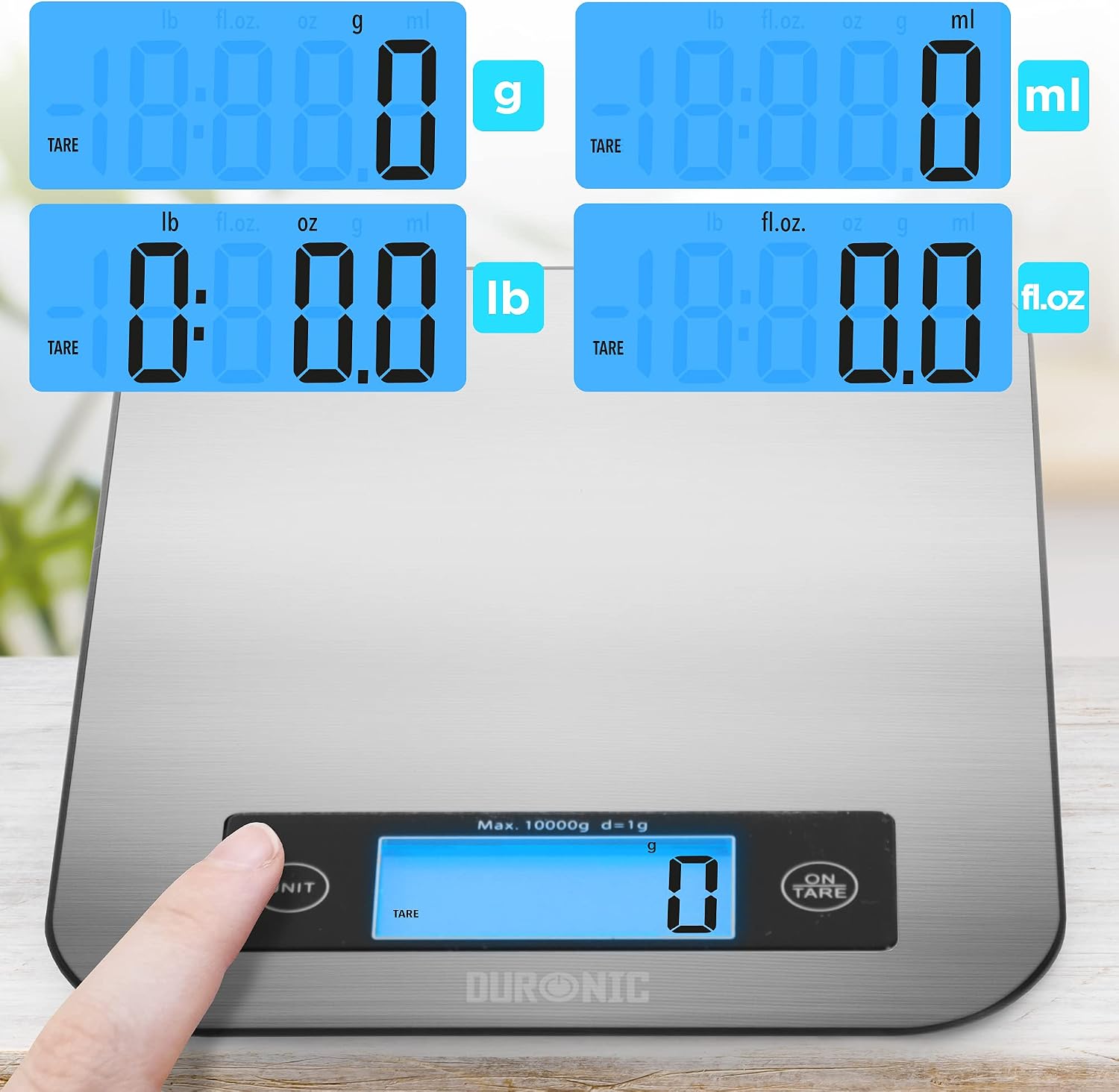
Image: Close-up of the scale's display showing different measurement units: grams (g), pounds (lb), milliliters (ml), and fluid ounces (fl.oz).
6.4. Taros funkcija
The tare function allows you to weigh multiple ingredients consecutively in the same container without removing previously weighed items. It also allows you to subtract the weight of a container.
- Padėkite tuščią indą ant svarstyklių. Ekrane bus rodomas jo svoris.
- Paspauskite ON/TARA mygtuką. Ekrane bus rodoma „0 g“.
- Add the first ingredient to the container. The display will show its weight.
- Norėdami pridėti kitą ingredientą, paspauskite ON/TARA button again to reset the display to "0g".
- Įdėkite kitą ingredientą. Pakartokite, jei reikia.

Image: A three-step demonstration of the tare function, showing an empty bowl being placed, the scale being tared to zero, and then pet food being added and weighed.
7. Priežiūra ir valymas
- Svarstyklių paviršių nuvalykite minkšta,amp audinys.
- Nenaudokite cheminių ar abrazyvinių valymo priemonių.
- Nenardinkite svarstyklių į vandenį.
- Nenaudojamas svarstykles laikykite sausoje vietoje.
8. Problemų sprendimas
| Problema | Galima priežastis | Sprendimas |
|---|---|---|
| Svarstyklės neįsijungia. | Baterijos išsikrovusios arba neteisingai įdėtos. | Patikrinkite baterijų poliškumą arba pakeiskite jas naujomis AAA baterijomis. |
| Netikslūs rodmenys. | Scale is on an uneven surface, overloaded, or needs calibration. | Place on a flat, stable surface. Do not exceed 10kg. Turn off and on again to re-calibrate to zero. |
| Rodomas „Lo“ arba „Err“. | Žemos baterijos arba perkrovos klaida. | Replace batteries if "Lo" appears. Remove excess weight if "Err" appears. |
9. Specifikacijos
| Funkcija | Detalė |
|---|---|
| Prekės ženklas | Duronic |
| Modelis | KS1007 |
| Spalva | Sidabras |
| Medžiaga | Nerūdijantis plienas |
| Maksimali svorio talpa | 10 kg |
| Minimali svorio talpa | 1 g |
| Ekrano tipas | LCD apšvietimas |
| Matavimo vienetai | g, ml, lb.oz, fl.oz |
| Maitinimo šaltinis | 2 x AAA baterijos (pridedamos) |
| Platformos matmenys | 20 x 18.5 x 1.7 cm (apytiksliai) |
| Prekės svoris | 300 gramų |
10. Garantija ir palaikymas
Duronic products are manufactured to high-quality standards. For warranty information or technical support, please refer to the contact details provided with your purchase or visit the official Duronic websvetainėje. Išsaugokite pirkimo įrodymą garantiniams reikalavimams.