
Įvadas
The Jabra Music Street2 Bluetooth Stereo Headset is designed to provide high-quality audio and hands-free communication. This manual provides essential information for the proper use, maintenance, and troubleshooting of your device. Please read it carefully before use.
Sąranka
1. Ausinių įkrovimas
Before first use, fully charge the headset. Connect the micro-USB charging cable to the charging port on the headset and the other end to a USB power source.
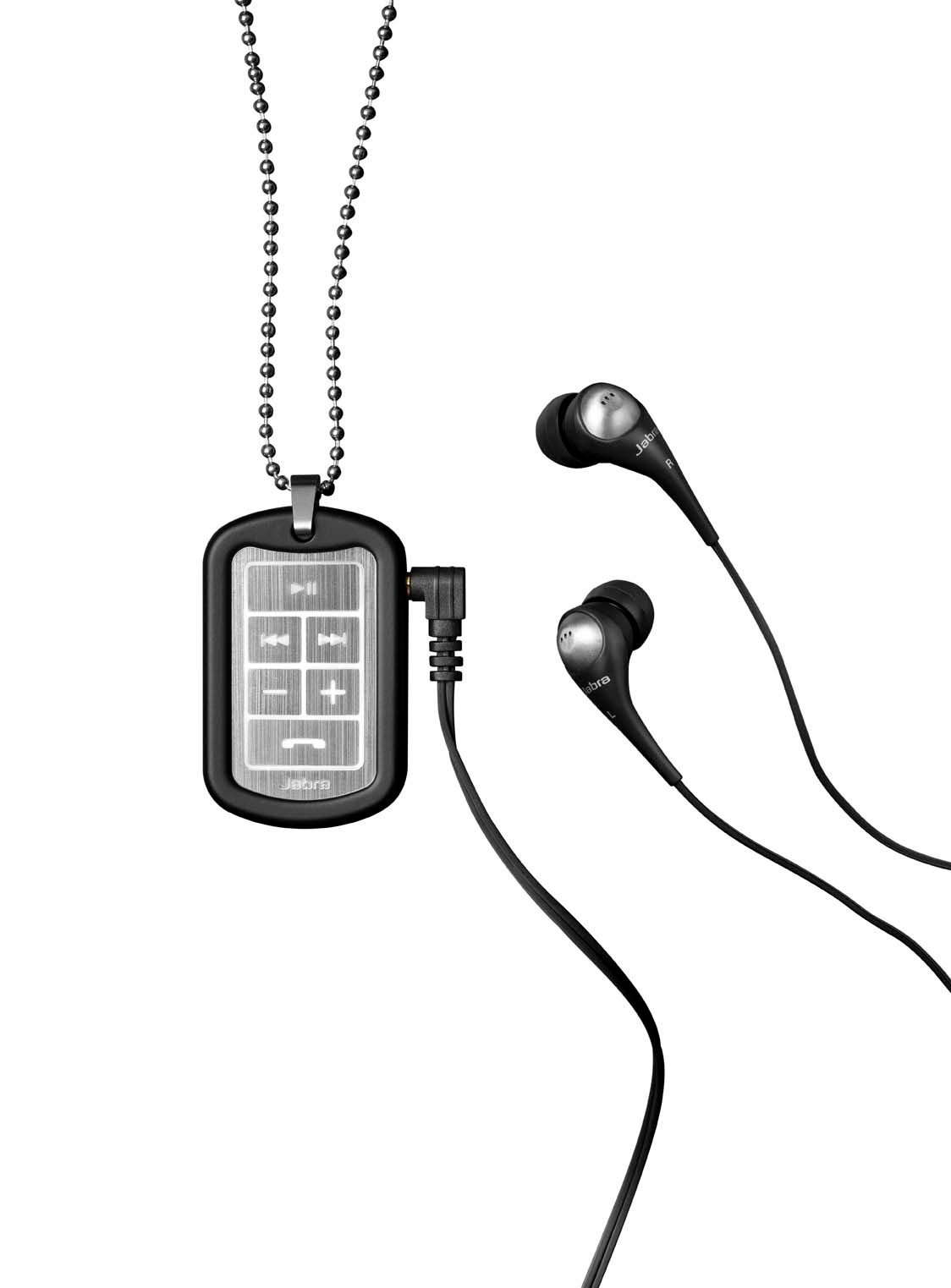
Image: The Jabra Music Street2 headset, highlighting the micro-USB charging port located on the side of the control unit.
- Pilnas įkrovimas paprastai trunka maždaug 2 valandas.
- LED indikatorius rodys įkrovimo būseną (pvz., raudona spalva reiškia, kad įrenginys kraunamas, mėlyna – kad įrenginys visiškai įkrautas).
2. Suporavimas su „Bluetooth“ įrenginiu
- Įsitikinkite, kad ausinės išjungtos.
- Press and hold the Multi-function button (usually the play/pause button) for approximately 5-7 seconds until the LED indicator flashes blue rapidly. This indicates pairing mode.
- „Bluetooth“ palaikančioje įrangoje (išmaniajame telefone, planšetiniame kompiuteryje ir kt.) eikite į „Bluetooth“ nustatymus ir įjunkite „Bluetooth“.
- Ieškokite available devices. "Jabra Street2" should appear in the list.
- Select "Jabra Street2" to connect. If prompted for a passcode, enter "0000" (four zeros).
- Sėkmingai suporavus, LED indikatorius lėtai mirksės mėlynai.
The headset can remember multiple paired devices but can only be connected to one at a time.
Naudojimo instrukcijos
Maitinimo įjungimas/išjungimas
- Maitinimas: Press and hold the Multi-function button until the LED flashes blue.
- Išjungti: Press and hold the Multi-function button until the LED flashes red and then turns off.
Muzikos valdymas
- Leisti / pristabdyti: Vieną kartą paspauskite daugiafunkcį mygtuką.
- Kitas takelis: Press the "Next Track" button (usually marked with a forward arrow).
- Ankstesnis takelis: Press the "Previous Track" button (usually marked with a backward arrow).
- Pagarsink: Paspauskite mygtuką „+“.
- Patildyti: Paspauskite mygtuką „-“.
Skambučių valdymas
- Atsiliepti į skambutį: Vieną kartą paspauskite daugiafunkcį mygtuką.
- Baigti skambutį: Skambučio metu vieną kartą paspauskite daugiafunkcį mygtuką.
- Atmesti skambutį: Paspauskite ir 2 sekundes palaikykite daugiafunkcį mygtuką.
- Perrink paskutinį numerį: Kai nekalbate telefonu, dukart paspauskite daugiafunkcį mygtuką.
- Rinkimas balsu: Press the Multi-function button once when not on a call (if supported by your phone).
The headset automatically switches between music and calls.
Priežiūra
- Keep the headset dry. Moisture can damage the electronic circuits.
- Venkite ekstremalių temperatūrų. Aukšta temperatūra gali sutrumpinti elektroninių prietaisų tarnavimo laiką, sugadinti baterijas ir deformuoti ar išlydyti tam tikrus plastikus.
- Do not attempt to open the headset. Unauthorized modifications can damage the unit and void your warranty.
- Clean the headset with a soft, dry cloth. Do not use harsh chemicals or detergents.
- Store the headset in a cool, dry place when not in use for extended periods.
Trikčių šalinimas
Nėra galios
- Įsitikinkite, kad ausinės yra visiškai įkrautos. Prijunkite jas prie maitinimo šaltinio ir patikrinkite įkrovimo indikatorių.
Negalima susieti su įrenginiu
- Make sure the headset is in pairing mode (LED flashing blue rapidly).
- Įsitikinkite, kad jūsų įrenginyje įjungtas „Bluetooth“ ryšys ir jis yra diapazone (paprastai 10 metrų arba 33 pėdų).
- Try turning off and on both the headset and your Bluetooth device.
- If previously paired, try deleting "Jabra Street2" from your device's Bluetooth list and re-pairing.
Nėra garso arba prasta garso kokybė
- Patikrinkite garsumo lygius tiek ausinėse, tiek prijungtame įrenginyje.
- Įsitikinkite, kad ausinės tinkamai prijungtos prie jūsų įrenginio.
- Kad išvengtumėte trukdžių, priartėkite prie savo įrenginio.
- Ensure the ear buds are correctly inserted and fit snugly to block external noise.
Calls Not Switching Automatically
- Verify that the headset is the active audio device for calls on your phone's Bluetooth settings.
- Some phone models may require manual selection of the audio output during a call.
Specifikacijos
| Modelio pavadinimas | Jabra Music Street2 |
| Bluetooth versija | 3.0 + EDR |
| belaidis diapazonas | Iki 10 metrų (33 pėdų) |
| Pokalbių laikas | Iki 8 valandų |
| Budėjimo laikas | Iki 9.5 dienų |
| Įkrovimo laikas | Maždaug 2 val |
| Ryšys | Bluetooth, 3.5 mm Jack (for wired connection if applicable) |
| Savybės | Virtual surround sound, power bass, noise-blocking ear buds, automatic music/call switching |
Garantija ir palaikymas
Jabra products are covered by a limited warranty. For specific warranty terms and conditions, please refer to the warranty card included with your product or visit the official Jabra websvetainę.
For technical support, frequently asked questions, or to download the latest software/firmware updates, please visit the official Jabra support page:
You may also contact Jabra customer service directly for assistance.