
Įvadas
This manual provides detailed instructions for the setup, operation, and maintenance of your iLive ISB212B Bluetooth Speaker. This compact speaker delivers audio wirelessly from compatible Bluetooth devices and also supports wired connections. Please read this manual thoroughly before using your speaker.
Pakuotės turinys
- iLive ISB212B Bluetooth Speaker
- Mini-USB to USB Charging Cable
Produkto savybės
- Wireless audio streaming via Bluetooth
- LED pairing indicator for connection status
- Compact, cylindrical design
- Rechargeable battery with approximately 2 hours of playback
- Mini-USB port for battery recharging
- 3.5mm Audio Input for wired connections
Valdikliai ir indikatoriai
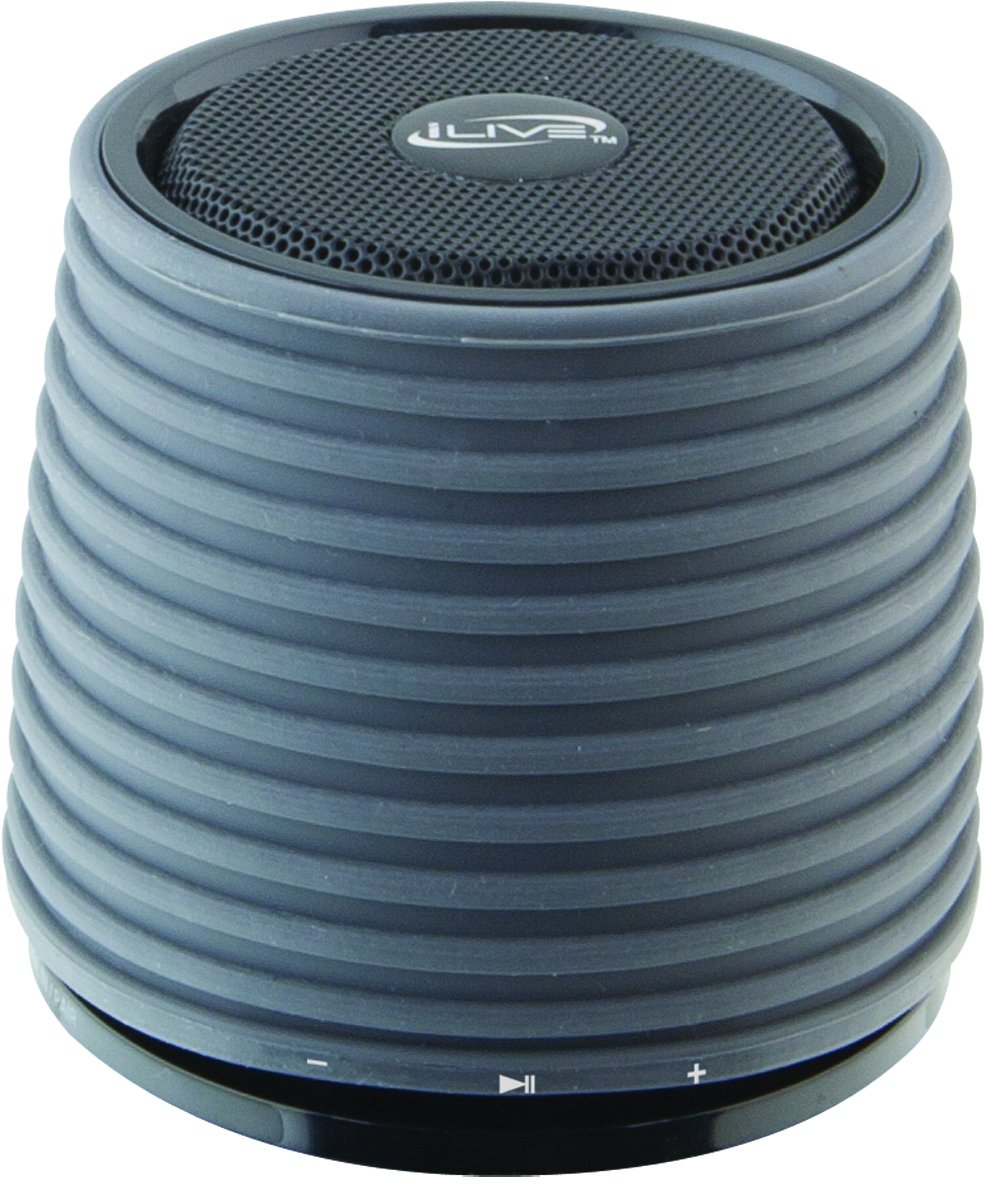
This image displays the iLive ISB212B Bluetooth Speaker. It features a cylindrical shape with a textured grey body and a black speaker grille on top. A band around the middle shows control buttons for play/pause, volume up/next track, and volume down/previous track.
- Maitinimo mygtukas: Paspauskite ir palaikykite, kad įjungtumėte/išjungtumėte.
- Atkūrimo / pristabdymo mygtukas: Valdo garso atkūrimą.
- Garsumo didinimo / kito takelio mygtukas: Trumpai paspauskite, kad padidintumėte garsumą, ilgai paspauskite kitą takelį.
- Garsumo mažinimo / ankstesnio takelio mygtukas: Trumpas paspaudimas – garsumui sumažinti, ilgas – ankstesniam takeliui.
- LED Pairing Indicator: Rodo „Bluetooth“ ryšio būseną.
- Mini USB prievadas: Skirta vidinei baterijai įkrauti.
- 3.5 mm garso įvestis: Skirta išoriniams garso įrenginiams prijungti naudojant pagalbinį kabelį (nepridedamas).
Sąranka
1. Akumuliatoriaus įkrovimas
- Connect the small end of the included Mini-USB to USB charging cable to the Mini-USB port on the speaker.
- Connect the large end of the USB charging cable to a powered USB port (e.g., computer, USB wall adapter).
- Įkrovimo metu LED indikatorius švies, o visiškai įkrovus, užges arba pakeis spalvą.
- Pilnai įkrautas grotuvas užtikrina maždaug 2 valandas grojimo laiko.
2. Įjungimas/išjungimas
- To power on, press and hold the Power button until the LED indicator illuminates.
- To power off, press and hold the Power button again until the LED indicator turns off.
Naudojimo instrukcijos
1. „Bluetooth“ poravimas
- Įsitikinkite, kad garsiakalbis įjungtas ir yra ne toliau kaip 30 pėdų atstumu nuo „Bluetooth“ įrenginio.
- The LED pairing indicator will flash, indicating it is in pairing mode.
- On your Bluetooth device (smartphone, tablet, etc.), enable Bluetooth and search for new devices.
- Select "iLive ISB212B" from the list of available devices.
- Once paired, the LED pairing indicator will become solid, and you may hear an audible confirmation.
- Jei susiejimas nepavyksta, išjunkite garsiakalbį ir įrenginį, tada pakartokite veiksmus.
2. Garso grojimas
- After successful Bluetooth pairing, begin playing audio on your connected device.
- Atkūrimui valdyti naudokite garsiakalbio mygtuką „Paleisti / pristabdyti“.
- Use the Volume Up/Down buttons for volume adjustment. Long press for track navigation.
3. Using the 3.5mm Audio Input
- Connect one end of a 3.5mm audio cable (not included) to the 3.5mm Audio Input port on the speaker.
- Kitą laido galą prijunkite prie išorinio garso įrenginio ausinių lizdo arba garso išvesties.
- Garsiakalbis automatiškai persijungs į pagalbinės įvesties režimą.
- Adjust volume using your external device and the speaker's volume controls.
Priežiūra
- Garsiakalbį valykite minkšta, sausa šluoste. Nenaudokite abrazyvinių valiklių ar tirpiklių.
- Saugokite garsiakalbį nuo vandens, drėgmės ir ekstremalių temperatūrų. Šis gaminys nėra atsparus vandeniui.
- Kai garsiakalbio ilgesnį laiką nenaudojate, laikykite jį vėsioje, sausoje vietoje.
- Nebandykite ardyti ar modifikuoti garsiakalbio. Tai panaikins garantiją.
Trikčių šalinimas
| Problema | Sprendimas |
|---|---|
| Garsiakalbis neįsijungia. | Ensure the battery is charged. Connect the speaker to a power source using the Mini-USB cable. |
| Negalima susieti su Bluetooth įrenginiu. |
|
| Nėra garso arba garsas per mažas. |
|
| Trumpas baterijos veikimo laikas. | Ensure the speaker is fully charged before use. Battery life can vary based on volume level and usage. |
Specifikacijos
| Funkcija | Detalė |
|---|---|
| Modelio numeris | ISB212B |
| Ryšys | Bluetooth, 3.5mm Auxiliary, Mini-USB (charging) |
| Garsiakalbio išėjimo galia | 3 vatų |
| Baterijos tipas | 1 ličio jonas (įtraukta) |
| Baterijos veikimo laikas (apytiksliai) | 2 valandų |
| Gaminio matmenys | 7.8 x 7.8 x 7.01 cm |
| Prekės svoris | 295 g |
| Kilmės šalis | Kinija |
| Atsparus vandeniui | Nr |
Garantija ir palaikymas
This iLive ISB212B Bluetooth Speaker comes with a 90 dienų garantija from the date of purchase. This warranty covers manufacturing defects. For technical support or warranty claims, please refer to the contact information provided with your product packaging or visit the official iLive websvetainę.