
beyerdynamic 721360
Beyerdynamic Stegos TB Wireless Boundary Microphone User Manual
Modelis: 721360
Įvadas
This manual provides comprehensive instructions for the setup, operation, and maintenance of your Beyerdynamic Stegos TB Wireless Boundary Microphone. Please read this manual thoroughly before using the device to ensure optimal performance and longevity.
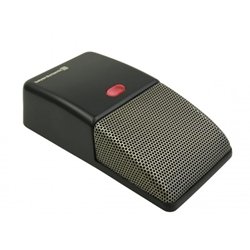
Image: Beyerdynamic Stegos TB Wireless Boundary Microphone. This image displays the compact, black wireless boundary microphone, designed for discreet placement on surfaces like conference tables.
Svarbios saugos instrukcijos
- Saugokite prietaisą nuo vandens ar per didelės drėgmės.
- Venkite ekstremalių temperatūrų.
- Nebandykite atidaryti ar modifikuoti įrenginio. Visus techninės priežiūros darbus patikėkite kvalifikuotiems darbuotojams.
- Naudokite tik nurodytus maitinimo šaltinius ir priedus.
- Laikyti vaikams nepasiekiamoje vietoje.
Pakuotės turinys
Patikrinkite, ar pakuotėje yra visi reikalingi daiktai:
- Beyerdynamic Stegos TB Wireless Boundary Microphone
- USB įkrovimo laidas (mikro USB)
- Vartotojo vadovas (šis dokumentas)
Sąranka
1. Mikrofono įkrovimas
- Connect the Micro USB end of the charging cable to the microphone's charging port.
- Connect the standard USB end of the cable to a powered USB port (e.g., computer, USB wall adapter).
- The LED indicator on the microphone will show charging status.
- Visiškai įkrovę atjunkite įkrovimo kabelį.
2. Prisijungimas prie įrenginio
The Stegos TB microphone connects wirelessly to compatible devices, typically personal computers, for video conferencing applications.
- Įsitikinkite, kad mikrofonas yra įkrautas ir įjungtas.
- Activate Bluetooth on your personal computer or compatible device.
- Put the microphone into pairing mode (refer to the device's specific button combination, usually holding a power/pairing button). The LED indicator will typically flash to indicate pairing mode.
- On your computer, search for available Bluetooth devices. Select "Beyerdynamic Stegos TB" from the list.
- Once paired, the LED indicator on the microphone will show a solid light, indicating a successful connection.
- In your computer's sound settings or video conferencing software, select the "Beyerdynamic Stegos TB" as the input audio device.
Naudojimo instrukcijos
Maitinimo įjungimas/išjungimas
- To power on: Press and hold the power button for approximately 3 seconds. The LED indicator will illuminate.
- To power off: Press and hold the power button for approximately 3 seconds. The LED indicator will turn off.
Nutildymo funkcija
The microphone features a mute function for privacy during calls.
- To mute: Press the mute button once. The LED indicator may change color or flash to indicate mute status.
- To unmute: Press the mute button again. The LED indicator will return to its normal operating state.
Placement for Optimal Performance
For best audio pickup, place the Stegos TB microphone on a flat surface in the center of the participants. Its omnidirectional polar pattern ensures 360-degree sound capture.
Priežiūra
Valymas
- Wipe the microphone's exterior with a soft, dry, or slightly damp audinys.
- Nenaudokite stiprių cheminių medžiagų, tirpiklių ar abrazyvinių valiklių.
- Ensure no liquid enters the microphone grille or ports.
Sandėliavimas
When not in use for extended periods, store the microphone in a cool, dry place, away from direct sunlight and extreme temperatures. It is recommended to fully charge the battery before long-term storage and recharge it every few months to maintain battery health.
Trikčių šalinimas
| Problema | Galima priežastis | Sprendimas |
|---|---|---|
| Mikrofonas neįsijungia. | Žemas arba išsikrovęs akumuliatorius. | Charge the microphone using the provided USB cable. |
| Nepavyksta prisijungti belaidžiu būdu. | Bluetooth is off on the device; microphone not in pairing mode; out of range. | Ensure Bluetooth is enabled. Put microphone into pairing mode. Move microphone closer to the device. |
| No audio input from microphone. | Microphone is muted; incorrect audio input selected on computer/software. | Unmute the microphone. Select "Beyerdynamic Stegos TB" as the input device in your system settings or application. |
| Prasta garso kokybė. | Microphone too far from speaker; environmental noise; interference. | Place microphone closer to speakers. Reduce background noise. Ensure no obstructions between microphone and receiving device. |
Specifikacijos
- Prekinis ženklas: Beyerdynamic
- Modelis: Stegos TB (721360)
- Ryšio technologija: Wireless (USB for charging)
- Jungties tipas: Micro USB (įkrovimui)
- Ypatinga funkcija: Bevielis
- Suderinami įrenginiai: Asmeninis kompiuteris
- Spalva: Juoda
- Poliarinis modelis: Visakryptis
- Maitinimo šaltinis: Maitinamas baterijomis
- Rekomenduojami naudojimo būdai: Vaizdo konferencija
Informacija apie garantiją
Beyerdynamic products are covered by a limited warranty. For specific warranty terms and conditions, please refer to the warranty card included with your product or visit the official Beyerdynamic websvetainėje. Išsaugokite pirkimo įrodymą garantiniams reikalavimams.
Note: Warranty details are subject to change and may vary by region.
Palaikymas ir kontaktai
For further assistance, technical support, or service inquiries, please contact Beyerdynamic customer support through their official websvetainėje arba kontaktinę informaciją, pateiktą jūsų produkto pakuotėje.
Oficialus Websvetainė: www.beyerdynamic.com
Kreipdamiesi į palaikymo tarnybą, turėkite po ranka savo modelio numerį (721360) ir serijos numerį.
Ask a question about this manual
Ask about setup, troubleshooting, compatibility, parts, safety, or missing instructions. Manuals+ will review the question and use this page’s manual context to help answer it.