
1. Produktas baigtasview
The AC Infinity AXIAL S1225 is a 120mm muffin fan designed for various air circulation projects. It is UL-certified and features a speed controller, allowing for optimized airflow and noise levels. This fan is suitable for applications such as improving air circulation in doorways, between rooms, near wood stoves, or fireplaces.

Image: The AC Infinity AXIAL S1225 120mm Muffin Fan with its speed controller.

Image: An AC Infinity AXIAL fan installed, illustrating its use for air circulation in various projects like wood stoves, doorways, and room-to-room ventilation.
Key features include a durable construction with dual-ball bearings, rated for a lifespan of 67,000 hours, and the ability to be mounted in any direction. The included speed controller provides flexibility to adjust the fan's performance to your specific needs.
2. Kas įskaičiuota
Your AC Infinity AXIAL S1225 package contains the following components:
- One (1) Heavy-Duty Aluminum Fan (120 x 120 x 25 mm)
- One (1) Speed Control Plug Cord - 6 Ft
- Two (2) Spiral Fan Guards - 120mm
- Keturi (4) tvirtinimo varžtai
- Four (4) Nuts and Washers
- One (1) Mounting Hinge

Image: All components of the AC Infinity AXIAL S1225 kit laid out, including the fan, speed controller, fan guards, mounting screws, nuts, washers, and a mounting hinge.
3. Sąranka ir diegimas
Follow these steps to set up and install your AC Infinity AXIAL S1225 fan:
- Nustatykite montavimo vietą: Choose a suitable location for the fan, considering airflow direction and proximity to a power outlet. The fan can be mounted in any orientation.
- Attach Fan Guards: Secure the spiral fan guards to both sides of the fan using the provided mounting screws, nuts, and washers. This protects the fan blades and prevents accidental contact.
- Ventiliatoriaus montavimas: Use the mounting screws and hinge (if applicable) to securely attach the fan to your desired surface. Ensure the fan is stable and vibration-free.
- Connect Speed Controller: Plug the fan's power connector into the speed control plug cord.
- Prijunkite prie maitinimo: Plug the speed control plug cord into a standard 100 to 120V AC power outlet.
Ensure all connections are secure before operating the fan.
4. Naudojimo instrukcijos
The AC Infinity AXIAL S1225 features a convenient speed controller to adjust the fan's performance.

Image: Close-up of the speed controller, showing the dial for speed adjustment and the on/off switch.
- Maitinimo įjungimas/išjungimas: The speed controller includes a switch to turn the fan on or off.
- Greičio reguliavimas: Rotate the dial on the speed controller to select your desired fan speed:
- L (Low Speed): For minimal noise and gentle airflow.
- M (Medium Speed): Suitable for most general applications, balancing airflow and noise.
- H (High Speed): Provides maximum airflow for demanding applications.
Adjust the speed as needed to achieve optimal air circulation and comfort for your specific environment.
5. Priežiūra
To ensure the longevity and optimal performance of your AC Infinity AXIAL S1225 fan, follow these maintenance guidelines:
- Reguliarus valymas: Periodically clean the fan blades and guards to prevent dust buildup, which can reduce airflow and increase noise. Use a soft, dry cloth or a can of compressed air.
- Patikrinkite, ar nėra kliūčių: Ensure no objects are obstructing the fan blades or airflow path.
- Patikrinkite jungtis: Occasionally verify that all electrical connections are secure.
- Venkite kontakto su skysčiu: Do not immerse the fan or speed controller in water or other liquids.
No lubrication is required for the dual-ball bearings.
6. Problemų sprendimas
If you encounter issues with your AC Infinity AXIAL S1225 fan, refer to the following troubleshooting tips:
- Ventiliatorius nesisuka:
- Ensure the speed controller is switched to the 'On' position.
- Verify that the power cord is securely plugged into both the fan and a working electrical outlet.
- Patikrinkite, ar lizdas gauna maitinimą, prijungdami kitą įrenginį.
- Per didelis triukšmas:
- Reduce the fan speed using the speed controller.
- Check for any loose components or obstructions around the fan blades.
- Ensure the fan is mounted securely and not vibrating against other surfaces.
- Sumažintas oro srautas:
- Clean any dust or debris from the fan blades and guards.
- Ensure the fan is set to a higher speed setting.
- Verify that the fan's intake and exhaust paths are clear and unobstructed.
Jei problemos išlieka, susisiekite su klientų aptarnavimo tarnyba dėl tolesnės pagalbos.
7. Specifikacijos
Detailed specifications for the AC Infinity AXIAL S1225 fan:
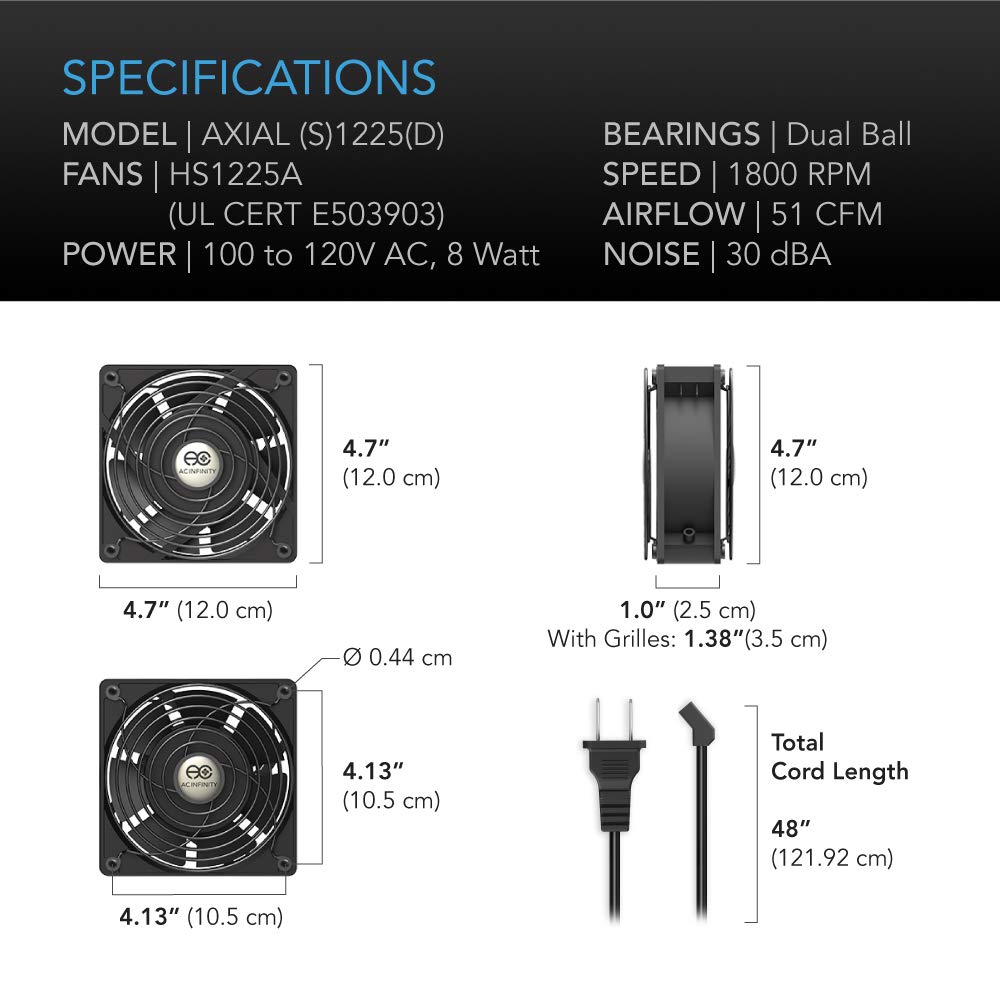
Image: Diagram illustrating the dimensions and key specifications of the AC Infinity AXIAL S1225 fan.
| Modelis | AXIAL (S)1225(D) |
| Prekės modelio numeris | AI-120SCX |
| Ventiliatoriaus dydis | 120 x 120 x 25 mm (4.7 x 4.7 x 1 colio) |
| Guoliai | Dvigubas kamuolys |
| Nominali gyvenimo trukmė | 67,000 valandos |
| Galia | 100 to 120V AC, 8 Watt |
| ttage | 12 voltų |
| Oro srautas | 51 CFM (kubinių pėdų per minutę) |
| Triukšmo lygis | 16–38 dBA |
| Medžiaga | Metalas |
| Bendras laido ilgis | 48 colio (121.92 cm) |
| Sertifikatai | UL-Certified (E503903), CE, RoHS |
8. Informacija apie garantiją
The AC Infinity AXIAL S1225 fan is backed by a dvejų metų gamintojo garantijaŠi garantija taikoma medžiagų ir gamybos defektams, atsiradusiems įprasto naudojimo sąlygomis. Išsaugokite pirkimo įrodymą, jei galėtumėte pateikti pretenzijas dėl garantijos.
For detailed warranty terms and conditions, please refer to the official AC Infinity websvetainėje arba susisiekite su jų klientų aptarnavimo tarnyba.
9. Pagalba klientams
For technical assistance, troubleshooting beyond this manual, or warranty inquiries, please contact AC Infinity customer support.
- Websvetainė: Apsilankykite oficialioje „AC Infinity“ svetainėje websvetainė, kurioje rasite pagalbos išteklių, DUK ir kontaktinės informacijos.
- El. paštas / Telefonas: Refer to the product packaging or the AC Infinity website for specific email addresses or phone numbers for customer service.
When contacting support, please have your product model number (AI-120SCX) and purchase date available.