
Įvadas
This manual provides instructions for the safe and efficient operation of your SkyTech 1410T/LCD Timer Fireplace Remote Control system. This system is designed to offer convenient remote control for gas heating appliances, featuring a timer function and an LCD display for room temperature.
Saugos informacija
- Prieš montuodami ir naudodami atidžiai perskaitykite visas instrukcijas.
- Ensure all electrical wiring is performed by a qualified professional to prevent electrical shock or fire hazards.
- Do not expose the remote control or receiver to water or excessive moisture.
- Replace batteries promptly when the low battery indicator appears on the remote's display.
- Keep the remote control out of reach of children to prevent unintended operation of the fireplace.
- Always ensure the fireplace area is clear of flammable materials before operation.
Pakuotės turinys
Įsitikinkite, kad pakuotėje yra visi komponentai:
- 1 x Remote Control Transmitter (4-button: On/Off/Timer/Set, with LCD display)
- 1 x Receiver Box (110V AC, with learn function and On/Remote/Off slider switch)
- 2 x AAA Alkaline Batteries (for transmitter)
Sąranka ir diegimas
1. Baterijos įdėjimas (siųstuvas)
Open the battery compartment located on the back of the remote control. Insert two AAA alkaline batteries, ensuring correct polarity (+/-). Close the compartment securely.
2. Receiver Placement and Wiring
The receiver box operates on 110-120 VAC and provides a "dry contact" output to your fireplace. It can be placed on the hearth or discreetly under the fireplace behind the control access panel.
Įspėjimas: Installation should be performed by a qualified technician. Always ensure power to the fireplace is disconnected at the circuit breaker before performing any wiring.
Connect the receiver's wires to the appropriate terminals on your gas heating appliance. These terminals are typically where a wall switch or existing remote receiver would connect. The receiver includes male-female connectors for straightforward integration.
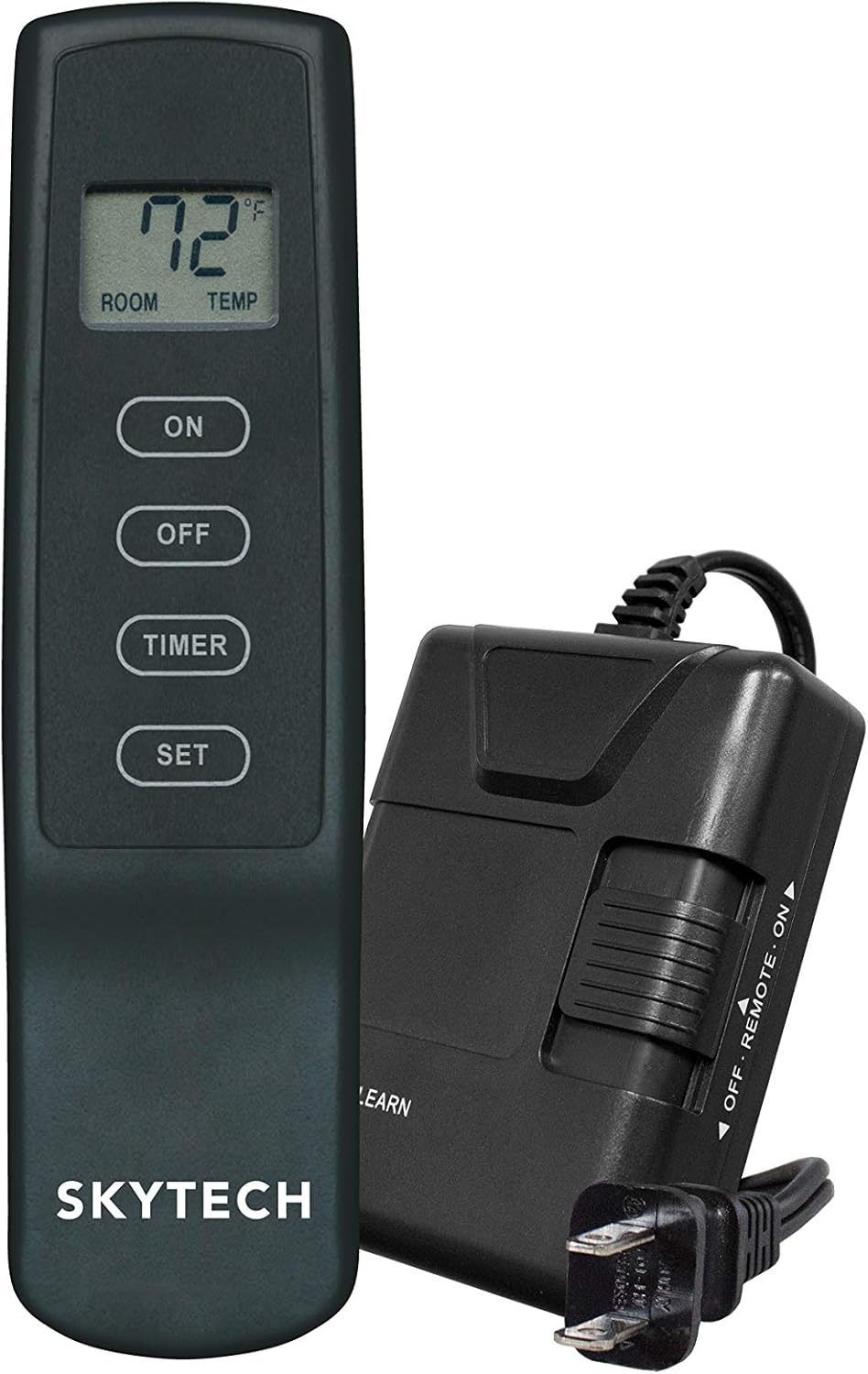
Image: The SkyTech 1410T/LCD remote control transmitter alongside its receiver unit. The receiver has a power cord and a slider switch for ON/REMOTE/OFF modes.

Vaizdas: priekis view of the SkyTech 1410T/LCD remote control transmitter, showing the LCD display and four control buttons: ON, OFF, TIMER, and SET.
3. Pairing the Transmitter and Receiver (Learning Function)
- Ensure the receiver is powered on and its slider switch is set to the "REMOTE" position.
- Locate the "LEARN" button on the receiver box. Press and hold this button until you hear a beep or see an indicator light flash.
- Within 20 seconds of pressing the "LEARN" button, press the "ON" button on the remote control transmitter.
- A confirmation beep from the receiver indicates successful pairing. The system operates on one of 65,536 security codes programmed at the factory.
Naudojimo instrukcijos
Pagrindinė operacija
- ĮJUNGIMO mygtukas: Press to turn the fireplace ON. The LCD will display the current room temperature.
- OFF mygtukas: Press to turn the fireplace OFF.
Laikmačio funkcija
The remote features a convenient 3-hour countdown timer for automatic fireplace shutdown.
- With the fireplace ON, press the "TIMER" button. The LCD will display "3:00" and begin counting down.
- To adjust the timer duration, press the "SET" button while the timer is active. Each press will cycle through available timer durations (e.g., 1 hour, 2 hours, 3 hours).
- The fireplace will automatically turn OFF when the timer reaches zero.
- To cancel the timer at any point, press the "OFF" button.
Temperatūros ekranas
The LCD on the transmitter displays the current ambient room temperature in either Fahrenheit (°F) or Celsius (°C). It is important to note that this unit is not a thermostat and does not control the fireplace based on a set temperature. It only provides a reading of the room's temperature.
Childproof Feature
To activate the childproof feature, press and hold the "ON" and "OFF" buttons simultaneously for approximately 5 seconds until "CP" appears on the LCD. When active, the remote will not respond to button presses. To deactivate, repeat the process until "CP" disappears from the display.
Priežiūra
Baterijos keitimas
When the low battery indicator appears on the LCD, replace the two AAA batteries in the transmitter promptly. Use only alkaline batteries for optimal performance and longevity.
Valymas
Wipe the remote control and receiver with a soft, dry cloth. Do not use abrasive cleaners, solvents, or immerse the units in liquids, as this can cause damage.
Trikčių šalinimas
| Problema | Galima priežastis | Sprendimas |
|---|---|---|
| Fireplace does not turn ON/OFF via remote | 1. Receiver slider switch in wrong position. 2. Transmitter batteries low or dead. 3. Remote and receiver not paired. 4. Receiver not powered. | 1. Ensure receiver switch is in the "REMOTE" position. 2. Replace transmitter batteries. 3. Re-pair remote and receiver (refer to "Pairing" section). 4. Check 110V AC power connection to the receiver. |
| LCD ekranas tuščias arba blankus | Mažos siųstuvo baterijos. | Pakeiskite siųstuvo baterijas. |
| Nuotolinio valdymo pulto veikimo nuotolis yra prastas | Obstructions or radio frequency interference. | Move closer to the receiver; ensure no large metal objects are blocking the signal path. |
| Fireplace turns off unexpectedly | Timer activated or safety feature triggered. | Check if the timer is set. Some fireplace systems have safety features that shut off gas if the remote signal is lost for an extended period. |
Specifikacijos
| Prekės ženklas | SkyTech |
| Modelio pavadinimas | SkyTech 1410T/LCD Timer Fireplace Remote Control (SKY-1410T-LCD-A) |
| Gaminio matmenys | 3.6 "D x 6.4" P x 3" A |
| Valdiklio tipas | Mygtukas |
| Ypatingos savybės | LCD Screen, Low Battery Indicator, Childproof Feature |
| Maitinimo šaltinis | Battery Powered (Transmitter), 110V AC (Receiver) |
| Baterijos | Reikalinga 2 AAA baterija (yra komplekte) |
| Ryšio technologija | RF (radijo dažnis) |
| Medžiaga | Plastikiniai |
| Prekės svoris | 12 uncijos |
Garantija ir palaikymas
For warranty information or technical assistance, please contact SkyTech customer support. Refer to the product packaging or the manufacturer's official website for current contact details. It is recommended to keep your purchase receipt as proof of purchase for any warranty claims.