
1. Įvadas
Ačiū, kad pirkoteasing the KLH R5100 Surround Sound Receiver. This receiver is designed to provide high-quality audio and video performance for your home entertainment system. It features multiple audio and video inputs, surround sound processing, and a powerful amplifier to deliver an immersive listening experience. Please read this manual thoroughly before operating the unit to ensure proper setup and optimal performance.
2. Svarbi saugos informacija
Kad sumažintumėte elektros smūgio, gaisro ar įrenginio sugadinimo riziką, laikykitės šių saugos priemonių:
- Maitinimo šaltinis: Connect the unit only to an AC 120V, 60Hz power supply.
- Vėdinimas: Užtikrinkite tinkamą vėdinimą. Neužblokuokite ventiliacijos angų. Palikite pakankamai vietos aplink įrenginį tinkamam oro cirkuliavimui.
- Vanduo ir drėgmė: Saugokite įrenginį nuo lietaus, drėgmės ar per didelės oro drėgmės. Nestatykite ant įrenginio daiktų, pripildytų skysčių, pavyzdžiui, vazų.
- Šiluma: Laikykite įrenginį atokiau nuo šilumos šaltinių, tokių kaip radiatoriai, šildytuvai, viryklės ar kiti prietaisai (įskaitant ampkeltuvai), kurie gamina šilumą.
- Valymas: Prieš valydami atjunkite įrenginį nuo elektros lizdo. Valymui naudokite sausą šluostę.
- Aptarnavimas: Nebandykite patys atlikti šio įrenginio techninės priežiūros. Visus techninės priežiūros darbus patikėkite kvalifikuotiems techninės priežiūros darbuotojams.
- Kabeliai: Saugokite maitinimo laidą, kad ant jo neužeitų ar nesuspaustų, ypač prie kištukų, patogių lizdų ir toje vietoje, kur jie išeina iš įrenginio.
3. Pakuotės turinys
Patikrinkite, ar jūsų pakuotėje yra šie elementai:
- KLH R5100 Surround Sound Receiver
- Nuotolinio valdymo blokas
- Vartotojo vadovas
- Garso / vaizdo kabeliai (RCA tipo)
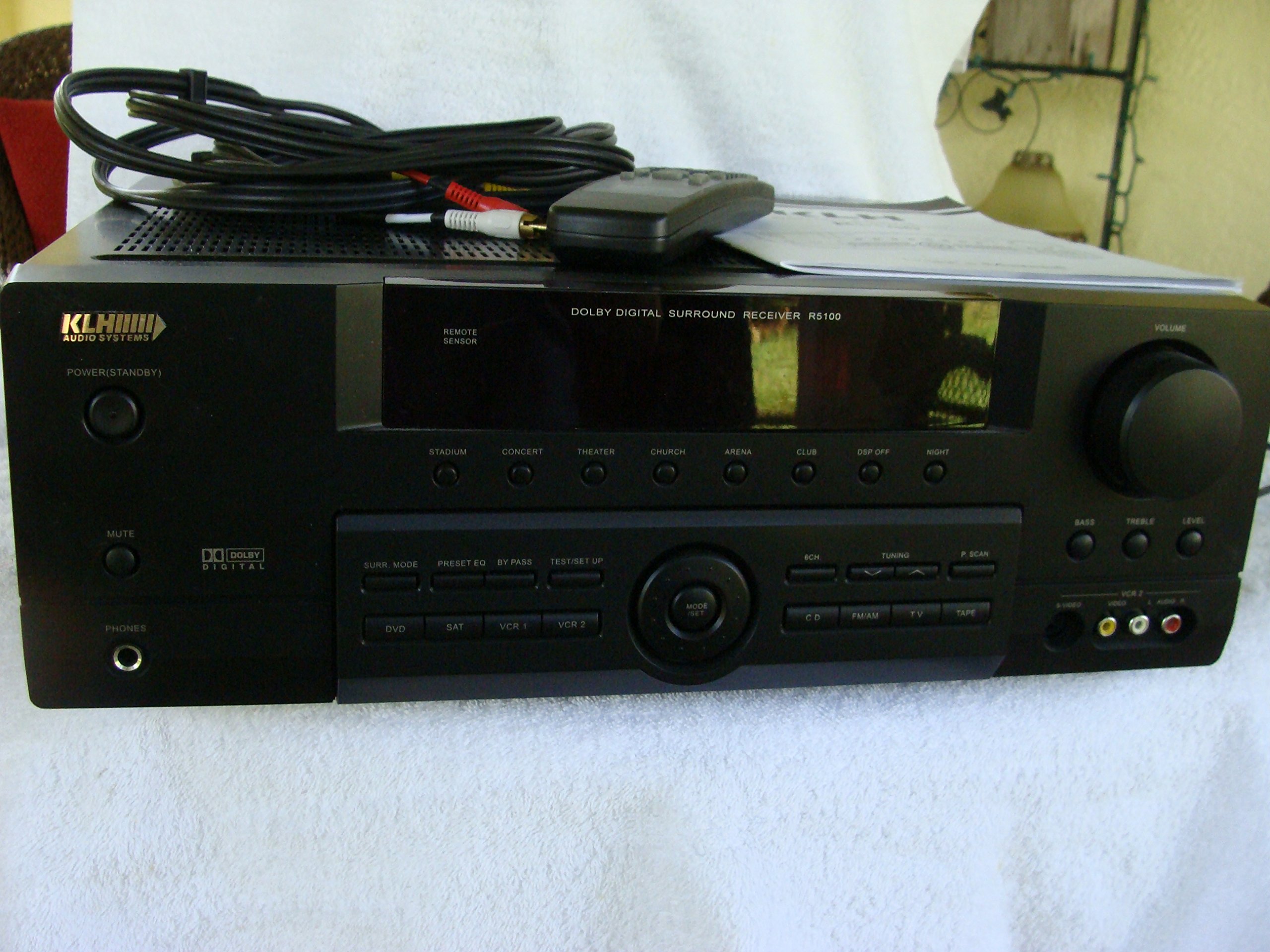
Image: The KLH R5100 receiver, its remote control, user manual, and included audio/video cables.
4. Produktas baigtasview
4.1 Priekinio skydelio valdikliai
The front panel provides access to essential controls and indicators for daily operation.

Paveikslėlis: detalus view of the receiver's front panel, highlighting the display, volume control, and input selection buttons.
- Maitinimo mygtukas: Įjungia arba išjungia imtuvą.
- Įvesties parinkikliai: Buttons for DVD, SAT, VCR 1, VCR 2, CD, FM/AM, TV, TAPE to choose your audio/video source.
- Garsumo rankenėlė: Reguliuoja bendrą išvesties garsumą.
- Surround Mode Buttons: Select various sound fields like Stadium, Concert, Theater, Church, Arena, Club, DSP Off, Night.
- Bass/Treble/Level: Controls for adjusting audio tone and individual channel levels.
- Ausinių lizdas: Privačiam pasiklausymui.
4.2 Galinio skydelio jungtys
The rear panel houses all input and output terminals for connecting your audio and video components, as well as speakers.

Image: The full rear panel of the receiver, displaying all connection ports for audio, video, and speakers.
- Garsiakalbių terminalai: Connections for Main (Front Left/Right), Center, and Rear (Surround Left/Right) speakers.
- Garso įėjimai (RCA): For connecting CD players, tape decks, VCRs, TVs, and other stereo audio sources.
- Video Inputs/Outputs (RCA/S-Video): For connecting video sources like DVD players, VCRs, and TVs.
- Digital Audio Inputs (Optical/Coaxial): For connecting digital audio sources like DVD players or set-top boxes.
- 6CH Direct Input: For connecting external multi-channel decoders or players with 5.1 analog outputs.
- Žemųjų dažnių garsiakalbio išėjimas: RCA išėjimas aktyviam žemų dažnių garsiakalbiui prijungti.
- Antenos gnybtai: For FM and AM antennas.
4.3 Nuotolinio valdymo pultas
The remote control provides convenient access to all receiver functions from your listening position.

Vaizdas: Stambus planas view of the remote control unit, detailing its buttons for various functions.
- Maitinimo įjungimas/išjungimas: Įjungia arba išjungia imtuvą.
- Įvesties parinkikliai: Dedicated buttons for each input source (DVD, CD, TV, etc.).
- Garsumo didinimas / sumažinimas: Reguliuoja pagrindinį garsumą.
- Nutildyti: Laikinai nutildo garso išvestį.
- Erdvinio garso režimas: Cycles through available surround sound modes.
- Level/Test: For adjusting individual speaker levels and running a test tone.
- Imtuvo valdikliai: For FM/AM station tuning and memory functions.
5. Sąranka
5.1 Garsiakalbių prijungimas
Prieš atlikdami bet kokius prijungimus, įsitikinkite, kad imtuvas yra atjungtas nuo maitinimo lizdo.
- Priekiniai garsiakalbiai: Connect your main left and right speakers to the 'MAIN SPEAKERS (8Ω)' terminals. Ensure correct polarity (+ to + and - to -).
- Centrinis garsiakalbis: Connect your center channel speaker to the 'CENTER SPEAKER (8Ω)' terminals.
- Galiniai garsiakalbiai: Connect your surround left and right speakers to the 'REAR SPEAKERS (8Ω)' terminals.
- Žemų dažnių garsiakalbis: Connect an active subwoofer to the 'SUBWOOFER OUT' RCA jack using a single RCA cable.

Vaizdas: Išsamus view of the speaker connection terminals on the rear panel.
5.2 Garso / vaizdo šaltinių prijungimas
Use appropriate cables (RCA, Optical, Coaxial) to connect your source components to the receiver.
- DVD grotuvas: Connect the audio output of your DVD player to the 'DVD' audio input jacks (RCA) on the receiver. For digital audio, use either the 'DIGITAL IN OPTICAL' or 'DIGITAL IN COAXIAL' input. Connect the video output to the 'DVD' video input.
- CD grotuvas: Connect the audio output of your CD player to the 'CD' audio input jacks (RCA).
- TV/Cable Box: Connect the audio output of your TV or cable box to the 'TV' audio input jacks (RCA). Connect video output to the 'TV' video input.
- Kiti įrenginiai: Use 'SAT', 'VCR 1', 'VCR 2', or 'TAPE' inputs for other audio/video components as needed.

Image: A close-up of the digital audio inputs (Coaxial, Optical) and the 6-channel direct input section on the rear panel.
5.3 Antenos prijungimas
Prijunkite pridedamas FM ir AM antenas prie atitinkamų gnybtų galiniame skydelyje, kad galėtumėte priimti radijo signalus.
6. Naudojimo instrukcijos
6.1 Pagrindinės operacijos
- Maitinimas: Press the Power button on the front panel or remote control.
- Pasirinkite įvestį: Press the desired input selector button (e.g., 'DVD', 'CD') on the front panel or remote control to choose your source.
- Reguliuoti garsumą: Turn the Volume knob on the front panel or use the Volume Up/Down buttons on the remote control.
6.2 Surround Sound Modes
The R5100 offers various sound modes to enhance your listening experience:
- Stadionas: Simulates the acoustics of a large stadium.
- Koncertas: Creates a concert hall ambiance.
- Teatras: Optimized for movie playback, enhancing dialogue and effects.
- Bažnyčia: Replicates the spaciousness of a church.
- Arena: Provides a wide, open sound field.
- Klubas: Simulates a lively club environment.
- DSP Off: Disables digital sound processing for a direct stereo signal.
- Naktis: Reduces dynamic range for late-night listening without disturbing others.
Press the 'SURR. MODE' button on the remote or front panel to cycle through these modes.
6.3 Tonų valdymas
Use the BASS and TREBLE controls on the front panel or remote to adjust the low and high frequency response. The LEVEL controls allow for fine-tuning of individual speaker output levels.
6.4 Derintuvo veikimas
To listen to radio:
- Press the 'FM/AM' input selector.
- Use the 'TUNING' buttons on the front panel or remote to find stations.
- Press 'MEMORY' to store favorite stations, and 'P.SCAN' to scan through presets.
7. Priežiūra
To ensure the longevity and optimal performance of your KLH R5100 receiver, follow these maintenance guidelines:
- Valymas: Wipe the exterior surfaces with a soft, dry cloth. Do not use abrasive cleaners, waxes, or solvents as they may damage the finish.
- Vėdinimas: Regularly check that the ventilation openings are not obstructed by dust or debris. Use a soft brush or vacuum cleaner to gently remove any build-up.
- Maitinimo laidas: Inspect the power cord periodically for any signs of damage. If damaged, discontinue use and contact qualified service personnel.
- Saugykla: Jei įrenginį ilgesnį laiką sandėliuosite, atjunkite jį nuo elektros lizdo ir uždenkite, kad apsaugotumėte nuo dulkių.
8. Problemų sprendimas
If you encounter problems with your receiver, refer to the following common issues and solutions before seeking professional service.
| Problema | Galima priežastis | Sprendimas |
|---|---|---|
| Nėra galios | Maitinimo laidas atjungtas; Maitinimo lizdas neaktyvus | Įsitikinkite, kad maitinimo laidas yra tvirtai prijungtas; patikrinkite maitinimo lizdą su kitu įrenginiu |
| Nėra garso | Incorrect input selected; Speakers not connected properly; Volume too low; Mute function active | Select correct input source; Check speaker connections and polarity; Increase volume; Deactivate Mute |
| Nuotolinio valdymo pultas neveikia | Batteries depleted; Obstruction between remote and receiver; Remote sensor blocked | Replace batteries; Remove any obstructions; Ensure remote sensor on receiver is clear |
| Prastas radijo priėmimas | Antena neprijungta arba netinkamai pastatyta | Connect antennas securely; Adjust antenna position for better reception |
| Iškraipytas garsas | Input signal too high; Speaker impedance mismatch; Damaged cables | Reduce source volume; Ensure speakers match 8Ω impedance; Check and replace damaged cables |
9. Specifikacijos
The following are the technical specifications for the KLH R5100 Surround Sound Receiver:
- Modelio numeris: R5100
- Gaminio matmenys: 16.88 x 6.88 x 15.75 colio
- Prekės svoris: 24.2 svaro
- Maitinimo šaltinis: 120 V kintamoji dalis, 60 Hz
- Energijos suvartojimas: 320W
- Garso išvesties režimas: Aplink
- Erdvinio garso kanalo konfigūracija: 5.1
- Ryšio technologija: RCA, 3.5mm Jack, Optical, Coaxial
- Suderinami įrenginiai: Garsiakalbiai
- Valdiklio tipas: Nuotolinis
- Ypatinga funkcija: Advanced Room Calibration (as per product listing, though specific details may vary)
- Spalva: Juoda
10. Garantija ir palaikymas
For warranty information and customer support, please refer to the documentation included with your purchase or contact KLH customer service directly. Keep your proof of purchase for any warranty claims.