
D-Link DCS-5020L
D-Link Pan & Tilt Wi-Fi Camera
Modelis: DCS-5020L
Prekės ženklas: D-Link
1. Įvadas
This manual provides comprehensive instructions for the installation, operation, and maintenance of your D-Link Pan & Tilt Wi-Fi Camera (DCS-5020L). This camera offers advanced surveillance capabilities, allowing you to monitor your home or business remotely with ease.
Key features include ultra-smooth pan and tilt functionality, digital zoom, night vision, and motion/sound detection with instant alerts via the mydlink Lite app.
2. Produktas baigtasview ir pakuotės turinį
Prieš pradėdami, įsitikinkite, kad pakuotėje yra visi komponentai:
- D-Link Pan & Tilt Wi-Fi Camera (DCS-5020L)
- Maitinimo adapteris
- Ethernet kabelis
- Tvirtinimo rinkinys (varžtai ir sieniniai inkarai)
- Greito montavimo vadovas
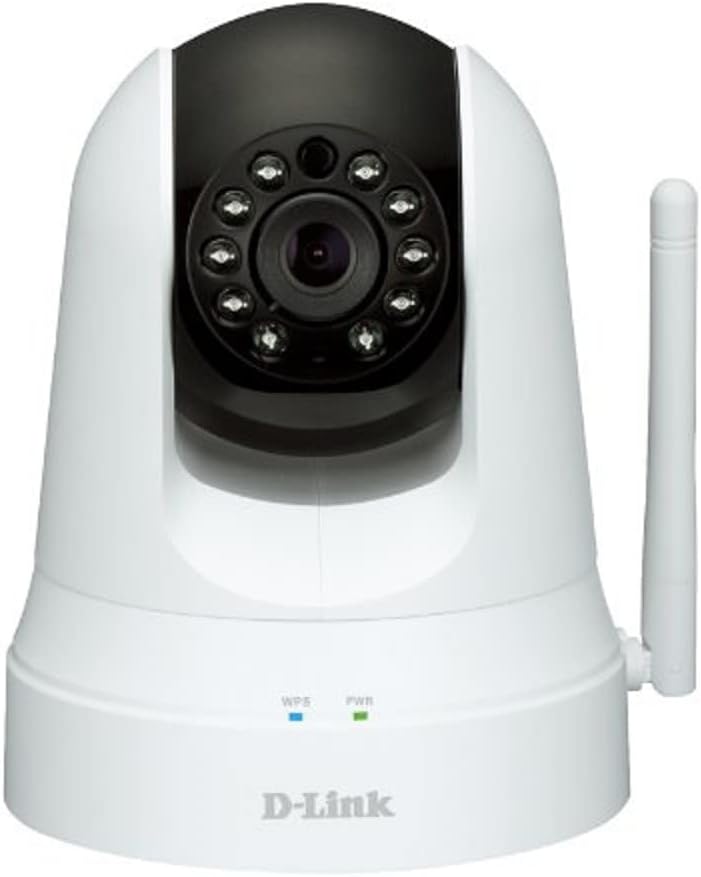
2.1 pav.: priekis view of the D-Link DCS-5020L camera. It features a white dome-shaped body with a black pan/tilt head. The camera lens is surrounded by infrared LEDs for night vision. Below the head, on the base, are indicators for WPS and Power, and a detachable antenna is visible on the right side.
3. Sąranka ir diegimas
3.1. Įdėjimas
Pasirinkite vietą, kuri suteikia norimą viewing angle and is within range of your Wi-Fi network. The camera can be placed on a flat surface or mounted to a wall or ceiling using the provided mounting kit.
3.2. Įjungimas
- Prijunkite maitinimo adapterį prie fotoaparato maitinimo prievado.
- Plug the power adapter into a wall outlet. The Power LED will illuminate.
3.3. Tinklo ryšys („Wi-Fi“)
There are two primary methods to connect your camera to your Wi-Fi network:
3.3.1. WPS („Wi-Fi Protected Setup“) metodas
- Ensure your Wi-Fi router supports WPS.
- Press the WPS button on your D-Link camera. The WPS LED will blink.
- Within two minutes, press the WPS button on your Wi-Fi router.
- Wait for the WPS LED on the camera to turn solid blue, indicating a successful connection.
3.3.2. Manual Setup via mydlink Lite App
- Download the free mydlink Lite app from the App Store (iOS), Google Play (Android), or Windows Phone Store.
- Open the app and create a mydlink account if you don't have one.
- Follow the on-screen instructions in the app to add your new camera. You will typically scan a QR code on the camera or manually enter its setup information.
- The app will guide you through connecting the camera to your Wi-Fi network.
4. Naudojimo instrukcijos
4.1. Accessing Your Camera
The primary way to operate your D-Link camera is through the mydlink Lite app or the mydlink web portalas (www.mydlink.com).
4.2. Pakreipimo ir pasukimo valdymas
Within the mydlink app, you can remotely control the camera's pan (horizontal) and tilt (vertical) movements to view different areas. The camera offers 340° pan and 120° tilt capability.
4.3. Skaitmeninis priartinimas
Use the digital zoom feature (up to 4x) in the app to get a closer look at specific details within the camera's view.
4.4. Naktinis matymas
The camera automatically switches to night vision mode in low-light conditions, providing clear black-and-white video up to 26 feet (8 meters).
4.5. Motion and Sound Detection
Configure motion and sound detection settings in the mydlink app. When motion or sound is detected, the camera can send instant push notifications to your connected device, allowing you to stay informed of events.
4.1 vaizdo įrašas: metimas per sekundęview of D-Link Wi-Fi Cameras, demonstrating their use for home security and monitoring. The video highlights features like remote viewing via mobile app, instant alerts for motion/sound detection, and ease of DIY installation. It shows scenarios such as monitoring children arriving home and receiving alerts about pets.
5. Priežiūra
To ensure optimal performance and longevity of your D-Link camera, follow these maintenance guidelines:
- Valymas: Gently wipe the camera lens and body with a soft, dry, lint-free cloth. Do not use liquid cleaners or aerosol sprays.
- Firmware atnaujinimai: Regularly check for and install firmware updates through the mydlink app or web portal. Updates often include performance improvements and security enhancements.
- Tinklo stabilumas: Ensure your Wi-Fi network is stable and strong to prevent connection drops and ensure continuous monitoring.
- Maitinimas: Naudokite tik originalų maitinimo adapterį, pateiktą kartu su fotoaparatu.
6. Problemų sprendimas
| Problema | Galimas sprendimas |
|---|---|
| Kamera neprisijungia prie „Wi-Fi“. |
|
| No video feed in mydlink app. |
|
| Motion/Sound alerts not received. |
|
| Pan/Tilt control is unresponsive. |
|
7. Specifikacijos
| Funkcija | Detalė |
|---|---|
| Modelio pavadinimas | DCS-5020L |
| Prekės ženklas | D-Link |
| Vaizdo įrašymo raiška | 480p |
| Pan/Tilt Capability | 340° Pan, 120° pakreipimas |
| Skaitmeninis priartinimas | 4x |
| Naktinio matymo diapazonas | 26 pėdos (8 metro) |
| Ryšio technologija | Belaidis ryšys (Wi-Fi) |
| Maitinimo šaltinis | AC/DC Adapter (12 Volts, 1 Watt) |
| Suderinami įrenginiai | Smartphone, Tablet (iOS, Android, Windows Phone) |
| Ypatingos savybės | Motion Sensor, Sound Detection, Night Vision, Wi-Fi Extender |
| Matmenys (I x P x A) | 4.03 x 4.54 x 5.26 colio |
| Prekės svoris | 0.64 svaro (10.2 uncijos) |
| Spalva | Baltas |
| Tarptautinis apsaugos įvertinimas | IP65 |
8. Garantija ir palaikymas
Dėl garantijos informacijos ir techninės pagalbos kreipkitės į oficialią „D-Link“ websvetainėje arba susisiekite su „D-Link“ klientų aptarnavimo tarnyba. Išsaugokite pirkimo kvitą garantiniams reikalavimams.
D-Link palaikymas Websvetainė: support.dlink.com
Ask a question about this manual
Ask about setup, troubleshooting, compatibility, parts, safety, or missing instructions. Manuals+ will review the question and use this page’s manual context to help answer it.