
DIRECTV RC71 nuotolinio valdymo pulto naudotojo vadovas
Modelis: RC71
Įvadas
The DIRECTV RC71 Remote Control is designed for efficient access to functions for your DIRECTV system. This remote is compatible with various DIRECTV receivers and can also control your television's volume and power functions. It supports both Infrared (IR) and Radio Frequency (RF) communication modes.
In IR mode, the RC71 is compatible with all legacy and current DIRECTV receivers. In RF mode, it is specifically designed to work with the DIRECTV HR44 Genie and Genie clients C41 and C41W. When operating in RF mode, the remote utilizes the RF4CE protocol for enhanced speed and accuracy, confirming each button press to reduce missed inputs. For TV and AV functions, the remote will still use IR communication even when in RF mode for the receiver.
Sąranka
1. Akumuliatoriaus įdėjimas
The RC71 remote control requires two (2) AA alkaline batteries for operation.
- Nuotolinio valdymo pulto gale raskite baterijų skyriaus dangtelį.
- Nustumkite dangtelį žemyn ir nuimkite jį.
- Įdėkite dvi AA baterijas, užtikrindami, kad teigiamas (+) ir neigiamas (-) poliai sutaptų su indikatoriais skyriaus viduje.
- Uždėkite baterijų skyriaus dangtelį, stumdami jį atgal į vietą, kol jis tvirtai užsifiksuos.
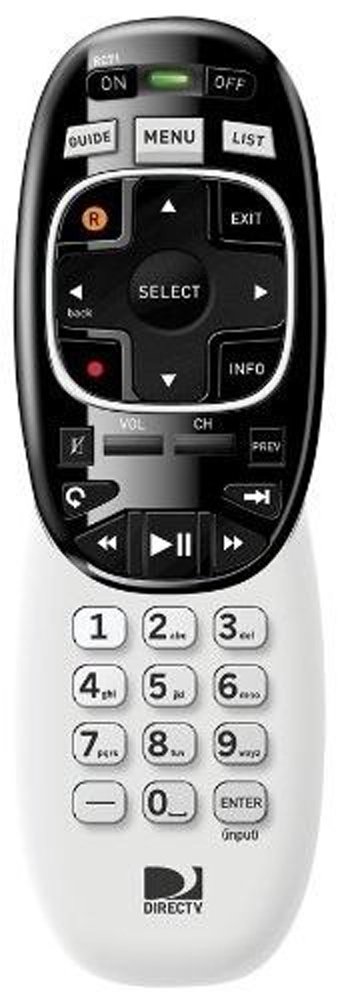
Image: The DIRECTV RC71 Remote Control, showing its ergonomic design and button layout.
2. Pairing with DIRECTV Receiver
The RC71 remote can operate in two modes: Infrared (IR) and Radio Frequency (RF).
IR Mode (for all DIRECTV receivers)
In IR mode, the remote requires a direct line of sight to the receiver. No special pairing is typically required; the remote should function immediately after battery installation.
RF Mode (for HR44 Genie, C41, C41W clients)
For RF mode functionality with compatible receivers, follow these steps:
- Ensure your DIRECTV receiver (HR44 Genie or C41/C41W client) is powered on.
- Point the RC71 remote at the receiver.
- Paspauskite ir palaikykite Nutildyti ir ENTER mygtukus vienu metu, kol du kartus sumirksės žalia lemputė nuotolinio valdymo pulto viršuje.
- Release the buttons. The remote is now attempting to pair in RF mode.
- Follow any on-screen prompts that may appear on your television to confirm the pairing.
3. Programming for TV/AV Functions
To control your television's volume and power, the remote needs to be programmed with your TV's code. This process typically involves using the receiver's on-screen menu.
- Paspauskite MENIU button on your RC71 remote.
- Eikite į Settings & Help, tada Nustatymai, and finally Nuotolinio valdymo pultas.
- Pasirinkite Programuok nuotoliniu būdu arba panašus variantas.
- Follow the on-screen instructions to select your television brand and program the remote.
- Test the volume and power buttons to ensure successful programming.
Nuotolinio valdymo pulto valdymas
The RC71 remote control features a streamlined button layout for intuitive operation.
- Maitinimo mygtukas: Toggles power for the DIRECTV receiver and, once programmed, for the television.
- Vadovas: Rodo programų vadovą.
- Sąrašas: Accesses your recorded programs.
- Kanalas aukštyn/žemyn: Keičia kanalus.
- Garsumo didinimas / sumažinimas: Adjusts television volume (after programming).
- Nutildyti: Mutes television audio (after programming).
- Directional Pad (Arrows) and SELECT: Naršo meniu ir pasirenka parinktis.
- REW, PLAY, FWD, PAUSE, STOP, RECORD: Controls playback of recorded content.
- Numbers (0-9): Tiesiogiai įvedami kanalų numeriai.
- INFORMACIJA: Rodo programos informaciją.
- UŽDARYTI: Exits menus or returns to live TV.
The ergonomic design of the RC71 is intended for comfortable handling during extended use.
Priežiūra
Baterijos keitimas
Replace batteries when the remote's response becomes sluggish or the indicator light fails to flash. Always replace both AA batteries simultaneously with new ones to ensure optimal performance.
Valymas
To clean the remote, gently wipe its surface with a soft, dry cloth. For stubborn dirt, a slightly damp cloth can be used, followed by immediate drying. Avoid using harsh chemicals or abrasive cleaners, as these can damage the remote's finish or internal components.
Trikčių šalinimas
- Nuotolinis nereaguoja:
- Patikrinkite akumuliatoriaus įdėjimą ir, jei reikia, pakeiskite.
- Ensure a clear line of sight between the remote and the receiver/TV for IR functions.
- If in RF mode, ensure the remote is properly paired with the receiver. Repeat the pairing steps if needed.
- TV/AV functions not working:
- Verify that the remote has been correctly programmed for your television model. Re-program if unsure.
- Įsitikinkite, kad nuotolinio valdymo pultas nukreiptas tiesiai į televizoriaus IR jutiklį.
- Remote feels sluggish or inconsistent:
- Pakeiskite baterijas naujomis.
- Consider resetting the remote to factory settings (consult your DIRECTV receiver's on-screen help or DIRECTV support for specific instructions, as this process can vary).
Specifikacijos
| Prekės ženklas | DIRECTV |
| Modelio pavadinimas | RC71 |
| Modelio numeris | RC71 |
| Spalva | Baltas |
| Ryšio technologija | Infraraudonieji spinduliai, radijo dažnis |
| Suderinami įrenginiai | DIRECTV Receivers (all in IR, HR44 Genie/C41/C41W in RF), Television |
| Maximum Number of Supported Devices | 1 (DIRECTV Receiver) + 1 (Television) |
| Mygtukų kiekis | 20 |
| Valdiklio tipas | Mygtukų valdymas |
| Didžiausias diapazonas | 10 Meters (RF) |
| Baterijos tipas | 2 AA šarminės baterijos |
| Prekės svoris | 3.52 uncijos |
| Ypatinga funkcija | Ergonomiškas dizainas |
Informacija apie garantiją
The DIRECTV RC71 Remote Control comes with a manufacturer warranty for 90 days from the date of purchase. Please retain your proof of purchase for warranty claims. For detailed terms and conditions, refer to the warranty documentation provided with your product or contact DIRECTV customer support.
Palaikymas
For further assistance, technical support, or to inquire about specific programming codes for your television, please contact DIRECTV customer support. You can find contact information on the official DIRECTV website or through your DIRECTV service provider.