
1. Įvadas
This manual provides comprehensive instructions for the installation, configuration, operation, and maintenance of your D-Link DGS-1210-08P Smart Switch. The DGS-1210 series represents the third generation of D-Link Web Smart Switches, designed to integrate advanced security and management functions for optimal application performance and modularity. Its innovative fanless design ensures silent operation and extended durability, making the DGS-1210 an efficient and cost-effective solution for small and medium-sized businesses (SMBs).
2. Produktas baigtasview
2.1 Pagrindinės savybės
- Features 8 Power over Ethernet (PoE) ports.
- These PoE ports provide up to 15.4 W per port.
- Offers the flexibility to connect 802.3af compatible devices, such as network cameras and IP phones.
- Includes 2 Gigabit SFP ports for fiber optic connections.
- Web-managed interface for advanced configuration.
2.2 Pakuotės turinys
- D-Link DGS-1210-08P Smart Switch Unit
- Maitinimo adapteris
- Rack montavimo rinkinys (jei taikoma)
2.3 Produktas Views
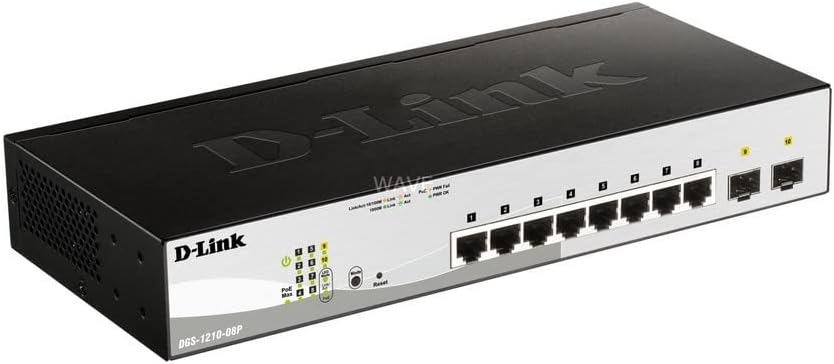
1 pav.: Kampinis view of the D-Link DGS-1210-08P Smart Switch, showcasindėl kompaktiško dizaino ir prievadų išdėstymo.

2 pav.: priekis view of the D-Link DGS-1210-08P Smart Switch, highlighting the 8 Gigabit Ethernet ports and 2 SFP ports, along with LED indicators.

3 pav.: galinis view of the D-Link DGS-1210-08P Smart Switch, showing the power input and grounding screw.

Figure 4: D-Link DGS-1210-08P Smart Switch with key dimensions indicated: 28 cm length, 12.6 cm width, and 4.4 cm height.
3. Sąranka
3.1 Fizinis įrengimas
- Vieta: Position the switch on a flat, stable surface or mount it in a standard 19-inch equipment rack using the provided rackmount kit. Ensure adequate ventilation around the unit.
- Aplinka: Avoid placing the switch in direct sunlight, near heat sources, or in areas with high humidity or dust.
3.2 Maitinimo jungtis
- Connect the power adapter to the power input port on the rear panel of the switch.
- Kitą maitinimo adapterio galą įkiškite į tinkamą maitinimo lizdą.
- Įsitikinkite, kad priekiniame skydelyje šviečia maitinimo šviesos diodas, rodantis, kad jungiklis gauna maitinimą.
3.3 Tinklo jungtis
- Connect your network devices (computers, servers, network cameras, IP phones) to the RJ45 Ethernet ports (1-8) on the front panel using standard Ethernet cables.
- For fiber optic connections, insert SFP transceivers into the SFP ports (9-10) and connect fiber optic cables.
- For PoE-powered devices, connect them to any of the 8 PoE-enabled ports. The switch will automatically detect and provide power to compatible devices.
3.4 Pradinė konfigūracija
The DGS-1210-08P is a managed switch, allowing for advanced configuration via a web-based graphical user interface (GUI). Refer to the detailed D-Link documentation for specific instructions on accessing and configuring the web interface, including default IP addresses and login credentials.
4. Naudojimo instrukcijos
4.1 Maitinimo per Ethernet (PoE) funkcionalumas
The switch's 8 PoE ports automatically detect and supply power to IEEE 802.3af compliant devices. This eliminates the need for separate power cables for devices like IP cameras or VoIP phones, simplifying deployment and reducing cable clutter.
4.2 Duomenų perdavimas
The Gigabit Ethernet ports support high-speed data transfer up to 1000 Mbps, while the SFP ports provide flexible uplink options. The switch operates automatically to forward data packets between connected devices.
5. Priežiūra
5.1 Valymas
Reguliariai valykite jungiklio išorę minkštu, sausu skudurėliu. Nenaudokite skystų ar aerozolinių valiklių. Įsitikinkite, kad ventiliacijos angos nėra dulkės ir neužsikimšusios.
5.2 Firmware atnaujinimai
Reguliariai tikrinkite „D-Link“ palaikymo tarnybą website for firmware updates. Keeping the switch's firmware up-to-date ensures optimal performance, security, and access to new features.
6. Problemų sprendimas
6.1 Maitinimo problemos
- If the Power LED is off, ensure the power adapter is securely connected to both the switch and a working power outlet.
- Patikrinkite maitinimo lizdą su kitu įrenginiu, kad įsitikintumėte, jog jis veikia.
6.2 Ryšio problemos
- Check that Ethernet cables are securely connected to both the switch and the network device.
- Verify that the Link/Act LED for the connected port is illuminated or blinking, indicating a valid connection and activity.
- Įsitikinkite, kad prijungtas įrenginys įjungtas ir tinkamai sukonfigūruotas.
6.3 PoE problemos
- Confirm that the connected device is IEEE 802.3af compliant.
- Check the PoE status LEDs on the switch for any error indications.
- Ensure the total power budget (65W) is not exceeded by all connected PoE devices.
7. Specifikacijos
| Gaminio matmenys | 28 L x 12.6 W x 4.4 A cm |
| Prekės svoris | 1.23 kilogramo |
| ttage | 240 voltų |
| Korpuso medžiagos tipas | Plastikiniai |
| Maksimali galia (PoE biudžetas) | 65 vatų |
| Sąsajos tipas | SFP, RJ45 |
| Duomenų perdavimo sparta | 2000 megabitų per sekundę |
| Nominali srovė | 2 Ampčia |
| Gamintojas | D-Link Mediterraneo S.r.l. |
| Prekės ženklas | D-Link |
| Serija | DGS-1210-08P |
| Spalva | Juoda |
| Prekės modelio numeris | DGS-1210-08P |
| Ethernet prievadų skaičius | 8 |
| Iš viso vatųtage | 97 vatų |
| Maitinimo tipas | Type F Connector (EU) |
| Įtraukti komponentai | Perjungimo blokas |
8. Garantija ir palaikymas
8.1 Informacija apie garantiją
This product originates from and is shipped within the European Economic Area (EEA). It is an original product from manufacturer-authorized distributors. For specific warranty terms and conditions, please refer to the warranty card included with your product or visit the official D-Link websvetainę.
8.2 Techninė pagalba
Dėl papildomos pagalbos, techninės pagalbos arba norėdami atsisiųsti naujausias tvarkykles ir programinę įrangą, apsilankykite oficialioje „D-Link“ palaikymo svetainėje. websvetainė: www.dlink.com/support.