
Įvadas
This manual provides detailed instructions for the operation and maintenance of your Calypso K5609/3 Digital Quartz Watch. Please read this manual thoroughly before using your watch to ensure proper function and longevity. Keep this manual for future reference.
Saugos informacija
- Venkite laikrodžio ilgą laiką būti veikiamas itin aukštos arba žemos temperatūros (karštos arba šaltos).
- Do not attempt to open the watch case or replace the battery yourself, as this may void the warranty and compromise water resistance. Contact a qualified technician.
- Clean the watch with a soft, dry cloth. Avoid using chemical cleaners.
- While the watch is water-resistant up to 100 meters, avoid operating buttons underwater to prevent water ingress.
Pakuotės turinys
- Calypso K5609/3 Digital Quartz Watch
- Vartotojo vadovas (šis dokumentas)
Globotiview
Your Calypso K5609/3 watch features a digital display with various functions. Familiarize yourself with the buttons and display layout.
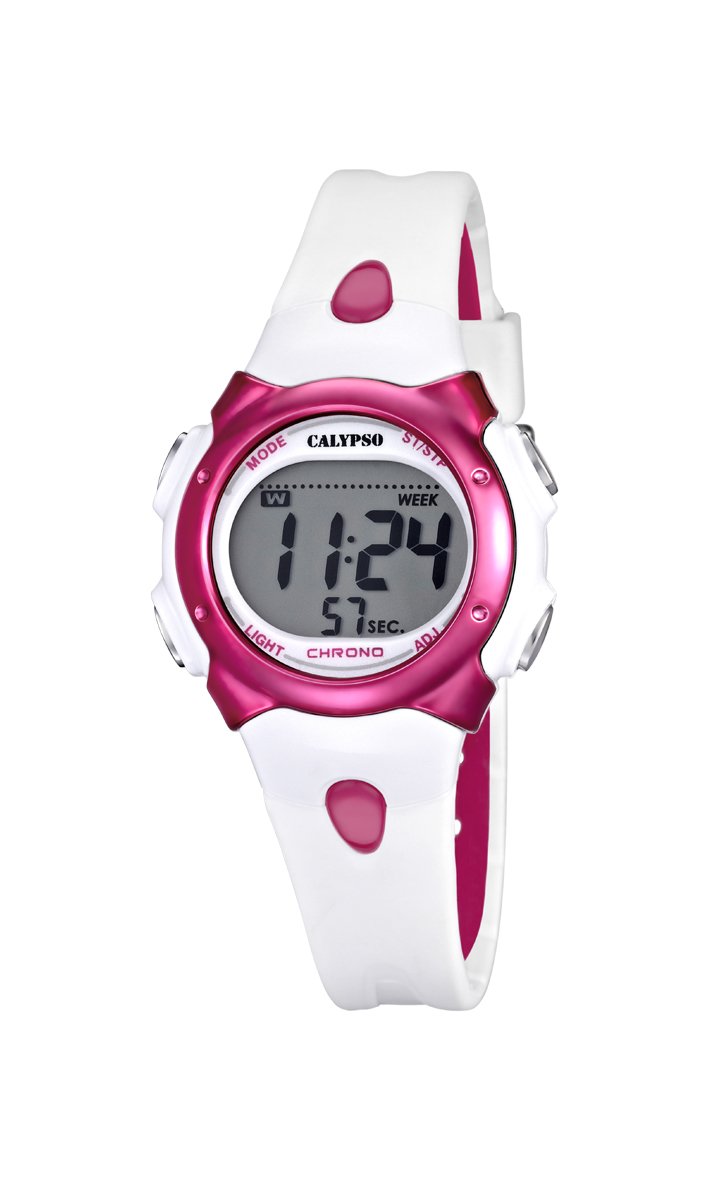
1 paveikslas: Priekyje view of the Calypso K5609/3 Digital Quartz Watch. This image shows the watch face with its digital display and the overall design of the watch, including the white plastic strap.

2 paveikslas: Kampuotas view of the Calypso K5609/3 Digital Quartz Watch. This image provides a different perspective of the watch, highlighting its round case shape and the texture of the plastic strap.
Button Functions (Typical Digital Watch Layout)
While specific button labels may vary, most digital watches follow a similar pattern:
- MODE mygtukas: Perjungia skirtingus režimus (laikas, žadintuvas, chronografas).
- SET/ADJUST Button: Naudojamas norint įjungti nustatymo režimą ir patvirtinti pasirinkimus.
- START/STOP mygtukas: Used to start/stop chronograph, adjust values upwards.
- Šviesos mygtukas: Activates the backlight for illumination.
Refer to the markings on your specific watch for exact button identification.
Sąranka
Laiko ir datos nustatymas
- Paspauskite REŽIMAS button repeatedly until the time display starts flashing or you enter the time setting mode.
- Paspauskite SET/ADJUST button to select the digit you wish to change (e.g., hours, minutes, year, month, day).
- Naudokite START/STOP button to increase the selected value. Hold it down for faster adjustment.
- Spauskite toliau SET/ADJUST ir START/STOP until all time and date settings are correct.
- Paspauskite REŽIMAS mygtuką, kad išeitumėte iš nustatymo režimo ir grįžtumėte į įprastą laiko rodymo režimą.
Signalo nustatymas
- Paspauskite REŽIMAS button until you reach the Alarm mode (often indicated by "AL" or a bell icon).
- Paspauskite SET/ADJUST button to select the alarm hour.
- Naudokite START/STOP mygtuką, kad nustatytumėte norimą žadintuvo valandą.
- Paspauskite SET/ADJUST again to select the alarm minute.
- Naudokite START/STOP mygtuką norėdami nustatyti norimą žadintuvo minutę.
- Paspauskite REŽIMAS , kad išeitumėte iš žadintuvo nustatymo režimo.
- Norėdami įjungti / išjungti žadintuvą, paprastai paspauskite START/STOP mygtuką, kai įjungtas žadintuvo režimas. Ekrane pasirodys / išnyks žadintuvo piktograma.
Veikiantis
Chronografo (chronometro) naudojimas
- Paspauskite REŽIMAS button until you reach the Chronograph mode (often indicated by "ST" or "CH"). The display should show "00:00:00".
- Paspauskite START/STOP mygtuką chronografui paleisti.
- Paspauskite START/STOP mygtuką dar kartą, kad sustabdytumėte chronografą.
- To reset the chronograph, press the SET/ADJUST button while the chronograph is stopped.
- Paspauskite REŽIMAS , kad išeitumėte iš chronografo režimo.
Foninio apšvietimo funkcija
Norėdami apšviesti ekraną esant prastam apšvietimui, paspauskite ŠVIESA mygtuką. Foninis apšvietimas paprastai dega kelias sekundes.
Atsparumas vandeniui
Your Calypso K5609/3 watch is water-resistant up to 100 meters (10 ATM). This means it is suitable for swimming and snorkeling. However, it is not recommended for scuba diving. Nespauskite jokių mygtukų, kai laikrodis yra panardintas į vandenį, nes tai gali pažeisti vandens sandariklį.
Priežiūra
Laikrodžio valymas
Regularly clean your watch to maintain its appearance and function. Use a soft, slightly damp cloth to wipe the case and strap. For the plastic strap, mild soap and water can be used, but ensure no soap residue remains. Avoid harsh chemicals or abrasive materials.
Baterijos keitimas
The watch is powered by a quartz battery. When the display becomes dim or the watch stops functioning, the battery may need replacement. Battery life varies depending on usage, especially backlight and alarm functions. It is recommended to have the battery replaced by a qualified watch technician to ensure the water resistance seal is properly maintained.
Trikčių šalinimas
| Problema | Galima priežastis | Sprendimas |
|---|---|---|
| Laikrodžio ekranas tuščias arba blankus. | Žemas arba išsikrovęs akumuliatorius. | Pakeiskite bateriją (rekomenduoja specialistas). |
| Laikas neteisingas. | Laikas nustatytas neteisingai arba pakeistas netyčia. | Norėdami iš naujo nustatyti laiką, žr. skyrių „Laiko ir datos nustatymas“. |
| Signalizacija neskamba. | Signalizacija neįjungta arba nustatyta neteisingai. | Ensure alarm is activated and set to the correct time. |
| Vanduo laikrodžio viduje. | Mygtukai veikia po vandeniu arba yra pažeistas sandarumas. | Nedelsdami nuneškite laikrodį specialistui apžiūrai ir remontui, kad išvengtumėte tolesnių pažeidimų. |
Specifikacijos
- Modelis: K5609/3
- Prekinis ženklas: Calypso
- Ekrano tipas: Skaitmeninis
- Judėjimas: Kvarcas
- Korpuso medžiaga: Plastikiniai
- Korpuso skersmuo: 33 mm
- Korpuso storis: 8 mm
- Juostos medžiaga: Plastikiniai
- Juostos plotis: 14 mm
- Užsegimo tipas: Pin Buckle (Boucle Ardillon)
- Ciferblato lango medžiaga: Akrilas
- Atsparumas vandeniui: 100 metrų (10 bankomatai)
- Ypatingos savybės: Alarm, Chronograph, Day-Date-Month Calendar
- Maitinimo šaltinis: Maitinamas baterijomis
- Gaminio matmenys: 20 x 20 x 20 cm; 50 grams (packaging dimensions, watch itself is smaller)
Garantija ir palaikymas
For warranty information and customer support, please refer to the official Calypso websvetainėje arba susisiekite su įgaliotuoju pardavėju. Išsaugokite pirkimo kvitą kaip pirkimo įrodymą garantijos pretenzijoms.
Jei reikia daugiau pagalbos, apsilankykite: www.calypsowatches.com