
1. Įvadas
This manual provides detailed instructions for the safe and efficient operation of your VOLTCRAFT 8210 Function Generator. The 8210 is a versatile instrument combining a sweep function, function generator, pulse generator, and frequency counter into a single unit. It is designed for professional use, generating various waveforms with precision.
2. Saugos instrukcijos
Please read these safety instructions carefully before operating the device to prevent injury and damage. Keep this manual for future reference.
- Visada prijunkite įrenginį prie įžeminto maitinimo lizdo.
- Nenaudokite įrenginio šlapioje arba damp sąlygas.
- Užtikrinkite tinkamą vėdinimą, kad išvengtumėte perkaitimo.
- Neatidarykite įrenginio c.asing; viduje nėra dalių, kurias galėtų aptarnauti vartotojas. Techninę priežiūrą patikėkite kvalifikuotiems darbuotojams.
- Prieš valydami ar perkeldami įrenginį, atjunkite jį nuo elektros tinklo.
- Venkite taikyti ttages exceeding the specified maximum input ratings.
3. Produktas baigtasview
The VOLTCRAFT 8210 is a versatile 4-in-1 instrument designed for various electronic testing and development applications. It integrates the functionalities of a sweep function generator, a standard function generator, a pulse generator, and a frequency counter.
Pagrindinės funkcijos:
- Four-in-one functionality: Sweep function, function generator, pulse generator, and frequency counter.
- Dažnių diapazonas: Generates signals from 0.1 Hz to 10 MHz.
- Dažnio skaitiklis: Measures frequencies from 2 Hz to 100 MHz.
- Waveform Generation: Produces professional-grade rectangular, triangular, and sawtooth signals.
- Išvestis Ampšviesa: Maksimalus amplitude of 20 Vpp (10 Vpp into 50 ohms).
Produkto vaizdai:
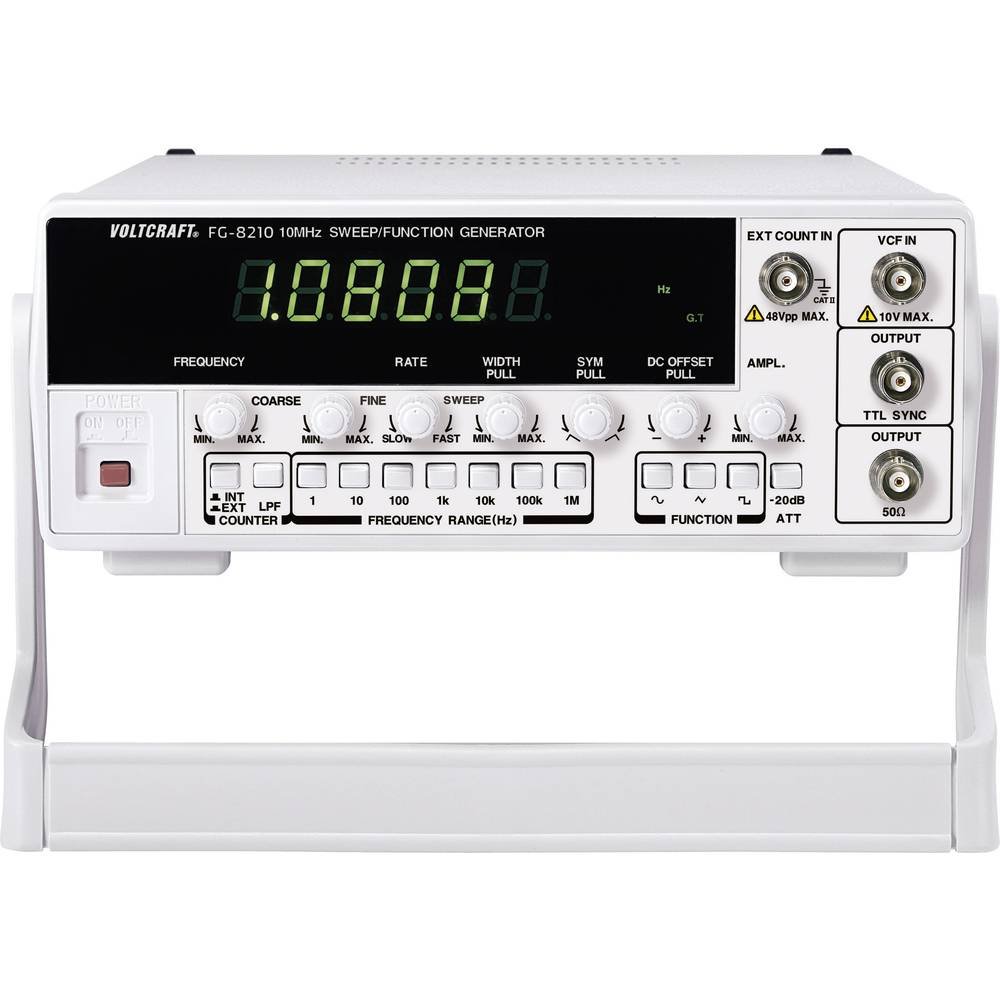


Oficialūs produktų vaizdo įrašai:
Šiuo metu nėra jokių oficialių pardavėjo produktų vaizdo įrašų, kuriuos būtų galima įterpti.
4. Sąranka
- Išpakavimas: Carefully remove the function generator from its packaging. Inspect the unit for any signs of damage during transit. Retain the packaging for future storage or transport.
- Vieta: Place the unit on a stable, flat surface with adequate ventilation around it. Avoid placing it near heat sources or in direct sunlight.
- Maitinimo jungtis: Connect the provided power cord to the power input on the rear panel of the 8210 and then to a suitable grounded AC power outlet. Ensure the power switch is in the OFF position before connecting.
- Pradinis įjungimas: Flip the power switch to the ON position. The display should illuminate, indicating the unit is receiving power.
- Išvesties jungtys: Connect your test leads or cables to the appropriate output terminals (e.g., BNC connectors for main output, TTL output) on the front panel, depending on your application.
5. Naudojimo instrukcijos
This section details the basic operation of the VOLTCRAFT 8210 for its primary functions.
5.1. Function Generator Mode
- Pasirinkite bangos formą: Use the dedicated buttons (e.g., Sine, Square, Triangle) on the front panel to select the desired output waveform.
- Nustatyti dažnį: Adjust the frequency using the frequency control knob and range buttons. The display will show the current frequency.
- Sureguliuoti Ampšviesa: Naudokite amplitude knob to set the desired output voltage peak-to-peak (Vpp). Monitor the output with an oscilloscope for precise adjustment.
- DC poslinkis: If available, use the DC offset control to add a DC bias to the output signal.
- Prijungti išvestį: Connect the main output (e.g., BNC) to your circuit or device under test.
5.2. Sweep Function Mode
The sweep function allows the output frequency to vary automatically over a specified range.
- Activate Sweep: Press the "Sweep" button to enable this mode.
- Set Start/Stop Frequencies: Use the frequency controls to define the lower and upper limits of the sweep range.
- Adjust Sweep Rate: Set the sweep duration or rate using the dedicated control.
- Monitoriaus išvestis: Observe the sweeping signal on an oscilloscope to verify the settings.
5.3. Frequency Counter Mode
The built-in frequency counter measures external signals.
- Select Counter Input: Connect the external signal to the designated frequency counter input terminal.
- Activate Counter: Press the "Counter" or "Freq. Meas." button to switch to frequency measurement mode.
- Read Frequency: The display will show the frequency of the input signal.
6. Priežiūra
Proper maintenance ensures the longevity and accuracy of your VOLTCRAFT 8210.
- Valymas: Įrenginio išorę valykite minkšta, sausa šluoste. Įsisenėjusius nešvarumus galima lengvai nuvalyti.amp Galima naudoti šluostę su švelniu plovikliu, užtikrinant, kad į įrenginį nepatektų skysčio. Nenaudokite abrazyvinių valiklių ar tirpiklių.
- Saugykla: When not in use for extended periods, store the unit in a dry, dust-free environment, preferably in its original packaging.
- Kalibravimas: Periodic calibration by qualified service personnel is recommended to maintain measurement accuracy, especially for critical applications.
7. Problemų sprendimas
If you encounter issues with your VOLTCRAFT 8210, refer to the following common problems and solutions:
| Problema | Galima priežastis | Sprendimas |
|---|---|---|
| Nėra maitinimo / ekranas išjungtas | Power cord disconnected, power switch off, faulty outlet. | Check power cord connection, ensure power switch is ON, test outlet with another device. |
| Nėra išėjimo signalo | Output cable disconnected, amplitude set to zero, incorrect function selected. | Verify output cable connection, increase amplitude, ensure correct waveform/function is selected. |
| Incorrect frequency reading (counter) | Signal too weak, incorrect input range, noisy signal. | Ensure signal amplitude is sufficient, check input range settings, use shielded cables. |
Jei problema išlieka ir išbandžius šiuos sprendimus, susisiekite su klientų aptarnavimo tarnyba.
8. Specifikacijos
The following are the technical specifications for the VOLTCRAFT 8210 Function Generator:
- Gamintojas: VOLTRAFTAS
- Modelio numeris: 8210
- Prekės svoris: 3 kilogramo
- Number of items in package: 1
- Įtrauktos baterijos: Nr
- Reikalingos baterijos: Nr
- ASIN: B00EPLFP46
- First Available Date on Amazon.fr: 15 m. vasario 2014 d
- Atsarginių dalių prieinamumas: Informacija apie atsargines dalis nepateikiama
9. Garantija ir palaikymas
Information regarding specific warranty terms and conditions for the VOLTCRAFT 8210 Function Generator is not available in the provided product data. Please refer to the documentation included with your purchase or contact VOLTCRAFT customer support directly for warranty details and technical assistance.
For further support, visit the official VOLTCRAFT websvetainėje arba kreipkitės į jų įgaliotuosius techninės priežiūros centrus.