
1. Įvadas
This manual provides instructions for the installation, programming, and operation of the Galcon 7101D 1-Station Battery Operated Irrigation Controller with a 3/4-inch waterproof valve. The 7101D controller is designed for automated operation of drip and sprinkler systems. It is completely waterproof and can be installed above or below ground, including in valve boxes or areas where it may be submerged up to 3 feet. The controller operates on a single 9V alkaline battery.
2. Saugos informacija
- Prieš montuodami ir naudodami atidžiai perskaitykite visas instrukcijas.
- Use only a 9V alkaline battery. Do not use rechargeable batteries.
- Ensure proper sealing of the battery compartment to maintain waterproofing.
- This product is designed for use only in the USA and Canada.
- Nebandykite patys ardyti ar taisyti įrenginio. Pagalbos kreipkitės į klientų aptarnavimo tarnybą.
3. Pakuotės turinys
Patikrinkite, ar pakuotėje yra visi komponentai:
- Galcon 7101D 1-Station Battery Operated Controller
- 3/4-inch Inline Irrigation Valve
- Vartotojo vadovas (šis dokumentas)
4. Produkto ypatybės
- Controller, solenoid, and 3/4" valve integrated into one unit.
- Easy programming with 6 large buttons.
- Manual operation and rain delay functions.
- Weekly or Cyclic programming options.
- Completely waterproof and UV resistant construction.
- Designed for use in the USA and Canada.
5. Sąranka ir diegimas
5.1 Akumuliatoriaus įdėjimas
- Suraskite valdiklio baterijų skyrių.
- Atidarykite akumuliatoriaus skyriaus dangtelį.
- Įdėkite vieną naują 9 V šarminę bateriją, užtikrindami teisingą poliškumą.
- Tvirtai uždarykite baterijų skyriaus dangtelį, kad išlaikytumėte atsparumą vandeniui.
5.2 Controller and Valve Installation
The Galcon 7101D integrates the controller and valve into a single unit.
- Identify the water flow direction. The valve has an arrow indicating the correct flow.
- Connect the inlet side of the valve to your main water supply line.
- Connect the outlet side of the valve to your irrigation system (drip or sprinkler lines).
- Įsitikinkite, kad visos jungtys yra sandarios, kad išvengtumėte nuotėkio.
- The unit can be installed above ground or submerged in a valve box up to 3 feet deep.

1 paveikslas: Galcon 7101D Controller and Valve Assembly. This image shows the integrated controller and valve unit, highlighting its compact design.
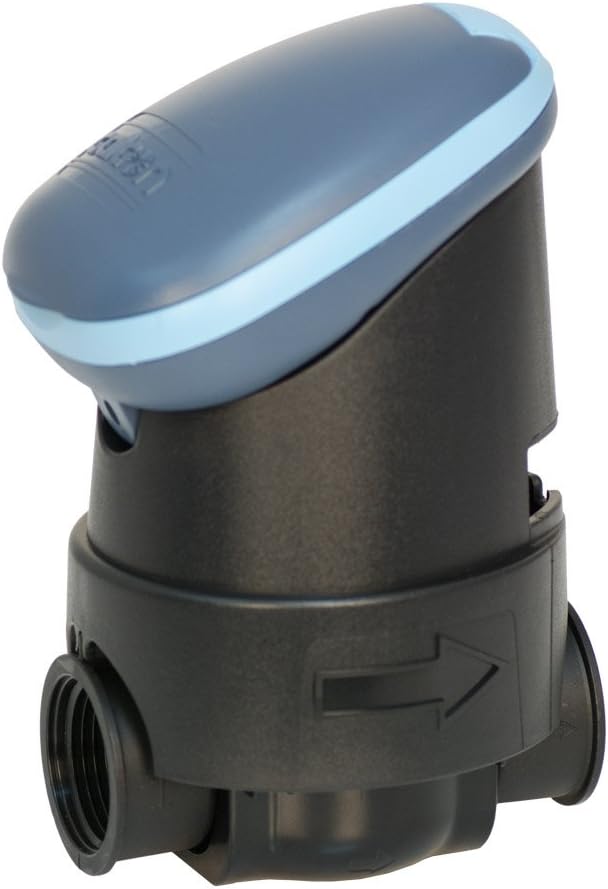
2 paveikslas: Galcon 7101D Valve with Flow Direction Arrow. This image illustrates the valve component, showing the arrow indicating the correct water flow direction for installation.
6. Naudojimo instrukcijos
The Galcon 7101D features 6 large buttons for programming and operation. Refer to the on-screen prompts for specific settings.
6.1 Dabartinio laiko ir dienos nustatymas
Follow the on-screen instructions to set the current time and day of the week. This is crucial for accurate scheduling.
6.2 Programming Irrigation Schedules
The controller supports two main programming modes:
- Savaitinis programavimas: Set specific days of the week for irrigation.
- Ciklinis programavimas: Set an irrigation cycle (e.g., every 2 days) regardless of the day of the week.
Use the programming buttons to navigate through the menu and set:
- Start Time(s)
- Duration of watering (in minutes)
- Frequency (specific days or cycle interval)
6.3 Rankinis valdymas
To manually turn the water on or off, use the dedicated manual operation button. This allows for immediate watering outside of the programmed schedule.
6.4 Lietaus uždelsimo funkcija
Activate the rain delay function to temporarily suspend irrigation for a set period (e.g., 24, 48, 72 hours) after rainfall. This conserves water and prevents overwatering.
7. Priežiūra
- Baterijos keitimas: Replace the 9V alkaline battery annually, or when the low battery indicator appears on the display.
- Valymas: Clean the exterior of the controller with a damp audinys. Nenaudokite abrazyvinių valiklių ar tirpiklių.
- Žieminimas: In freezing climates, remove the controller and valve from the irrigation system and store indoors to prevent freeze damage.
8. Problemų sprendimas
| Problema | Galima priežastis | Sprendimas |
|---|---|---|
| Valdiklio ekranas tuščias. | Išsikrovęs arba netinkamai įdėtas akumuliatorius. | Replace the 9V alkaline battery, ensuring correct polarity. |
| Valve does not open/close. | Low battery, incorrect programming, or debris in valve. | Check battery, verify programming, or inspect valve for obstructions. |
| Iš jungčių teka vanduo. | Atsilaisvinusios jungtys arba pažeisti sandarikliai. | Tighten connections. If leaks persist, check for damaged O-rings or seals. |
| Irrigation does not start at scheduled time. | Incorrect time/day setting, rain delay active, or programming error. | Verify current time and day, check if rain delay is active, review irrigation program. |
9. Specifikacijos
- Modelis: 7101D
- Dalies numeris: GAR6S2312P0
- Vožtuvo dydis: 3/4 colio
- Maitinimo šaltinis: 1 x 9V Alkaline Battery (required)
- Atsparumo vandeniui įvertinimas: IP-68 (submersible up to 3 feet)
- Programavimo parinktys: Weekly or Cyclic
- Matmenys: 4.4 x 3.9 x 7.4 colio (gaminys)
- Svoris: 3.2 uncijos
- Gamintojas: Galcon USA, LTD
- Operating Region: JAV ir Kanada
10. Garantija ir palaikymas
For warranty information or technical support, please contact Galcon customer service. Refer to the product packaging or the official Galcon websvetainė, kurioje pateikiami naujausi kontaktiniai duomenys.
Pastaba: Neteisėtas gaminio išardymas arba modifikavimas gali panaikinti garantiją.