
1. Įvadas
This manual provides essential information for the safe and efficient installation, operation, and maintenance of your Delta DPS-750EB A D20850-006 750 Watt Power Supply. This power supply unit (PSU) is designed for server applications, offering reliable power delivery with a 750-watt output capacity.
2. Saugos informacija
WARNING: Improper installation or use can result in electric shock, fire, or damage to the equipment. Always follow these safety guidelines.
- Įžeminimas: Connect only to a properly earth grounded outlet. The apparatus must be connected to a mains socket outlet with a protective earthing connection.
- ttage: Įsitikinkite, kad įvesties ttage matches the specifications on the power supply label (100-127V~ or 200-240V~).
- Profesionalus montavimas: Montavimą turėtų atlikti kvalifikuotas personalas.
- Vėdinimas: Neužblokuokite ventiliacijos angų. Užtikrinkite pakankamą oro cirkuliaciją aplink įrenginį, kad jis neperkaistų.
- Drėgmė: Do not expose the power supply to moisture or liquids.
- Aptarnavimas: Neatidarykite maitinimo šaltinio c.asing. Viduje nėra dalių, kurias galėtų aptarnauti vartotojas. Visus techninės priežiūros darbus patikėkite kvalifikuotiems techninės priežiūros darbuotojams.

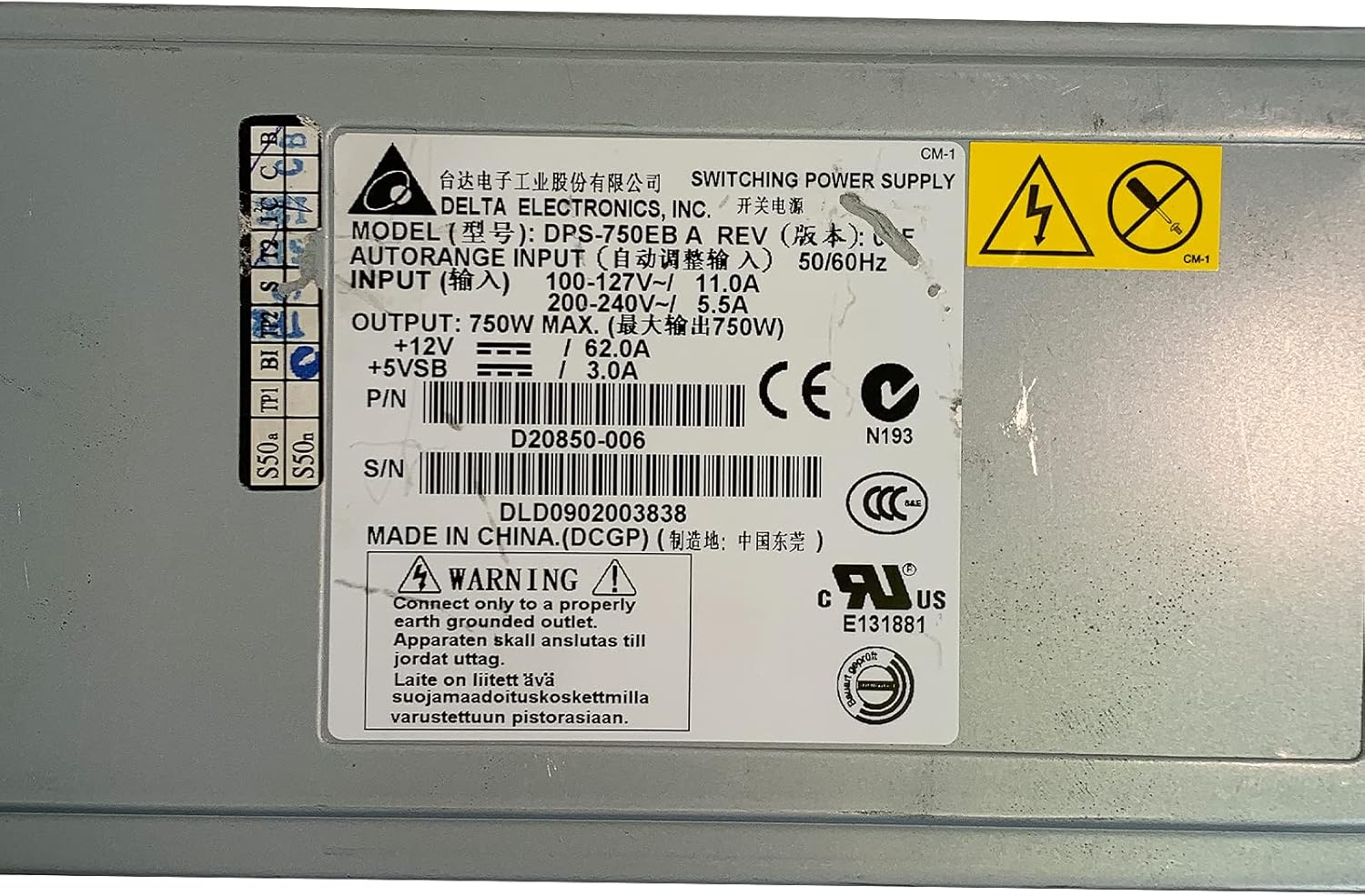
2.1 vaizdas: Product label showing input voltage, išvestis vataitage, and safety warnings. Note the grounding requirement: "Connect only to a properly earth grounded outlet."
3. Produktas baigtasview
The Delta DPS-750EB A is a robust 750-watt power supply designed for server environments. It features a semi-modular design, allowing for flexible cable management. The unit includes active cooling with integrated fans to maintain optimal operating temperatures.
3.1 vaizdas: Priekyje view of the Delta DPS-750EB A power supply, showcasindėl savo kompaktiško formos faktoriaus.

3.2 vaizdas: Galinis view of the power supply, showing the dual cooling fans and the AC power input connector.
4. Sąranka ir diegimas
- Išpakavimas: Carefully remove the power supply from its packaging. Inspect for any visible damage.
- Paruošimas: Ensure the server system is powered off and disconnected from the main power outlet.
- Montavimas: Install the power supply into the designated bay within your server chassis. Secure it using the appropriate screws.
- Kabelių jungtys: Connect the necessary power cables (e.g., motherboard, CPU, peripherals) from the power supply to the corresponding components. The semi-modular design allows you to connect only the cables you need.
- Kintamosios srovės maitinimo jungtis: Connect the AC power cord to the power supply's input port and then to a properly grounded wall outlet.
5. Naudojimo instrukcijos
- Pradinis įjungimas: After all connections are secure, power on your server system.
- Sistemos patikrinimas: Verify that all components are receiving power and functioning correctly. Listen for normal fan operation from the power supply.
- Normalus veikimas: The power supply will operate continuously as long as the server system is powered on. The internal fans will adjust speed based on temperature and load to maintain optimal cooling.
6. Priežiūra
- Dulkių šalinimas: Periodically inspect the power supply's fan vents for dust accumulation. Use compressed air to gently clean the vents and fan blades to ensure unrestricted airflow. Perform this with the system powered off and unplugged.
- Kabelio apžiūra: Regularly check all power cables for signs of wear, fraying, or loose connections. Replace any damaged cables immediately.
- Aplinka: Ensure the server operates in a clean, dry, and well-ventilated environment to prevent dust buildup and overheating.
7. Problemų sprendimas
| Problema | Galima priežastis | Sprendimas |
|---|---|---|
| Sistema neįsijungia. | Loose power cable, faulty outlet, power supply failure. | Check all power connections. Test the outlet with another device. If issues persist, consult a technician. |
| System powers on but is unstable/shuts down. | Overheating, insufficient power, component failure. | Ensure proper ventilation. Verify power supply wattage meets system requirements. Check for component errors. |
| Loud fan noise from PSU. | Dust accumulation, high load, fan malfunction. | Clean fan vents. Ensure system is not under excessive load. If noise is abnormal, consider professional inspection. |
8. Specifikacijos
| Funkcija | Specifikacija |
|---|---|
| Modelio pavadinimas | DPS-750EB A |
| Prekės ženklas | Delta |
| Suderinami įrenginiai | Serveris |
| Išėjimo vattage | 750 vatų |
| Formos faktorius | ATX |
| Aušinimo būdas | Air (1 Fan) |
| Maitinimo bloko dizainas | Pusiau modulinis |
| Minimalus įvesties tūristage | 100 voltai (kintamoji srovė) |
| Maksimalus įvesties tūristage | 230 voltai (kintamoji srovė) |
| Viršutinės temperatūros įvertinimas | 50 laipsniai Celsijaus |
| Prekės svoris | 5 svaro |
| P/N | D20850-006 |
| S/N | DLD0902003838 |
9. Garantija ir palaikymas
For warranty information and technical support, please refer to the documentation provided with your purchase or contact Delta Electronics directly. Keep your purchase receipt and product serial number (DLD0902003838) readily available when contacting support.